A Complete Guide to CRM Systems and Database Management
 Jeremy Wayne Howell : Jul 22, 2026 9:48:31 PM


NetSuite REST web services security practices are the foundation of any integration your business depends on — and getting them wrong is far more costly than most teams realize.
Here is a quick summary of the most important practices:
| Security Area | Key Practice |
|---|---|
| Authentication | Use OAuth 2.0 for new integrations; avoid hardcoding credentials |
| Access Control | Create dedicated integration roles with least-privilege permissions |
| Data Protection | Enforce TLS encryption for all data in transit |
| Credential Management | Store tokens in encrypted vaults; rotate regularly |
| Monitoring | Log all API activity; set alerts for anomalies |
| Rate Limiting | Implement exponential backoff on 429 errors |
| Incident Response | Revoke compromised tokens immediately via the token endpoint |
Most organizations don’t fail at integration because of bad technology. They fail because nobody clearly owned the security decisions — and the gaps only become visible after something breaks.
NetSuite’s REST web services are genuinely powerful. They support CRUD operations, SuiteQL queries, metadata discovery, and asynchronous processing — all without requiring custom server-side scripts. But that simplicity can create a false sense of security.
The authentication landscape is also shifting fast. As of 2027.1, NetSuite will no longer allow new Token-Based Authentication (TBA) integrations for REST web services. OAuth 2.0 is the required path forward. If your team hasn’t started planning that transition, the clock is already running.
Security isn’t just a technical problem. It’s a clarity problem — one that compounds when teams are moving fast, under-resourced, or working from assumptions rather than documented decisions.
I’m Jeremy Wayne Howell, founder of The Way How, and over 20 years of working with revenue and operations teams I’ve seen how unclear system architecture — including poorly secured API integrations — quietly erodes the organizational trust that NetSuite REST web services security practices are designed to protect. This guide will walk you through the decisions that actually matter, in the order they matter, so your team can move forward with confidence rather than guesswork.
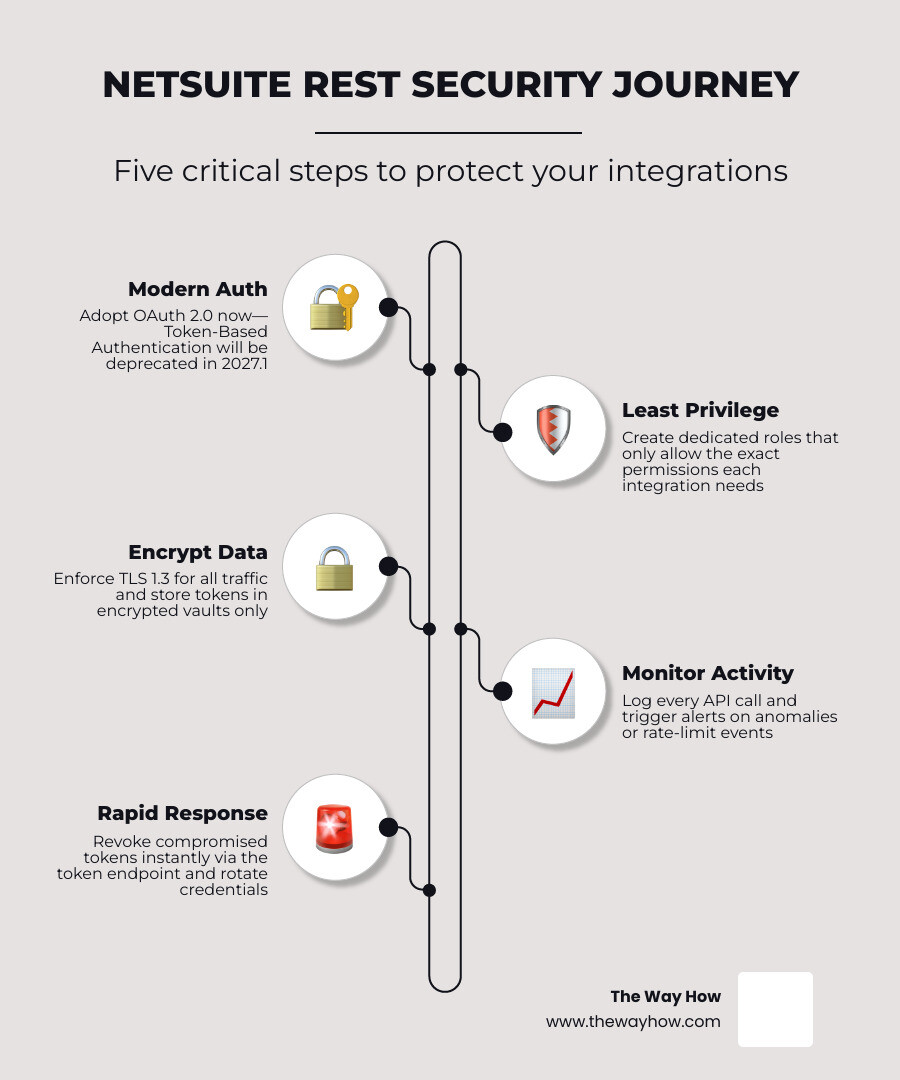
For years, NetSuite integrations relied on either basic user credentials (which are highly vulnerable) or Token-Based Authentication (TBA) built on the OAuth 1.0a standard. While TBA was a massive step forward because it eliminated the need to store static passwords, it introduces significant administrative friction.
TBA tokens do not expire automatically, and they require complex signature generation on the client side. Furthermore, with the upcoming 2027.1 deprecation of new TBA integrations for REST web services and RESTlets, transitioning to OAuth 2.0 is no longer an optional optimization—it is a business-critical requirement.
OAuth 2.0 provides a modern, state-of-the-art framework that separates user authentication from API authorization. It uses short-lived access tokens and optional refresh tokens, which greatly reduces the window of vulnerability if a token is intercepted.
| Feature / Dimension | Token-Based Authentication (TBA / OAuth 1.0a) | OAuth 2.0 (Client Credentials / JWT) |
|---|---|---|
| Security Level | Moderate (relies on long-lived secrets) | High (uses short-lived tokens & key pairs) |
| Ease of Implementation | Complex (requires precise manual signature generation) | Standardized (supported by most modern API clients) |
| Token Lifespan | Indefinite until manually revoked | Short-lived (typically 60 minutes) |
| Industry Standing | Phased out for new NetSuite REST integrations by 2027.1 | Modern industry standard |
Understanding the distinction between how RESTlets and standard REST web services authenticate is also vital. While standard REST web services leverage native SuiteTalk structures, RESTlets rely on custom scripts that must handle authentication seamlessly. You can read more about these differences in the official documentation on Authentication for RESTlets.
If you are still maintaining legacy systems that rely on TBA for custom scripts, you must ensure that your token generation workflows are tightly controlled. For step-by-step instructions on setting up these legacy credentials securely, consult the guide on NetSuite Applications Suite - Setting up Token-based Authentication for a RESTlet integration.
When implementing NetSuite REST web services security practices using OAuth 2.0, the recommended approach is the Client Credentials Flow using JSON Web Tokens (JWT).
Instead of exchanging a client secret over the network, your integration client signs a JWT locally using a private key. NetSuite then validates this signature using the corresponding public key uploaded to your NetSuite Integration Record. This method ensures that your private keys never leave your secure environment.
To set up this flow:
For those executing custom automated workflows, you can explore NetSuite Applications Suite - Using SuiteScript with OAuth 2.0 to understand how native scripts interact with these tokens.
If you are maintaining older TBA systems during your migration phase, you must construct signatures flawlessly. NetSuite requires percent encoding according to RFC 5849. Any deviation in parameter ordering or encoding will result in a hard failure. The precise mathematical construction of these signatures is detailed in NetSuite Applications Suite - The Signature for Web Services and RESTlets.
Security failures rarely occur because encryption algorithms are cracked; they happen because an integration was granted too much power. If an attacker compromises an API key associated with a “Full Administrator” role, they gain total control over your ERP.
We must apply the principle of least privilege. An integration user should only be allowed to see and modify the exact records required for its specific business function.
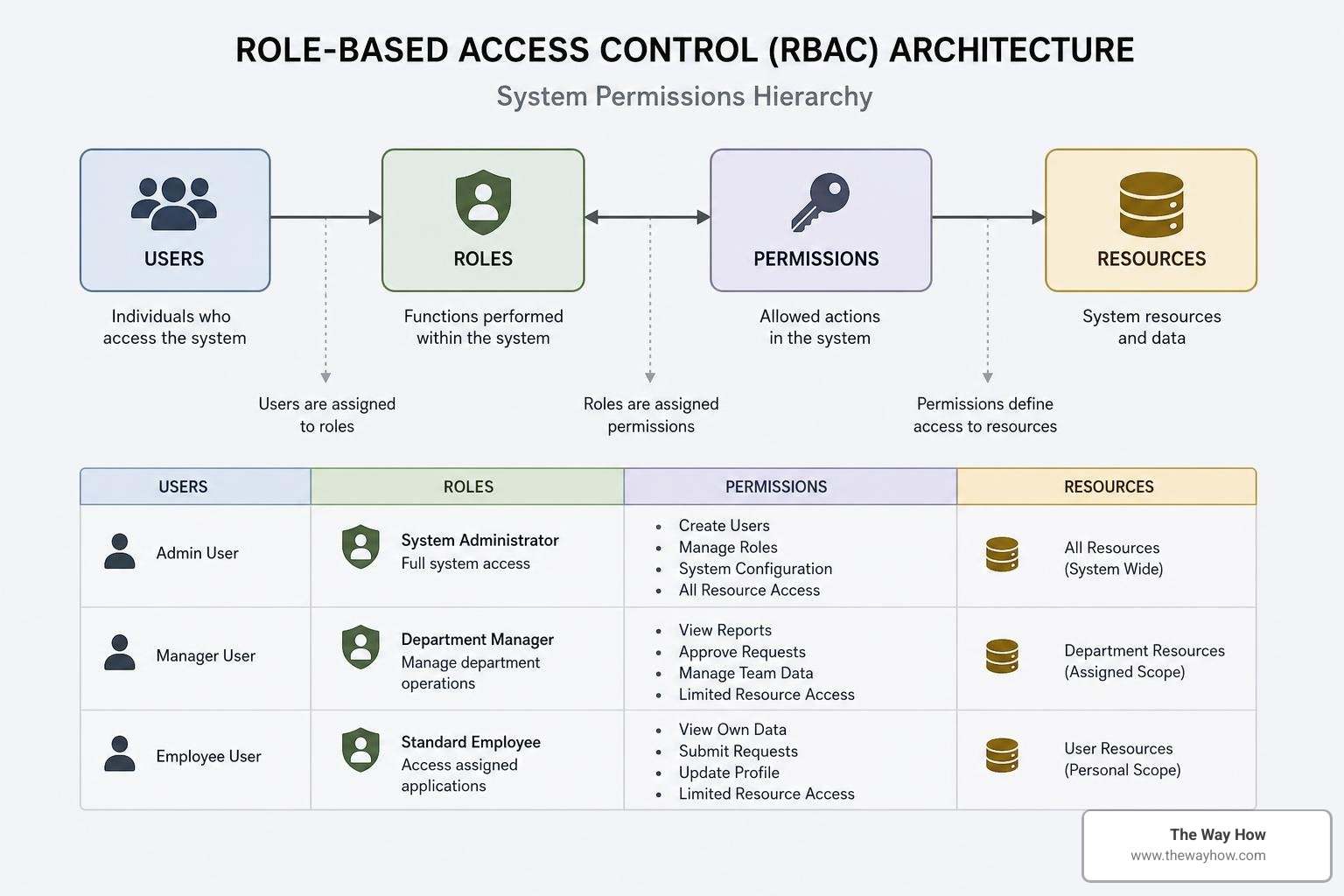
To design secure access control:
Within your custom integration role, permissions must be explicitly mapped to CRUD (Create, Read, Update, Delete) operations.
For REST web services, permissions are governed under the Setup and Transactions tabs of the role configuration. For example, if an integration only needs to sync customer records, grant “View” or “Edit” permissions to “Customers” and nothing else.
If your integration executes search operations, you must transition away from legacy data sources. NetSuite is deprecating the older NetSuite.com data source. All modern query operations, including SuiteQL execution via the REST Query Service, must utilize the NetSuite2.com data source. This ensures that your queries respect the role-based security boundaries established within the modern NetSuite security framework.
Securing your authentication credentials is only half the battle. You must also protect the data as it travels across the public internet and ward off common web application threats.
NetSuite strictly enforces TLS 1.2 and TLS 1.3 for all REST API endpoints, ensuring that data in transit is encrypted using modern cryptographic standards. However, your integration client must also be configured to reject weak cipher suites and legacy SSL protocols to prevent downgrade attacks.
When structuring your API requests, the formatting of your HTTP headers is critical. NetSuite expects a highly specific syntax in its authorization headers to validate identity and secure the payload. You can review the exact string formatting requirements in NetSuite Applications Suite - The Authorization Headers.
To protect your system against common threats, implement these defensive practices:
fields query parameter to request only the specific data points your external system requires. This minimizes payload sizes and reduces the risk of exposing sensitive data.When an API request fails, how your system handles the error can expose critical vulnerabilities. Raw database errors, unhandled exception stack traces, or internal field mappings in error responses provide attackers with a map of your ERP architecture.
Security and performance are deeply intertwined. A flood of API requests—whether intentional (a DDoS attack) or accidental (a runaway loop in your integration code)—can exhaust your system resources and lock out legitimate users. NetSuite enforces strict governance rules to prevent this.

NetSuite limits the number of concurrent requests an account can process at any given moment. These limits are tied to your account tier and the number of SuiteCloud Plus licenses you possess:
When your integration exceeds these limits, NetSuite returns an HTTP 429 Too Many Requests status code.
To handle this securely and efficiently, your integration must employ an exponential backoff algorithm. When a 429 error is detected, the client should pause, wait for a short duration (e.g., 1 second), and retry. If it fails again, the wait time should double (2s, 4s, 8s…) up to a maximum threshold. This prevents your integration from acting as a self-inflicted denial-of-service attack on your own ERP.
For long-running processes or bulk updates, do not hold synchronous connections open. Instead, send the Prefer: respond-async header. This instructs NetSuite to process the request asynchronously, returning a 202 Accepted status along with a status monitor URL, freeing up your active concurrency slots.
A robust security posture requires continuous observation. You cannot protect what you do not monitor. NetSuite provides several native tools to audit API behavior, but your team must actively review them.
If you suspect that an integration credential has been compromised, you must act instantly. A delayed response can result in catastrophic data exposure.
NetSuite REST APIs are generally easier to secure and maintain than SOAP APIs. SOAP relies on complex XML structures and WS-Security protocols, which are resource-heavy and prone to configuration errors. NetSuite’s REST web services utilize lightweight JSON payloads and standard HTTP protocols, making them compatible with modern security tooling, API gateways, and standardized OAuth 2.0 flows.
As of the 2027.1 release, NetSuite will no longer allow the creation of new Token-Based Authentication (TBA) connections using OAuth 1.0a for REST web services and RESTlets. Existing integrations may continue to run for a transition period, but all new integrations must use OAuth 2.0. Organizations should proactively migrate their legacy connections to OAuth 2.0 to avoid operational disruptions.
To prevent data loss during rate-limiting events, your integration architecture should include a message broker or queue (such as RabbitMQ, AWS SQS, or HubSpot’s queueing mechanisms). When NetSuite returns a 429 Too Many Requests error, the integration client should place the failed request back onto the queue and retry processing using an exponential backoff strategy, ensuring no payload is dropped.
At The Way How, we believe that integration security isn’t just a technical box to check—it’s a critical component of organizational momentum. When your leadership team is uncertain whether your core ERP data is secure, decision-making stalls, and growth slows down.
We help founders and mid-market leadership teams diagnose these exact architectural friction points. By combining deep technical execution with behavioral clarity, we design systems that replace anxiety with predictable, scalable performance.
If you are ready to secure your integrations, transition your legacy authentication systems, and build an enterprise architecture you can trust, we are here to guide you. More info about our strategic integration services.
 Jeremy Wayne Howell : Jul 22, 2026 9:48:31 PM
 Jeremy Wayne Howell : Jul 21, 2026 9:47:10 PM
 Jeremy Wayne Howell : Jul 20, 2026 9:46:47 PM