A Complete Guide to CRM Systems and Database Management
 Jeremy Wayne Howell : Jul 22, 2026 9:48:31 PM
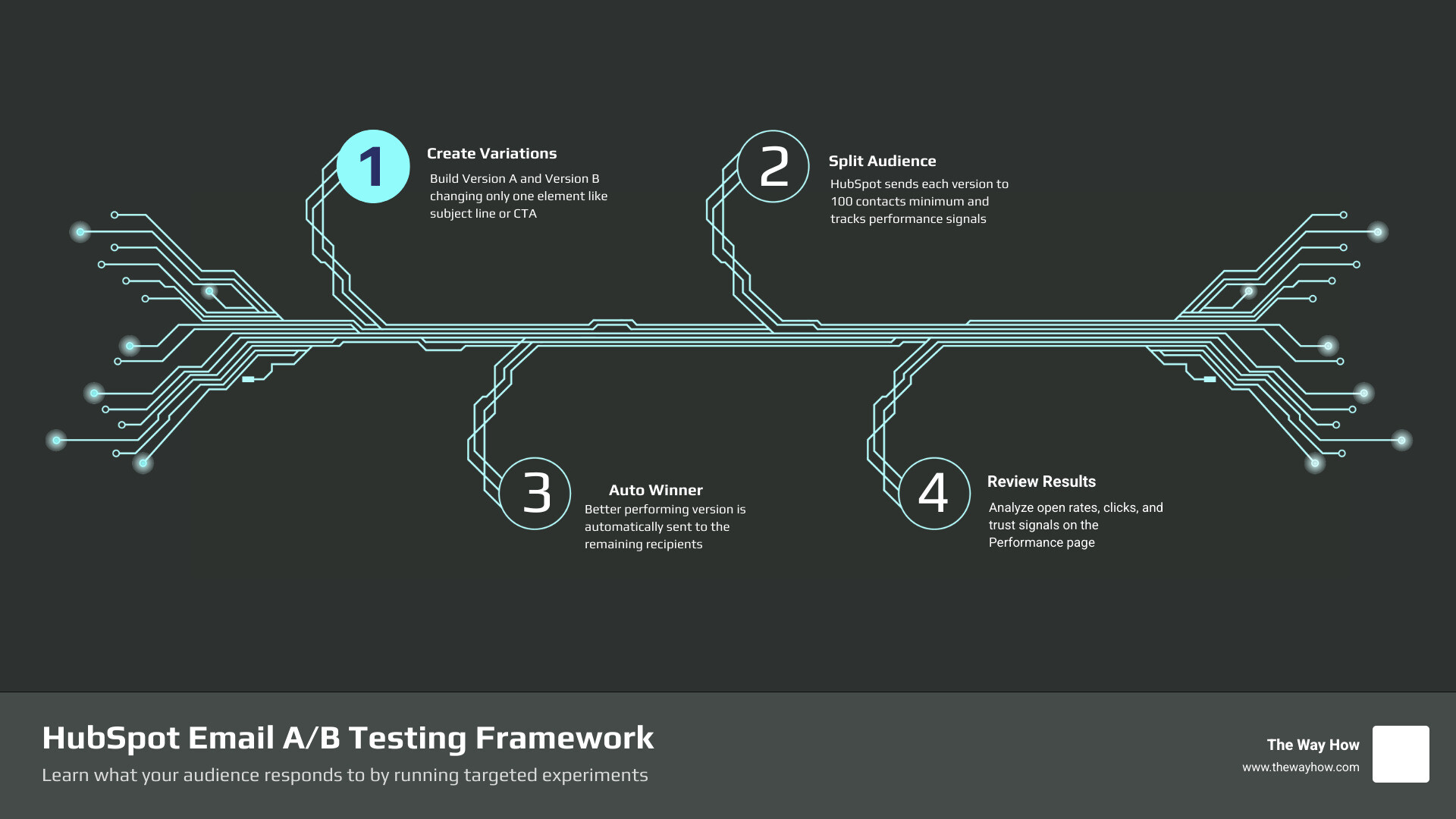
HubSpot email A/B testing is one of the most direct ways to stop guessing and start learning what your audience actually responds to. Here’s the short version:
How HubSpot email A/B testing works:
What you can test:
Minimum requirements:
Most email testing fails before the first send. Not because the test was designed wrong — but because the question behind the test was wrong.
Founders and revenue leaders often run A/B tests looking for a winning subject line. What they actually need is a signal about where buyer trust breaks down. Those are very different problems. One optimizes a metric. The other builds a system.
HubSpot’s A/B testing tools are genuinely useful — but only when you know what you’re trying to learn and why it matters to the person on the other side of the inbox.
I’m Jeremy Wayne Howell, founder of The Way How, and I’ve spent over 20 years helping revenue teams implement systems like hubspot email ab testing that reflect how buyers actually think — not just how dashboards are built. I’ll walk you through both the mechanics and the mindset you need to make this work.
When we look at email analytics, we are looking at the digital exhaust of human decision-making. Every open, delete, and click is a choice driven by cognitive energy, perceived value, and trust.
Most brands treat email as a volume game, hoping that a slightly punchier subject line will trick a few more prospects into opening. This approach creates cognitive friction. If your subject line promises a breakthrough insight but the email body delivers a generic sales pitch, you may win the open, but you lose the relationship. The prospect immediately senses the misalignment, and their psychological defense mechanisms go up.
To run experiments that actually scale revenue, we must design tests that target specific certainty gaps. A certainty gap is the distance between what a prospect needs to feel secure making a decision and the information they currently possess.
Are your prospects hesitant because they do not understand your operational process? Or is it because they do not trust your pricing model? By structuring your experiments around these psychological assumptions, your A/B tests stop being random guesses and start becoming diagnostic tools that build genuine buyer momentum.

To gather clean, reliable insights, we have to respect both statistical math and behavioral psychology. If we test too many variables at once, we learn nothing. If we send our tests to a group that is too small, our winner is chosen by pure chance rather than clear human preference.
HubSpot recommends sending a tested marketing email to a minimum sample size of 1,000 contacts to achieve meaningful results. For sequence emails, we should run our tests until at least 100 contacts have received each version before we begin drawing conclusions.
These numbers are not arbitrary platform constraints; they are safeguards against statistical noise. When you run tests below these thresholds, a single accidental click can skew your entire strategy, leading you to optimize your systems based on false signals.
To learn how to configure these parameters in your portal, you can read the step-by-step guide on how to Run A/B tests for marketing emails. If you are looking to run advanced experiments on operational or system-triggered communications, check out our HubSpot Transactional Email AB Test Guide 2026.
Setting up an experiment inside HubSpot is straightforward, but it requires careful attention to detail before you hit send.
To run a valid experiment, change only one element between these two variations. If you change the subject line and the header image and the main call-to-action all at once, you will never know which change actually drove the performance difference.
For technical teams or developers who want to manage variations programmatically, you can use HubSpot’s developer tools to Create an A/B test variationdirectly via the API.
Sometimes, priorities shift or you spot an error right after a campaign starts. Managing or stopping an active test is simple, but you must know where to look.
If your email is scheduled or currently running its test phase, you can cancel it by going to the email’s performance details screen. Click Review and send in your editor or locate the active send in your email dashboard, then select End A/B test from the Actions dropdown menu.
When you end a test early, HubSpot stops the distribution split. It will not send the remaining emails to the rest of your list, allowing you to salvage the campaign, edit your draft status, and re-evaluate your messaging.
If you run into technical issues or delivery blockages while managing your active campaigns, refer to our guide on HubSpot Email Troubleshooting to diagnose and fix setup errors quickly.
Manual email sends are perfect for monthly newsletters or major company announcements. However, the real engine of predictable revenue is marketing automation. Running experiments inside automated nurture paths allows you to continuously optimize your messaging without manual intervention.
By utilizing workflows and sales sequences, we can build self-optimizing feedback loops that constantly refine how we communicate with prospects at every stage of their buyer journey.
To learn more about setting up these automated systems, you can read the official guide on how to Automate A/B email testing with workflowsor explore our strategic framework on HubSpot Marketing Automation.
Sales sequences are highly personal, one-to-one outreach tools designed for sales development and relationship building. Because these emails feel personal, the psychological triggers that drive opens, replies, and booked meetings are entirely different from marketing emails.
When you A/B test sequence steps, HubSpot automatically splits your enrolled contacts in a 50/50 distribution between Version A and Version B. It then tracks detailed metrics for both variations, including:
Inside sequences, we recommend testing personalization tokens (such as referencing a prospect’s specific industry versus their job title) and CTA placement. Does a soft CTA (“Are you open to a brief exchange of ideas next week?”) perform better than a hard CTA (“Book a time on my calendar here”)?
To set this up, go to your sequence editor, click + Add A/B test on any email step, and create your alternate version. For step-by-step instructions, view the documentation to A/B test your sequence emails.
Drip campaigns allow us to nurture leads over weeks or months based on specific behavioral triggers. When integrating hubspot email ab testing into automated workflows, there are a few platform-specific rules we must follow:
This continuous split allows you to gather data over months. Once you have a statistically significant sample, you can review the performance metrics, choose the winning variation, and HubSpot will automatically send only the winning version to all future contacts while archiving the losing draft.
To build out these multi-step automated journeys, you can leverage our strategic guide on HubSpot Drip Campaigns.
Data without psychological context is just noise. To make informed decisions, we have to look past the raw percentages and understand what our metrics are telling us about our buyers’ minds.
| Metric | What It Measures (Tactical) | What It Signals (Psychological) |
|---|---|---|
| Open Rate | Subject line, preheader, and sender name impact. | Curiosity, relevance, and baseline trust. |
| Click-Through Rate | CTA clarity, copy alignment, and value proposition. | Intent, expectation alignment, and motivation. |
| Unsubscribe Rate | Content quality, email frequency, and audience fit. | Fatigue, misalignment, or broken expectations. |
If Version B has a 40% higher open rate but a 50% lower click-through rate than Version A, your subject line was likely too aggressive or misleading. You created curiosity, but when the user opened the email, they experienced cognitive friction because the body copy did not deliver on the subject line’s promise. Trust was lost, and so was the click.
To analyze your results, go to your HubSpot dashboard, navigate to Marketing > Email, and click on the name of your sent email. This will take you directly to the Performance page.
Here, HubSpot highlights the winning variation in green based on the metric you selected (either open rate or click-through rate). You can toggle between Version A and Version B to see the exact performance breakdown for each audience segment.
If you are building custom reports to analyze long-term email performance across your entire portal, keep this key HubSpot limitation in mind: Custom reports can only filter data using Variation A’s Email content ID. If you attempt to build a custom multi-email report, metrics for Variation B are rolled up under Variation A’s ID.
For marketing emails, HubSpot recommends a list of at least 1,000 contacts for best results. This allows the system to send Version A to 250 contacts, Version B to 250 contacts, and then send the winning version to the remaining 500 contacts. For sales sequences, we recommend running your tests until at least 100 contacts have received each variation to ensure statistical significance.
No, native A/B testing is not available for transactional emails sent via the single-send API. Because transactional emails are critical, system-triggered messages (like password resets or purchase receipts), they bypass marketing subscription preferences and cannot be split-tested using standard marketing features.
To learn more about managing these critical system communications, explore our comprehensive guide on HubSpot Transactional Email.
For automated workflow emails, the 50/50 split runs continuously. To choose a winner, navigate to the email details screen of your automated email. Review the performance metrics, click Choose winner, and select the variation that performed best. HubSpot will immediately send only the winning version to all future contacts enrolled in your workflow and archive the losing version.
Optimizing email metrics is a valuable tactical exercise, but minor tweaks to copy and design will not fix a fundamentally broken go-to-market strategy.
At The Way How, we help founders and leadership teams move past tactical guesswork. We diagnose the hidden certainty gaps in your sales and marketing systems, design clear customer journeys based on human psychology, and build operational structures that turn marketing into a predictable revenue engine.
If you are ready to stop guessing and start building a dependable growth system, we can help you align your strategy, software, and execution.
 Jeremy Wayne Howell : Jul 22, 2026 9:48:31 PM
 Jeremy Wayne Howell : Jul 21, 2026 9:47:10 PM
 Jeremy Wayne Howell : Jul 20, 2026 9:46:47 PM