A Complete Guide to CRM Systems and Database Management
 Jeremy Wayne Howell : Jul 22, 2026 9:48:31 PM

HubSpot features and pricing can feel deceptively simple at first glance — until you realize the published price is rarely what you actually pay.
Here’s a quick-reference breakdown to answer the most common questions upfront:
| Plan | Starting Price | Best For |
|---|---|---|
| Free | $0 | Solo founders, basic CRM |
| Starter | $20/seat/month | Small teams, simple automation |
| Professional | $90–$890/month | Growth-stage teams, full automation |
| Enterprise | $150–$3,600/month | Large orgs, advanced governance |
Key facts to know before you read further:
What makes this genuinely hard to evaluate isn’t the pricing page. It’s the gap between what you think you’re buying and what you’ll actually need six months after go-live. Stacking Hubs, hitting contact limits, and discovering that the feature you need lives one tier above your current plan — these aren’t edge cases. They’re the norm.
That’s the problem this guide is designed to solve.
I’m Jeremy Wayne Howell, founder of The Way How and a revenue growth strategist with over 20 years of hands-on experience implementing HubSpot CRM and lifecycle systems for founders and revenue teams. I’ve helped businesses navigate HubSpot features and pricing decisions at every stage — from first-time setup to full enterprise architecture — and what I’ve consistently found is that the right plan is almost never the obvious one.
When we talk to founders and revenue leaders, we rarely hear complaints about a lack of software features. Instead, we hear about fatigue. There is a deep, psychological friction that comes with selecting a customer relationship management (CRM) platform. You are not just buying a tool; you are asking your team to change how they behave.
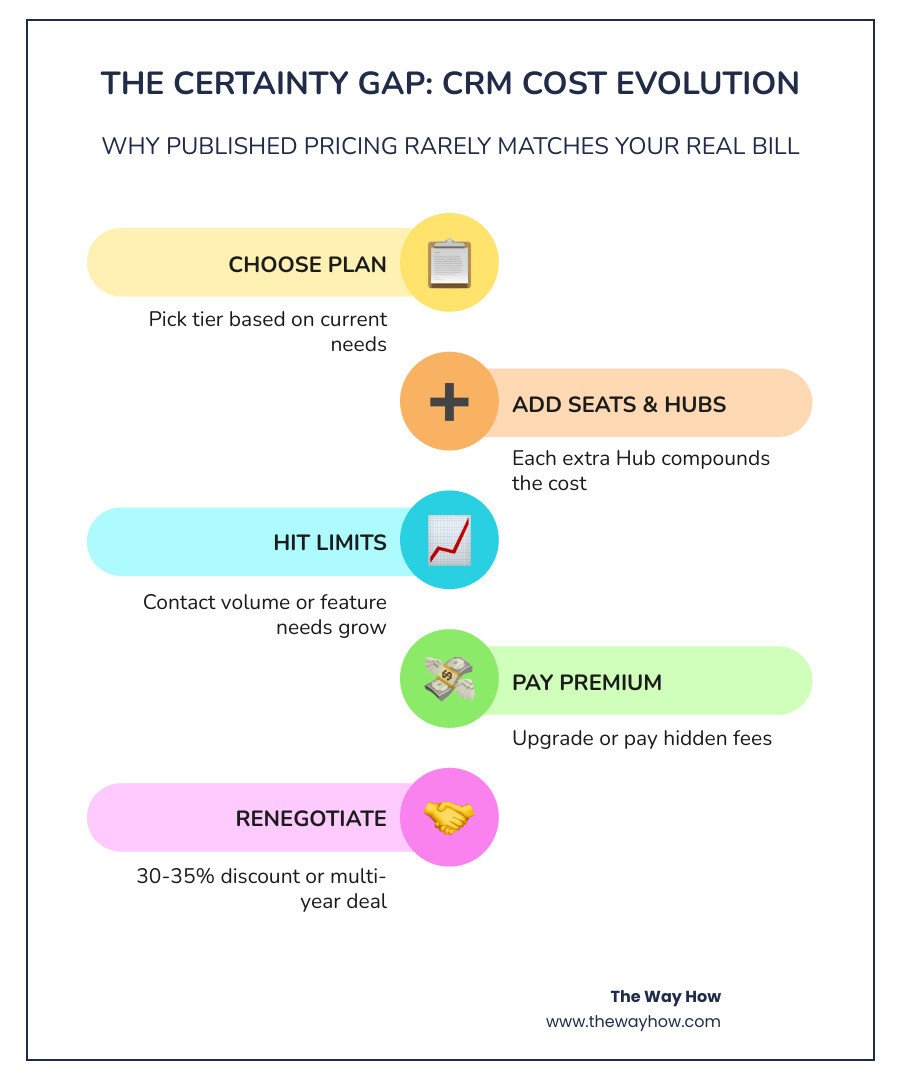
This decision often feels like a gamble because the pricing structures of modern SaaS platforms are built to obscure the true cost of ownership. We call this the “Certainty Gap.” You purchase a plan believing it fits your current budget, only to realize that as your business grows, the software penalizes your success with compounding fees.

Software fatigue sets in when teams are forced to jump between disjointed point solutions, leading to fragmented customer experiences and broken data handoffs. We look at CRM selection through a behavior-first lens: if a platform is too complex or its pricing model makes you hesitant to add new contacts or users, your team will find workarounds. They will go back to spreadsheets, and your single source of truth will vanish.
At its core, HubSpot is not just a CRM; it is an AI-powered customer platform designed to unify your marketing, sales, service, content, and data operations. By building all of its tools on top of a single Smart CRM database, HubSpot ensures that every team member sees the exact same customer timeline.
This unified database is what sets HubSpot apart from legacy systems that rely on fragile, third-party integrations to connect separate databases. When a prospect visits your website, reads a blog post, opens an email, fills out a form, and speaks to a sales representative, every single one of those interactions is logged in real-time on a single contact record.
To explore how these capabilities translate into operational value, you can review our breakdown of hubspot features.
In 2026, this system is supercharged by Breeze AI, HubSpot’s native intelligence layer. Breeze AI powers specialized agents—such as the Customer Agent, Data Agent, and Prospecting Agent—to automate manual tasks and accelerate your workflows without sacrificing the human empathy your customers expect.
HubSpot organizes its platform into six distinct product modules, known as Hubs. Each Hub can be purchased individually or stacked together as a bundled platform:
HubSpot’s free tier is famously generous, allowing you to store up to 1,000,000 contact records. It includes basic contact management, forms, landing pages, live chat, and limited email marketing. However, the free tools come with technical caps and HubSpot branding on all customer-facing assets.
The real value unlocks when you transition to paid tiers:
Understanding HubSpot features and pricing requires looking past the flat monthly rates. HubSpot employs a hybrid pricing model. Some Hubs (like Sales and Service) are priced per seat, while others (like Marketing) are priced based on the volume of contacts you actively target.
In 2024, HubSpot introduced a simplified seat-based model that remains the standard in 2026. This model categorizes seats into specific types:
| Subscription Tier | Core Seat Base Price (Est.) | Included Seats / Contacts | Key Inclusions |
|---|---|---|---|
| Starter | $20/seat/month | 1 Seat Included | Basic automation, branding removal, 24/7 support |
| Professional | $90–$100/seat/month | Hub-dependent minimums (e.g., 5 seats for Sales Pro) | Workflow automation, custom reporting, A/B testing |
| Enterprise | $150/seat/month | Hub-dependent minimums (e.g., 10 seats for Sales Enterprise) | Advanced governance, custom objects, sandbox environments |
For startups and small businesses, the Starter Customer Platform bundle is an incredibly cost-effective entry point. HubSpot offers up to 65% off this bundle for new customers, with pricing starting as low as $7/month per seat when billed annually (or $10/month per seat on a monthly contract). This plan includes essential tools across all Hubs, making it perfect for teams moving off spreadsheets.
However, growing companies eventually hit what we call the “Professional pricing cliff.” The jump from Starter to Professional is steep. For example, Sales Hub Professional starts at $90/mo per seat, but it requires a mandatory 5-seat minimum, making the true entry price $450/month before onboarding. Marketing Hub Professional starts at $890/month (which includes 3 seats and 2,000 marketing contacts).
To deep-dive into these mid-tier costs, you can read our detailed analysis of hubspot professional pricing or review the HubSpot Pricing 2026 (Tested May 2026) — Real Costs + Hidden Feesreport.
At the Enterprise level, HubSpot is built to compete directly with legacy platforms like Salesforce, but with a significantly faster deployment time. Marketing Hub Enterprise starts at $3,600/month (including 5 seats and 10,000 marketing contacts), while Sales Hub Enterprise starts at $150/seat/month with a 10-seat minimum ($1,500/month).
Enterprise features are focused on control, security, and scale. You gain access to custom objects, advanced data partitioning, multi-brand settings, and sandbox environments to test changes before they go live. For exact limits, technical definitions, and official service terms, you can reference the HubSpot Product & Services Catalog.
Many businesses fall into the trap of the “ecosystem tax”—the compounding cost of stacking multiple Hubs together. Because each Hub is priced independently, a company using Marketing Pro, Sales Pro, and Service Pro can easily find their monthly bill scaling from a few hundred dollars to several thousand.

The most common pricing escalator is contact-based billing in Marketing Hub. While HubSpot allows you to store non-marketing contacts for free, you must pay for “marketing contacts”—any contacts you actively target with marketing emails or ads. Once you exceed your plan’s included contact tier, HubSpot automatically upgrades you to the next tier, which can add hundreds of dollars to your monthly invoice.
To understand these nuances, we recommend reviewing our guides on hubspot marketing hub pricing, hubspot operations hub pricing, and hubspot transactional email pricing.
In 2026, HubSpot uses a Credit system to manage the consumption of AI agents and advanced automation features. Rather than charging flat fees for AI usage, HubSpot allocates a set number of monthly HubSpot Credits based on your subscription tier:
These credits reset every month and do not roll over. If your team heavily utilizes features like Breeze AI’s Prospecting Agent, Data Agent, or automated data enrichment, you can purchase Capacity Packs at $10 per 1,000 credits, or utilize Pay-as-You-Go pricing at $0.010 per credit.
One of the most frequently overlooked hidden costs is the mandatory onboarding fee. If you purchase a Professional or Enterprise plan directly from HubSpot, you are required to pay a one-time onboarding fee:
Additionally, following the end of free data enrichment in March 2025, teams utilizing Breeze Intelligence for real-time lead enrichment must budget for Breeze credits, which start at $45/month for 5,000 credits.
To plan your budget effectively, you can read our guide on hubspot marketing hub implementation or consult the comprehensive pricing breakdown in How Much Does HubSpot Cost in 2026? CRM Pricing, Hubs, and Hidden Fees | CompareTiers.
Before committing to HubSpot, it is wise to evaluate how it compares to other leading CRMs:
For a direct side-by-side comparison, see the ActiveCampaign vs HubSpot CRM Pricing 2026 | CompareTiersanalysis and read our perspective on HubSpot CRM in 2026: Worth It for Startups?.
You do not have to accept HubSpot’s published list prices. Historically, buyers achieve 30% to 35% discounts off list prices through strategic negotiation. Here is how we recommend approaching your purchase:
Yes, HubSpot’s core CRM is free with no time limit. It allows you to store up to 1,000,000 contact records and includes basic tools like email tracking, meeting scheduling, and live chat. However, it caps features at low limits, supports only 2 users, and includes HubSpot branding on all customer-facing assets.
The “ecosystem tax” refers to the compounding cost of buying multiple HubSpot Hubs. Because each Hub (Marketing, Sales, Service, etc.) has its own independent pricing and seat minimums, stacking them together can quickly multiply your software spend far beyond the cost of a single Hub.
Yes, onboarding fees are mandatory for all Professional and Enterprise plans purchased directly from HubSpot. However, these fees can often be waived or significantly reduced if you purchase your licenses and manage your implementation through a certified HubSpot Solutions Partner.
At The Way How, we believe that software should never be a source of operational friction or financial anxiety. If you are feeling overwhelmed by HubSpot features and pricing, the problem usually isn’t the software itself—it is a misalignment between your technology, your team’s behavior, and your customer journey.
We help founders and leadership teams remove this uncertainty. As a psychology-first revenue strategy firm, we diagnose why growth is stalled, design custom HubSpot architectures that your team will actually love using, and align your systems with how human beings actually make buying decisions.
Let us help you turn your CRM from a costly gamble into a predictable growth engine. Align your revenue systems with a custom HubSpot architecture and take control of your growth journey today.
 Jeremy Wayne Howell : Jul 22, 2026 9:48:31 PM
 Jeremy Wayne Howell : Jul 21, 2026 9:47:10 PM
 Jeremy Wayne Howell : Jul 20, 2026 9:46:47 PM