A Complete Guide to CRM Systems and Database Management
 Jeremy Wayne Howell : Jul 22, 2026 9:48:31 PM
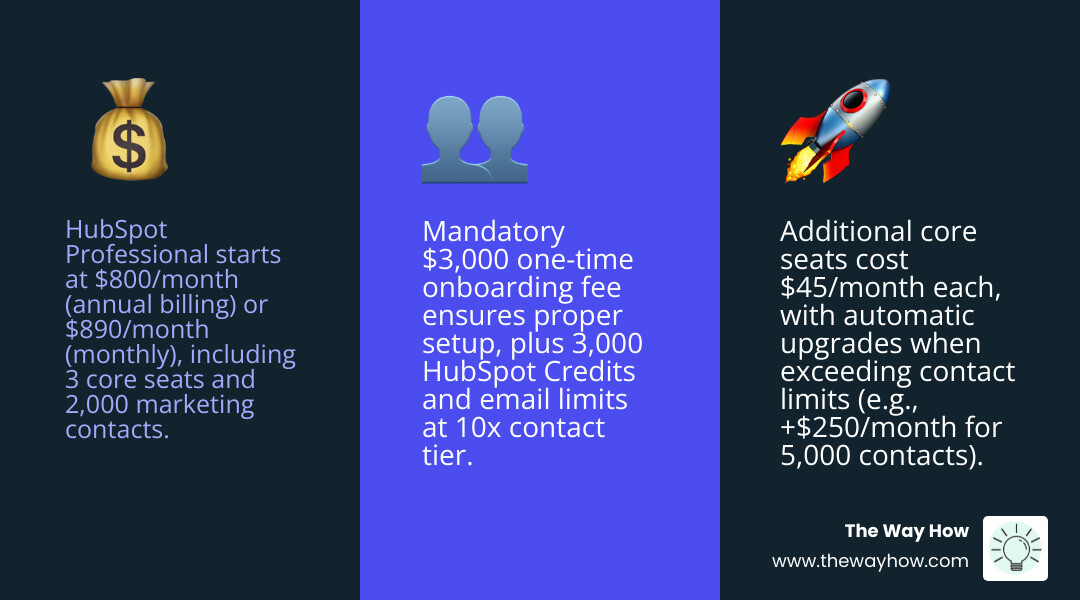
HubSpot Professional pricing starts at $800/month (billed annually) or $890/month (billed monthly) for Marketing Hub — plus a mandatory one-time onboarding fee of $3,000.
Here’s a quick snapshot of what that base price includes:
| Detail | Amount |
|---|---|
| Monthly cost (annual billing) | $800/mo |
| Monthly cost (monthly billing) | $890/mo |
| Core seats included | 3 |
| Additional core seat cost | $45/mo (annual) |
| Marketing contacts included | 2,000 |
| HubSpot Credits included | 3,000 |
| Required onboarding fee (one-time) | $3,000 |
| Email send limit | 10x your contact tier per month |
That’s the short answer. But the number itself rarely causes the confusion — the jump does.
Going from HubSpot Starter (as low as $9/month) to Professional at $800/month is not a small step. It’s a structural shift in what you’re buying. One Reddit user shared that their sales rep quoted them $17,500/year to upgrade from their $250/year Starter plan — a roughly 70x increase. That kind of sticker shock stops a lot of smart business leaders cold.
And that reaction makes sense. When a price jumps that dramatically, it’s natural to wonder whether the platform is growing too fast for your team, whether the ROI is real, or whether you’re being pushed into a tier you don’t need.
This guide exists to remove that uncertainty. Not to sell you on Professional — but to give you the clarity to decide for yourself.
I’m Jeremy Wayne Howell, founder of The Way How, a psychology-first marketing and revenue strategy firm, and I’ve spent over 20 years helping founders and revenue teams evaluate tools like HubSpot Professional pricing to determine whether they’re buying a system that fits how their buyers actually behave. If you’ve ever felt like the pricing conversation moved faster than your confidence in the decision, this guide is for you.
Hubspot professional pricing definitions:
When we look at hubspot professional pricing, we aren’t just looking at a software subscription; we are looking at the cost of moving from manual tactics to a systemized revenue engine. The base monthly cost is the price of admission for advanced automation, but how you pay matters just as much as what you pay.
Choosing annual billing is the most common path for businesses committed to the platform. By paying upfront for the year, you secure the $800/month rate, which saves you $1,080 annually compared to the month-to-month flexibility of the $890/month plan. For a detailed breakdown of these tiers, you can explore our guide on HubSpot Marketing Hub Pricing.
Beyond the base subscription, the number of people interacting with the tool impacts your bottom line. Professional plans include 3 “Core” seats. These are users who need edit access to the marketing tools. If your team grows, each additional core seat will cost you $45/month on an annual plan or $50/month on a monthly plan.
The $800 per month entry point is specifically for the Marketing Hub. However, HubSpot’s ecosystem is modular. If you are looking at other hubs, the Professional entry points vary:
Each of these tiers brings a specific set of HubSpot Features designed to eliminate friction in different parts of the customer journey.
In the Marketing Hub, your database size is a primary price driver. The Professional plan includes 2,000 marketing contacts. These are the people you can actively target with marketing emails and ads. You can store up to 15 million “non-marketing” contacts (like existing customers or partners you don’t market to) for free, but once a contact is marked for marketing, they count toward your tier.
If you cross the 2,000-contact threshold, HubSpot automatically upgrades you to the next tier. Usually, this means moving to a 5,000-contact limit, which can add approximately $250/month to your bill. It is vital to monitor your database health to avoid these “surprise” jumps. For a deeper dive into how these tiers scale, refer to the HubSpot contact pricing guide.
One of the biggest hurdles for businesses evaluating hubspot professional pricing is the one-time, mandatory onboarding fee. For the Professional tier, this is a non-negotiable $3,000.
While it can feel like a “tax” on your first year, this fee covers the cost of a HubSpot Specialist or a certified partner guiding your technical setup. This ensures your DNS records are correct, your tracking code is firing, and your initial workflows aren’t creating a broken experience for your customers. To see what you’re actually setting up, check out HubSpot Marketing Hub Demo Features.
The implementation burden of a tool this powerful is significant. Without proper onboarding, most teams end up with a “Ferrari in the garage”—a high-performance machine they only use to drive to the grocery store.
The $3,000 investment is designed to accelerate your ROI. It includes training for your team and ensures that your CRM architecture is built to support long-term growth. You can Discover HubSpot’s Powerful Business Software capabilities during this phase to ensure you are utilizing every tool at your disposal.
In the Professional tier, your email sending limit is 10x your marketing contact tier. If you have 2,000 contacts, you can send 20,000 emails per month. If you need more, you may need to look into the Dedicated IP add-on or higher tiers.
Furthermore, if you want to reach customers via text, Marketing SMS is an add-on. Pricing for SMS depends on volume and character counts. Following Twilio SMS character limits, a standard message is 160 characters. If you use emojis or special characters, that limit drops to 70 characters per segment. For those running high-volume transactional notifications, understanding HubSpot Transactional Email Pricing is also essential.
At The Way How, we often talk about the “Certainty Gap.” In the Starter tier, your marketing is likely manual. You send an email, you check a box, you move a lead. It is labor-intensive and prone to human error.
The jump to $800/month represents the shift from doing marketing to building a system that does marketing for you. This is where behavioral insight meets operational execution. When you automate your lead nurturing based on how a user actually interacts with your site, you aren’t just saving time; you are creating a more empathetic, responsive journey for the buyer.
The data backs this up. HubSpot reports that users see a 167% increase in website traffic and a 3x increase in inbound leads after six months on the platform. By HubSpot ROI data standards, 83% of users report an increase in conversion rates. The price jump is the cost of eliminating the friction that keeps your growth stalled.
The Professional tier is where HubSpot becomes an omni-channel powerhouse. You gain the ability to manage social media, run A/B tests on landing pages, and receive SEO recommendations directly within the tool.
One of the most valuable additions is “Smart Content.” This allows you to show different website content to different people based on their CRM data. A first-time visitor might see a “Download our Guide” button, while a returning customer sees “Book a Consultation.” This level of personalization is how you build trust at scale.
You can’t fix what you can’t measure. Professional unlocks 75 custom dashboards and advanced marketing analytics. The most critical feature here is multi-touch attribution.
Instead of just knowing that a lead “came from Google,” you can see the entire journey: they clicked a LinkedIn ad, read three blog posts, attended a webinar, and then requested a quote. This allows you to showcase ROI to leadership and make data-driven decisions about where to spend your next dollar. For technical details, see the HubSpot reporting documentation.
The heart of the Professional tier is the Workflow engine. You can build up to 300 customizable workflows to automate everything from internal task assignments to complex customer journeys.
| Feature | Starter | Professional |
|---|---|---|
| Workflows | Simple (10) | Advanced (300) |
| Lead Scoring | None | Predictive & Rules-based |
| Social Media | None | Full Management |
| A/B Testing | None | Emails & Landing Pages |
| Salesforce Sync | Basic | Advanced Mapping |
Lead scoring allows you to assign points to contacts based on their actions. If someone visits your pricing page three times, they get a high score and are automatically routed to a sales rep via a sequence trigger. This ensures your team is only talking to the people most ready to buy. You can also manage complex data structures with HubSpot Operations Hub Pricing if your data needs go beyond standard marketing automation.
For a small team of 2-3 people, the question isn’t whether $800/month is “expensive”—it’s whether the platform replaces the need for an additional hire. If HubSpot Professional can automate the work of a marketing coordinator, the ROI is immediate.
However, if you are a very small business with a tiny database, alternatives like Pipedrive or ActiveCampaign might offer lower entry points for basic automation. But be warned: many businesses “outgrow” those tools quickly and face a painful migration back to HubSpot later.
If you are a startup or a nonprofit, don’t pay full price. HubSpot for Startups offers up to 90% off in the first year for eligible companies, and HubSpot for Nonprofits provides a flat 40% discount.
Yes, HubSpot requires a one-time Professional Onboarding fee of $3,000 to ensure the platform is architected correctly for your specific business goals and technical requirements. While some agencies can waive this if they provide the onboarding themselves, you will still be paying for the service in some form to ensure the system is set up for success.
HubSpot will automatically upgrade you to the next contact tier. For example, moving from 2,000 to 5,000 contacts typically adds approximately $250 per month to your Professional subscription. It is best to use the pricing calculator to estimate costs at 150% of your current volume so you aren’t caught off guard.
The primary difference is the shift from basic email tools to advanced automation. Professional unlocks 300 workflows, social media management, A/B testing, and custom reporting that are unavailable in the Starter tier. It also removes all HubSpot branding from your emails and pages, providing a more professional look.
At The Way How, we believe that growth stalls when there is a lack of clarity. Choosing the right software tier is a high-stakes decision because it dictates the ceiling of your marketing operations.
If you feel stuck between tiers or uncertain about how to architect your revenue engine, we provide Fractional CMO leadership and HubSpot architecture services to help you bridge that gap. We don’t just look at the features; we look at the human behavior driving your sales. Our goal is to help you eliminate uncertainty with HubSpot Marketing Automation and turn your marketing into a predictable, dependable growth engine.
When you see the problem clearly, the solution—and the price tag—finally starts to make sense.
 Jeremy Wayne Howell : Jul 22, 2026 9:48:31 PM
 Jeremy Wayne Howell : Jul 21, 2026 9:47:10 PM
 Jeremy Wayne Howell : Jul 20, 2026 9:46:47 PM