
Here’s the comparison with the thing you came for up front: the prices. Both price lists, side by side, straight from each vendor’s own page. Then we’ll tell you when Salesforce is the better call, because sometimes it is.
I’m Jeremy Wayne Howell, founder of The Way How. We implement HubSpot and we migrate teams off Salesforce, so you know where we stand. That’s exactly why every figure here is dated and linked: you can check our work.
HubSpot vs Salesforce: The Quick Answer
If you just need the quick answer:
Prices Side by Side, Like for Like
The PointFor YouOn list price, the 2 are closer than their reputations. The gap depends on the tier you need and HubSpot's one-time onboarding fee.
These are list prices in US dollars, as each vendor published them on October 8, 2026, for their sales CRM products. HubSpot’s figures come from its product catalog, which lists them as “starts at” prices. We re-check every price monthly.
| Tier | HubSpot (Sales Hub) | Salesforce (Sales Cloud) |
|---|---|---|
| Entry | Sales Hub Starter: from $20 per seat per month | Starter Suite: $25 per user per month, billed monthly or annually |
| Middle | Sales Hub Professional: from $100 per seat per month, plus a required one-time onboarding fee of $1,500 | Pro Suite: $100 per user per month, billed annually |
| Top | Sales Hub Enterprise: from $150 per seat per month, billed annually, plus a required one-time onboarding fee of $3,500 | Core: $195 per user per month, billed annually |
| Above that | No higher Sales Hub tier | Advanced: $395 per user per month, billed annually; Max: $550 per user per month, billed annually |
Where these prices come from, checked October 8, 2026:
- HubSpot Sales Hub Starter from $20, Professional from $100 and Enterprise from $150 per seat per month, with required one-time onboarding of $1,500 on Professional and $3,500 on Enterprise, from the HubSpot product catalogHubSpot Product and Services Catalog. HubSpot, 2026-10. Read the Source →
- Salesforce Sales Cloud Starter Suite $25, Pro Suite $100, Core $195, Advanced $395 and Max $550 per user per month, from the Salesforce Sales Cloud pricing pageSales Cloud Pricing. Salesforce, 2026-10. Read the Source →
A few notes so the comparison stays fair:
- We pair tiers by where they sit in each lineup. Entry with entry, middle with middle, and each vendor’s first edition built for larger sales teams at the top.
- Seats and users are the same idea. HubSpot calls a paid login a seat; Salesforce calls it a user.
- Billing terms differ. Salesforce states the term on each edition. HubSpot’s catalog states it for Enterprise (billed annually) and lists Starter and Professional as “starts at” prices.
- Neither price includes add-ons, data work or an implementation partner. Both vendors sell add-ons, and both have partners who set them up. We aim to price a standard HubSpot implementation to meet or beat HubSpot’s own onboarding fee for Sales Hub Professional, listed at $1,500 as of October 8, 2026 in HubSpot’s product catalog.
What a 10-Person Sales Team Pays in Year 1
Here’s the math on list price, licenses plus any required onboarding, before add-ons:
At the middle tier:
- HubSpot Sales Hub Professional: 10 seats x $100 x 12 months = $12,000, plus $1,500 onboarding = $13,500HubSpot Product and Services Catalog (our arithmetic). HubSpot, 2026-10. Read the Source →
- Salesforce Pro Suite: 10 users x $100 x 12 months = $12,000Sales Cloud Pricing (our arithmetic). Salesforce, 2026-10. Read the Source →
At the top tier:
- HubSpot Sales Hub Enterprise: 10 seats x $150 x 12 months = $18,000, plus $3,500 onboarding = $21,500HubSpot Product and Services Catalog (our arithmetic). HubSpot, 2026-10. Read the Source →
- Salesforce Core: 10 users x $195 x 12 months = $23,400Sales Cloud Pricing (our arithmetic). Salesforce, 2026-10. Read the Source →
So in year 1, Salesforce’s Pro Suite costs less than HubSpot’s Professional tier, by the onboarding fee. At the top tier, HubSpot’s Enterprise costs less than Salesforce’s Core. From year 2, the onboarding fee is gone and the middle tiers cost the same on list price.
That’s the honest picture: on license alone, neither one is the cheap option. The bigger cost sits somewhere the price page doesn’t show.
Where They Really Differ
The PointFor YouIn our view, the real difference isn't the license. It's how much admin time each platform needs to stay useful.
In our view, the real difference isn’t the license. It’s how much admin time each platform needs to stay useful.
- How it’s built. HubSpot puts marketing, sales, service and its other tools on 1 shared CRM, so every team sees the same customer record. Salesforce offers a very wide set of products and add-ons, and a lot of power to shape each one.
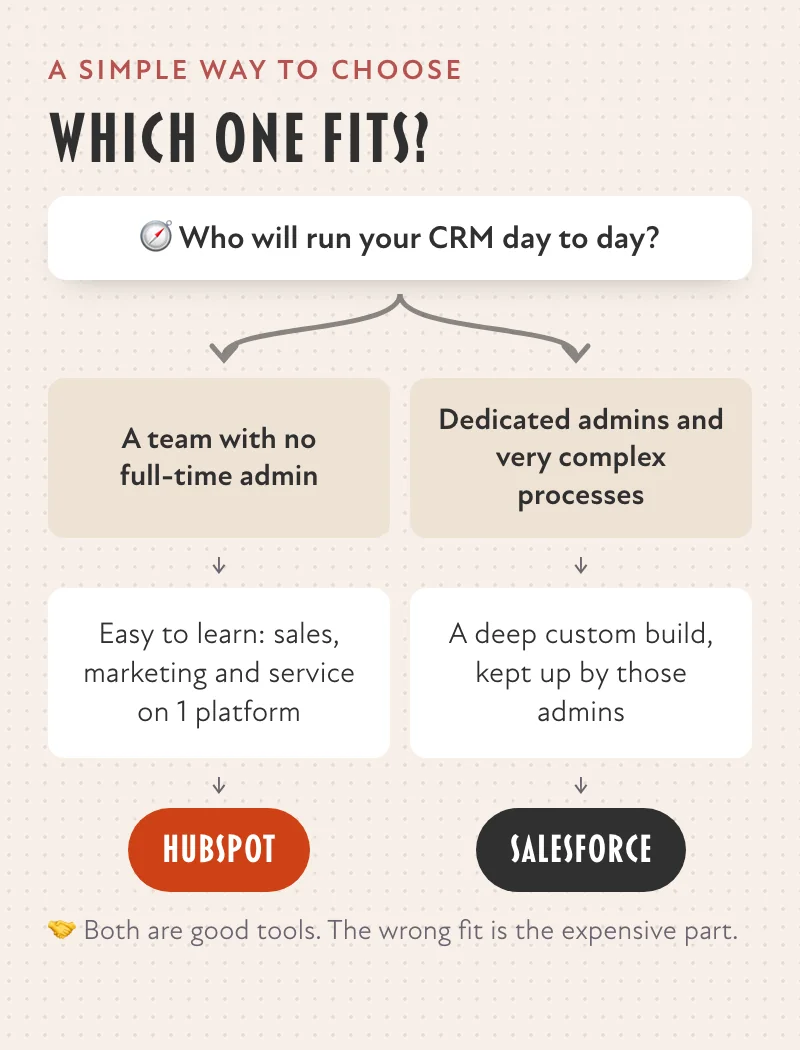
- Who runs it. In our experience, most teams run HubSpot with a part-time owner. Salesforce can be shaped to almost any process, and that depth usually comes with a dedicated admin or a partner to build and maintain it.
- How fast your team uses it. The sooner a team works from 1 record every day, the sooner the CRM pays for itself. That’s where we see HubSpot pull ahead for growing teams.
Admin time doesn’t show up on either price page, but it shows up on your payroll.
When Salesforce Is the Right Call
The PointFor YouSalesforce is the right call for an enterprise with dedicated admins and very complex processes.
We’d point you to Salesforce when:
- You’re an enterprise with dedicated admins and the budget to keep them.
- Your processes are very complex, with territory rules, approvals and lead scoring that need deep custom build work.
- You already run deeply on Salesforce and the products connected to it, and it’s working.
If that’s you, Salesforce is a strong platform, and switching for its own sake would cost you more than it saves.
Why We Point Most Teams to HubSpot
The PointFor most growing teams, HubSpot's 1 shared platform gets sales, marketing and service working from the same record sooner.
In our view, HubSpot is the right pick for most small and mid-sized teams, for 3 reasons:
- 1 shared record. Sales, marketing and service see the same customer without stitching systems together.
- Room to grow without a rebuild. You can start on the free CRM or Starter, and add tiers and tools on the same record as you grow.
- Time to value. Your team can be working in it every day without a full-time administrator.
If you’re weighing the 2 for a smaller team, our guide to HubSpot CRM for small businesses and our overview of cloud-based CRM software are good next reads.
Switching From Salesforce to HubSpot
If you’re on Salesforce today and it isn’t working, moving is a project, not a weekend. Plan for 3 things:
- Decide what to bring. Contacts, companies, deals, activities and the custom fields people actually use. Leave the rest.
- Clean it on the way. A migration is the cheapest moment you’ll ever get to fix duplicates and dead fields.
- Rebuild the automation, don’t copy it. Workflows built years ago often encode problems nobody has anymore. Start from what the team needs now.
We do these migrations, and we’ll tell you if staying put is the better answer.
We’re a HubSpot Solutions Partner. We make money when businesses buy HubSpot through us or hire us to set it up. We still think it’s the right pick for most teams.
Independent of HubSpot, Inc.; not authorized, endorsed or sponsored by HubSpot, Inc.