A Complete Guide to CRM Systems and Database Management
 Jeremy Wayne Howell : Jul 22, 2026 9:48:31 PM

NetSuite SuiteTalk SOAP search migration is the process of replacing legacy SOAP-based search operations in NetSuite with modern REST web services — and if your integrations still rely on SOAP, the clock is already running.
Here is what you need to know right now:
| Milestone | Date | What It Means |
|---|---|---|
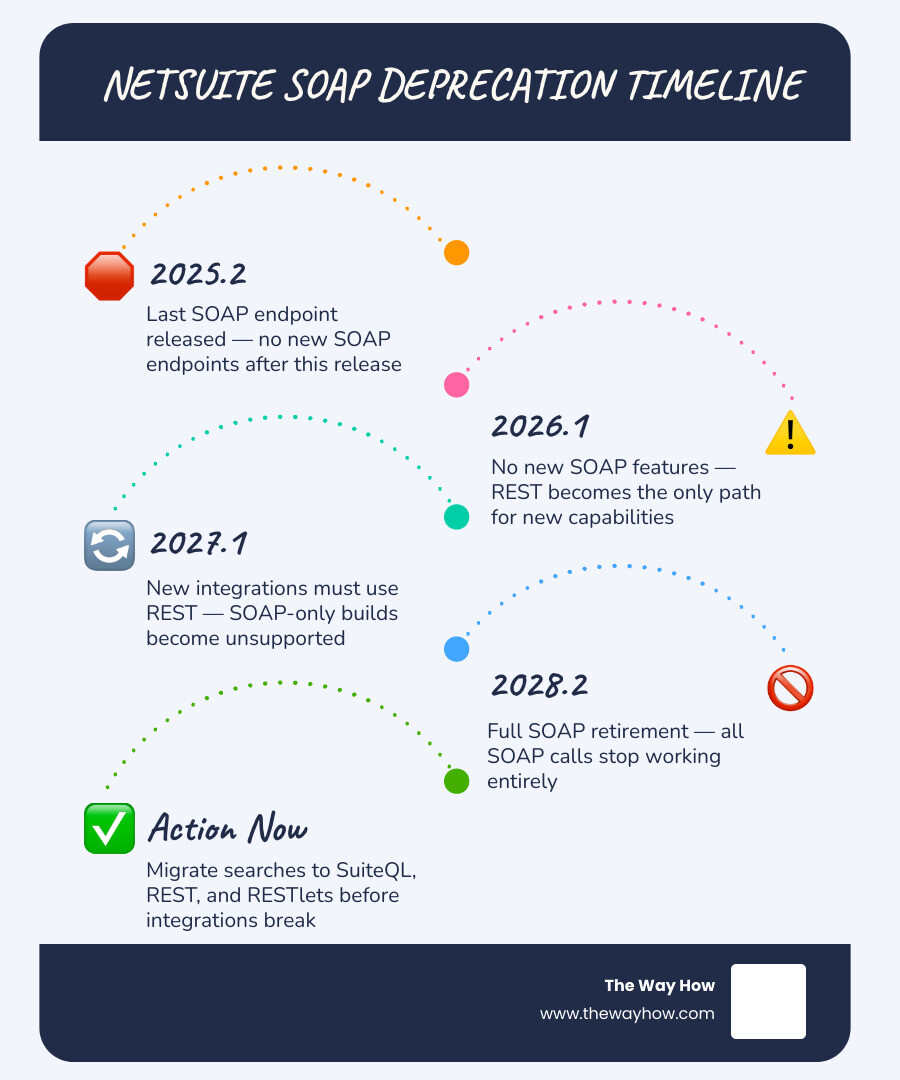
| Last SOAP endpoint released | 2025.2 | No new SOAP endpoints after this |
| No new SOAP features | 2026.1 | REST is the only path for new capabilities |
| New integrations must use REST | 2027.1 | SOAP-only builds become unsupported |
| Full SOAP retirement | 2028.2 | All SOAP calls stop working entirely |
The short answer: If you have SOAP-based searches running in NetSuite today, you need to migrate them to a combination of SuiteQL, SuiteTalk REST, and SuiteScript RESTlets before the 2028.2 release — or face broken integrations and disrupted business operations.
This is not a distant problem. The 2025.2 WSDL is already the last planned SOAP endpoint. Starting with the 2027.1 release, only that single endpoint will remain supported. By 2028.2, every SOAP call goes dark — permanently.
What makes this harder than it looks is that a straight swap from SOAP to REST is not how this works. The REST Record API has real limitations — pagination ceilings, N+1 query bottlenecks, and gaps in feature parity — that can break workflows if you migrate without a plan.
This guide walks you through every layer of the migration: the timeline, the architectural traps, the authentication changes, and the step-by-step path to a stable, modern integration.
I’m Jeremy Wayne Howell, a revenue growth strategist and founder of The Way How, and while my core work sits at the intersection of buyer psychology and go-to-market strategy, I’ve spent over two decades helping organizations navigate high-stakes system transitions — including the kind of NetSuite SuiteTalk SOAP search migration decisions that quietly stall operations while leadership is focused elsewhere. Understanding where technical debt creates organizational uncertainty is exactly the kind of diagnostic work I do every day.
When engineering teams and business leaders look at a deprecation timeline, the default psychological response is denial. We tell ourselves, “We have until 2028. That is years away.” But as we sit here in June 2026, that runway is shrinking fast.
Choosing to delay a migration is rarely a logical decision; it is an emotional one driven by the fear of touching legacy systems that “just work.” In psychology, we call this the status quo bias—the tendency to prefer things to remain the same because the perceived risk of change feels heavier than the hidden cost of staying still.

Every day you run on legacy SOAP endpoints, you build up cognitive load and organizational debt. Your developers are forced to maintain outdated XML schemas, and your business operates with an invisible “certainty gap.” You cannot confidently build new real-time customer experiences, automate advanced inventory flows, or scale your operations when your core data pipeline is tethered to a system scheduled for demolition.
By reframing this migration not as a forced chore, but as a strategic opportunity to clear out technical debt, you remove the friction that stalls growth. Transitioning early gives your team the space to test, learn, and build a high-performing architecture without the panic of an impending hard deadline.
To understand the urgency, we have to look at how Oracle NetSuite manages its API lifecycles. Historically, NetSuite released new SOAP endpoints with every major version. However, starting with the 2026.1 release, that routine cycle has ended.
NetSuite’s official policy dictates that each SOAP endpoint receives exactly three years of support from its release date. With the release of the 2025.2 endpoint, NetSuite delivered its last scheduled SOAP WSDL.
Let us map out what this means for your business:
Delaying this transition carries massive technical and operational risks. If you wait until the last minute, you face resource bottlenecks as qualified NetSuite developers become scarce and expensive. More importantly, you risk catastrophic data flow disruptions—orders failing to sync, inventory levels drifting, and financial reporting grinding to a halt.
To understand what we are moving toward, we must look at how the two protocols handle data retrieval. The technical specifications of NetSuite SuiteTalk SOAP API Capabilities | knowledgelib.ioshow a clear divergence in capability:
| Capability / Feature | SuiteTalk SOAP Web Services | SuiteTalk REST Web Services |
|---|---|---|
| Data Format | XML (Document-style over HTTPS) | JSON (Lightweight payloads) |
| Standard Authentication | Token-Based Authentication (OAuth 1.0) | OAuth 2.0 (JWT or Auth Code) |
| Max Page Size (Search) | 1,000 records per page | 1,000 records per page |
| Pagination Method | searchMoreWithId (Prone to result drift) | HATEOAS links (Next/Prev page URLs) |
| Query Engine | Saved Search references & SearchBasic | SuiteQL (SQL-like queries) & REST Query (q) |
| Performance | Slower due to heavy XML overhead | ~40% to 70% faster response times |
| Batching | Multi-call batching (up to 1,000 records) | Asynchronous batch processing / RESTlets |
The structural shift is clear: we are moving from a heavy, stateful XML protocol to a lightweight, stateless JSON architecture. According to industry analyses, 93% of organizations now standardize on REST APIs because they are more scalable, secure, and easier to maintain. Furthermore, moving off SOAP can yield approximately 40% faster response times, with market analyses suggesting overall performance improvements of 50% to 70% due to reduced payload sizes and optimized database queries.
Many engineering teams approach this project with a naive plan: “We will just find our SOAP search calls and swap them for REST Record API GET requests.”
This is an architectural trap. If you attempt a direct, one-to-one translation of your search logic, your production systems will likely fail under load.
As highlighted in A Practical NetSuite Migration Guide: Moving Off SOAP Before 2028 | Truto Blog, the SuiteTalk REST Record API is designed for single-record CRUD operations, not for heavy data extraction. When you use the REST Record API to query lists of records, you run into strict pagination ceilings. The REST API caps results at 1,000 records per page and imposes a hard ceiling of 1,000 pages total (1,000,000 records max). If your transactional history or customer ledger exceeds this size, a standard REST query will simply block you from accessing the deeper pages.
The fundamental issue lies in how the two systems represent data. SOAP web services rely on highly structured XML schemas. To run a search, you instantiate a SearchRecord object, define search filters, and specify return columns. The server serializes this entire graph into a massive XML document, processes it, and returns an equally heavy XML response.
While this XML structure is verbose, it allows you to define complex, nested search criteria and retrieve joined records in a single round-trip. You can learn more about how SOAP handles these structures in the documentation for Advanced Searches in Web Services.
When you move to the REST Record API, that nested structure disappears. REST resources are designed to be flat and modular. If you query a list of Sales Orders via REST, you do not automatically get the line-item details or the associated customer address fields in the same payload. Instead, you are given HATEOAS links pointing to those sub-resources.
This flat resource design introduces the dreaded N+1 query problem.
Imagine you need to export 200 Purchase Orders to an external warehouse management system. In SOAP, you could configure your search to return both the body fields and the line-item sublists in a single request.
In the REST Record API, if you request those 200 Purchase Orders, the initial response gives you a list of the 200 records. However, to get the actual items inside those orders, your integration must make an additional HTTP request for each individual order’s sublist.
That is 1 initial request + 200 individual sub-resource requests = 201 total API calls.
This behavior is highly inefficient and will quickly exhaust your account’s concurrency limits. In SOAP, you could manage this behavior using preferences like bodyFieldsOnly set to false, as detailed in the guide on Transaction Search. In a standard REST Record API implementation, you do not have that level of control over sublist serialization.
To survive the migration, you must abandon the idea of a pure REST Record API replacement and adopt a more robust, hybrid integration architecture.
To build a reliable, high-performing integration that replaces SOAP searches, we recommend a tri-partite architecture. Rather than relying on a single API surface, we split our integration patterns across three distinct layers, using each for what it does best.
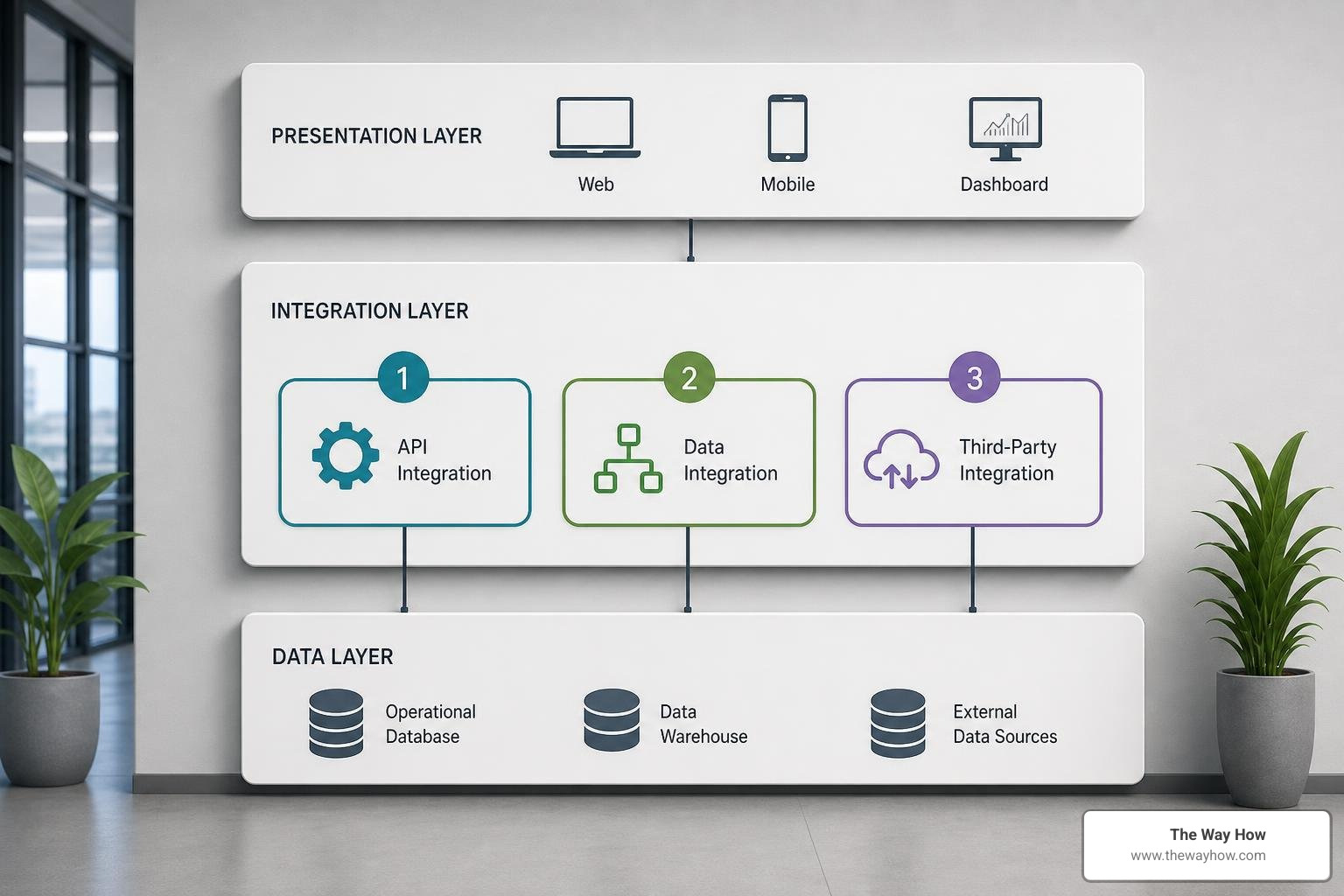
For any operation that replaces a SOAP search, a SOAP saved search reference, or a complex join, SuiteQL is your primary tool. Executed via the REST query endpoint, SuiteQL allows you to write SQL-like queries against the NetSuite2.com unified data source.
SuiteQL completely bypasses the N+1 problem. It allows you to perform complex SQL JOINs, filter on deep criteria, and aggregate data in a single database query. It supports up to 100,000 results per request when using the proper headers, making it highly efficient for bulk data reads.
We reserve the standard SuiteTalk REST API primarily for single-record writes (POST, PATCH, DELETE). The REST Record API is excellent for creating a customer, updating an invoice, or deleting a record because it handles NetSuite’s business logic, validations, and workflows automatically.
There are certain things the REST API cannot do. For example, generating a transaction PDF, executing complex custom business logic, or accessing legacy features that lack REST coverage. For these edge cases, we deploy custom RESTlets. Written in SuiteScript 2.x, RESTlets allow you to expose custom endpoints that execute server-side logic and return tailored JSON payloads.
By utilizing this three-pronged approach, you can mirror—and often exceed—the capabilities of your legacy SOAP searches. The standard NetSuite Applications Suite - searchdocumentation outlines how these REST endpoints and query parameters are structured to replace legacy search operations.
Now let us look at the practical implementation steps to migrate your search logic and update your security protocols.
SuiteTalk SOAP relies on Token-Based Authentication (TBA), which uses the OAuth 1.0 standard. OAuth 1.0 requires your integration to compute complex, dynamic cryptographic signatures for every single HTTP header. It is mathematically tedious and prone to configuration errors.
For REST, you should transition to OAuth 2.0 (specifically the Client Credentials Grant using JWT). This modern standard uses digital certificates to exchange a secure JSON Web Token for a short-lived access token. It is highly secure, easier to manage in modern programming environments, and does not require manual signature calculations for every request.
In SOAP, search filters are defined in XML. In REST, you filter record collections using the q query parameter in the URL.
For example, if you want to find customers whose email contains “example.com”, the transition looks like this:
Legacy SOAP XML Filter:
Modern REST Query Parameter:
For a comprehensive breakdown of how to translate complex SOAP search structures—including handling logical operators and parenthetical groupings—see our deep-dive guide on the Netsuite SOAP to REST Search Filter Conversion.
If your SOAP integration references existing saved searches by their internal IDs (using SearchAdvanced objects), you will need to reconstruct that logic. The REST Record API does not natively execute legacy saved searches in the same manner.
Instead, you have two primary options:
N/search module in SuiteScript, runs it, and returns the results as JSON.For a detailed look at how SOAP handled these advanced search patterns historically, refer to NetSuite Applications Suite - Advanced Searches in SOAP Web Services.
Yes. Because SOAP and REST use entirely different protocols, payload formats, and authentication methods, this is not a configuration change that can be completed in the NetSuite user interface. You will need developer resources or an experienced integration partner to rewrite custom code, update middleware mappings, and configure your OAuth 2.0 credentials.
There is no native “magic button” tool within NetSuite that automatically translates SOAP XML payloads into REST JSON formats. However, you can use declarative mapping tools like JSONata or enterprise service bus (ESB) platforms to assist with data transformation. The most reliable approach remains auditing your existing SOAP integrations, mapping the data requirements, and rebuilding the queries using SuiteQL or REST endpoints.
Yes. SuiteQL is supported exclusively through the modern NetSuite2.com data source. It cannot be used with the legacy NetSuite.com data source (which was retired in early 2026). This is actually a major benefit: NetSuite2.com provides a much cleaner, more consistent schema that aligns perfectly with modern record structures and security standards.
Technical migrations are often treated as pure engineering tasks. But at The Way How, we look at them through a different lens.
Every broken integration, slow API call, and looming deprecation deadline creates an “uncertainty gap” within your business. When your team is worried about whether your ERP integrations will survive the next NetSuite release, they aren’t focused on improving the customer journey, optimizing your lead-to-cash pipeline, or driving growth. Technical debt breeds operational anxiety.
We help leadership teams remove this uncertainty. As a psychology-first marketing and revenue strategy firm, we specialize in diagnosing where growth is stalled, identifying friction points in your systems, and designing clear, predictable paths forward. Whether we are aligning your HubSpot architecture with your back-office ERP or helping your executive team navigate complex digital transformations, our goal is to restore trust and momentum.
Do not let legacy technical debt quiet your growth. Partner with The Way How for strategic execution and let us help you turn system complexity into a clear competitive advantage.
 Jeremy Wayne Howell : Jul 22, 2026 9:48:31 PM
 Jeremy Wayne Howell : Jul 21, 2026 9:47:10 PM
 Jeremy Wayne Howell : Jul 20, 2026 9:46:47 PM