A Complete Guide to CRM Systems and Database Management
 Jeremy Wayne Howell : Jul 22, 2026 9:48:31 PM
Understanding hubspot ai features pricing is harder than it should be — and that gap between what’s advertised and what you actually pay is where most buying decisions go wrong.
Here’s the quick answer for those who need it fast:
| Breeze Agent | Cost Per Action | Plan Required |
|---|---|---|
| Customer Agent | $0.50 per resolved conversation (50 credits) | Professional or Enterprise |
| Prospecting Agent | $1.00 per recommended lead (100 credits) | Starter and above |
| Data Agent | $0.10 per answer (10 credits) | Starter and above |
| HubSpot Credits | $10 per 1,000 credits | All paid plans |
| Credits included (Professional) | 3,000/month (~60 resolutions) | Professional |
| Credits included (Enterprise) | 5,000/month (~100 resolutions) | Enterprise |
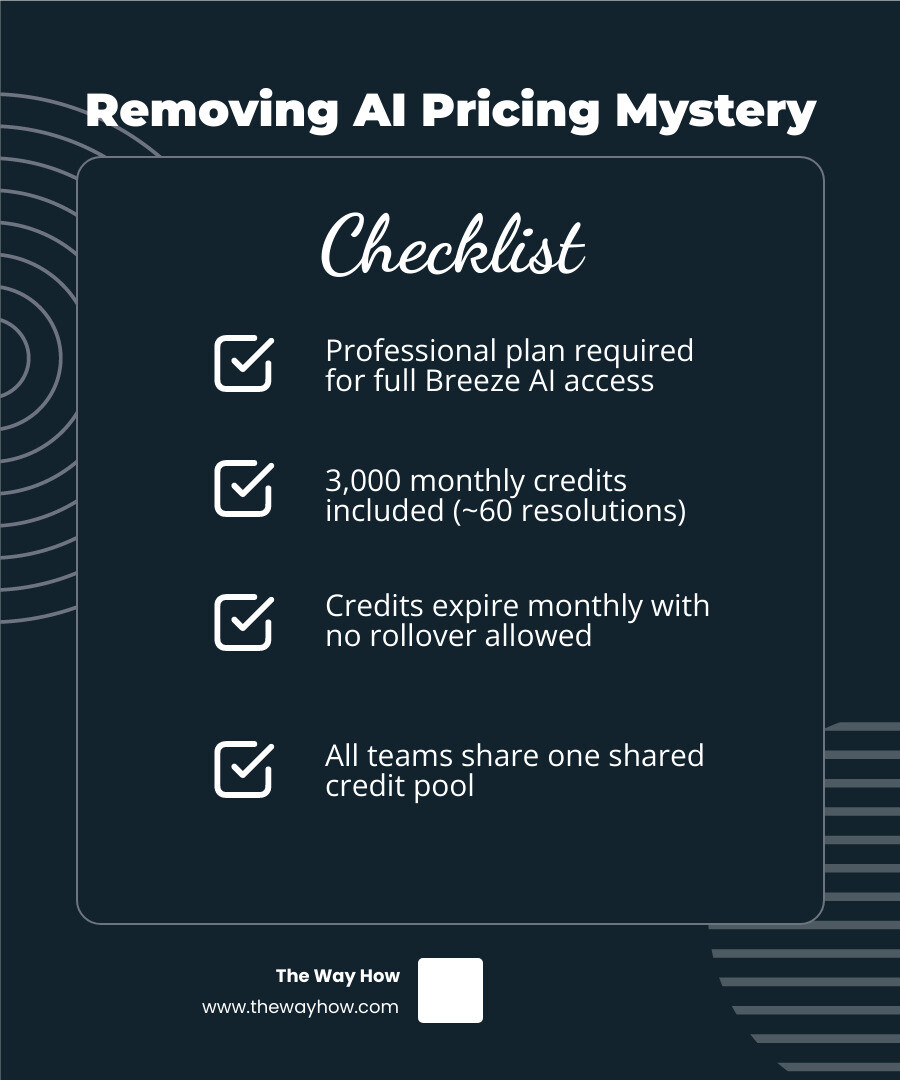
The short version: HubSpot’s AI lives inside a product called Breeze. Most AI agents require a Professional or Enterprise subscription. You pay through a credit system — and credits don’t roll over.
Most revenue leaders arrive at this decision carrying two things: genuine curiosity about what AI can do for their pipeline, and quiet anxiety about committing to a system they don’t fully understand yet.
That tension is worth naming. Because HubSpot’s marketing around Breeze is compelling — 77% more tickets closed, 65% more leads created, deals closing faster. The numbers feel real. But the pricing structure underneath those claims is layered in ways that aren’t immediately obvious.
What you see on the surface — “free to start, pay when work gets done” — is technically accurate. What it doesn’t tell you is that the agents producing those results sit behind a Professional-tier paywall, that your credits expire monthly with no rollover, and that all your teams share one credit pool.
That’s not a criticism of HubSpot. It’s an observation about the gap between AI promise and operational reality — and it’s exactly the kind of gap that stalls otherwise smart buying decisions.
I’m Jeremy Wayne Howell, founder of The Way How, a psychology-first revenue strategy firm, and I’ve spent over 20 years helping companies implement and evaluate tools like HubSpot — including diagnosing where hubspot ai features pricing creates clarity or confusion in a revenue system. In the breakdown below, I’ll walk you through exactly what Breeze costs, what drives those costs up, and how to evaluate whether the investment is the right fit for where your business actually is right now.
When we look at how businesses adopt new technology, we often find a hidden friction point: cognitive overload. Buyers are not just evaluating features; they are trying to protect their teams from complexity and their budgets from unpredictable spikes.
The psychological weight of a variable, credit-based bill can actually paralyze a team’s willingness to use the tool. If every click, prompt, or customer interaction feels like a micro-transaction, reps hesitate. They default back to manual, comfortable, yet highly inefficient processes.
To make AI work, we must first build psychological safety around its usage. That starts with removing the mystery from the bill.
For years, CRM systems were passive databases. They held your contacts, tracked your deals, and sent emails when you told them to. HubSpot Breeze represents a fundamental shift from a passive database to an active, agentic system.
Breeze is HubSpot’s native, built-in AI engine. Unlike standalone tools like ChatGPT or generic writing assistants that operate in a vacuum, Breeze is deeply embedded into the Smart CRM. It does not need to be trained on your customer data through complex API integrations; it already sits inside your database, sharing the exact same context as your human reps.
This deep integration means that Breeze can look at a contact record, understand the historical relationship, read past support tickets, and take action with a level of relevance that external tools simply cannot match. It connects directly with the core HubSpot Features you already use, making your entire database more dynamic.
Furthermore, because it works natively with various HubSpot Integrations, Breeze can pull context from your external tech stack, ensuring that your AI agents do not suffer from the “hallucination” problems common to disconnected models.

Breeze is divided into two primary categories: Breeze Assistant (the co-pilot that helps your reps work faster) and Breeze Agents (autonomous systems that complete entire workflows on their own).
To understand the real cost of Breeze, we have to look closely at HubSpot Credits. In April 2026, HubSpot shifted its AI pricing model away from flat monthly fees and toward an outcome-based credit system.
The philosophy behind this change is simple: you should only pay when the AI delivers tangible value.
Instead of paying a flat $100 a month for an agent that you might only use ten times, you buy a pool of HubSpot Credits. These credits are consumed as the agents perform work.
Under this system, 1,000 HubSpot Credits cost $10 (or $0.010 per credit). If you sign up for an annual commitment, that cost drops slightly to $9 per 1,000 credits. You can manage these credits directly through the HubSpot Product & Services Catalog, which outlines how credits are allocated and purchased.
To help teams control costs, HubSpot allows Super Admins to set monthly spending caps, configure automated alerts when usage hits 75%, 85%, or 90%, and toggle between pay-as-you-go overages or automatic capacity pack upgrades.
For more details on credit management and allocation, you can refer directly to the official page on HubSpot Credits | Pay Only When AI Delivers Value.
Every paid HubSpot subscription tier comes with a baseline allowance of monthly credits. This allows teams to test the water before committing to larger credit purchases.
If you are evaluating your overall platform costs, it is important to remember that these credits are tied to your base subscription. You can review how these tiers fit into your broader budget by looking at Hubspot Professional Pricing and Hubspot Marketing Hub Pricing.
Because the pricing is outcome-based, each Breeze Agent has a specific credit “price tag” tied to a successful action:
This outcome-based shift was highly publicized, as noted in the coverage of how HubSpot flips AI pricing on its head with outcome-based Breeze agents - SiliconANGLE.
The critical detail here is how HubSpot defines a “resolved” conversation for the Customer Agent. A conversation is billed as resolved if the agent provides a content source or completes an action and the customer does not request a human handoff within a 72-hour window. If the customer returns 73 hours later to ask a follow-up question, a brand-new 50-credit charge is triggered.
On paper, $0.50 per support resolution sounds incredibly cheap compared to the cost of a human agent. But when you look at the total cost of ownership, several hidden fees and structural gotchas can cause your budget to spiral.
First, let’s look at the Shared Credit Pool Problem. All your Breeze agents—marketing, sales, and service—draw from the exact same pool of credits.
If your marketing team runs a massive data enrichment project using the Data Agent on Monday, they could easily burn through your entire monthly credit allocation in a few hours. When Tuesday morning arrives, your customer support team’s Customer Agent will stop functioning because there are no credits left to power it. This creates internal friction and budget unpredictability.
Second, there is the Use-It-or-Lose-It Rule. Unused credits do not roll over to the next month. If you purchase a 30,000-credit capacity pack and only use 15,000, the remaining 15,000 credits simply disappear at the end of your billing cycle. This makes accurate forecasting essential.
Third, beware of Auto-Upgrade Defaults. By default, HubSpot is set to automatically upgrade your account to a higher credit tier if you exceed your monthly limit. A sudden spike in customer support tickets or a viral marketing campaign can trigger an automatic upgrade, locking you into a higher monthly commitment for the remainder of your contract term.
Finally, you must factor in the mandatory onboarding fees. HubSpot requires professional onboarding for its higher tiers, which starts at $3,000 for Professional plans and $7,000 for Enterprise. To get a complete picture of these platform-wide dynamics, you can read the breakdown on How Much Does HubSpot Cost in 2026? CRM Pricing, Hubs, and Hidden Fees | CompareTiers.
HubSpot uses a hybrid pricing model. While some hubs (like Sales and Service) charge on a per-seat basis, others (like Marketing Hub) charge based on contact volume. When you start stacking multiple hubs to get the full benefit of Breeze, you encounter what industry analysts call the “ecosystem tax.”
For example, if you want your Prospecting Agent to hand off qualified leads to your sales reps, you need Sales Hub seats. If you want your Customer Agent to update records automatically, you need Service Hub.
To keep your backend data clean across all these tools, you may also need to budget for Hubspot Operations Hub Pricing. Likewise, if your AI agents are triggering automated customer alerts, you should factor in Hubspot Transactional Email Pricing to handle high-volume system emails.
To determine if Breeze makes financial sense for your business, you have to look beyond the software bill and calculate the actual return on investment. Below is a realistic projection of what different business sizes actually pay when factoring in both subscriptions and credit usage:
| Metric | Small Business (500 resolutions/mo) | Growing Business (2,000 resolutions/mo) | Enterprise (5,000 resolutions/mo) |
|---|---|---|---|
| Recommended Tier | Professional | Professional | Enterprise |
| Base Subscription Cost | ~$1,300/mo (Customer Platform) | ~$1,300/mo (Customer Platform) | ~$4,700/mo (Customer Platform) |
| Included Credits | 3,000 | 3,000 | 5,000 |
| Required Credits | 25,000 | 100,000 | 250,000 |
| Additional Credit Cost | ~$220/mo | ~$970/mo | ~$2,450/mo |
| Mandatory Onboarding | $3,000 (One-time) | $3,000 (One-time) | $7,000 (One-time) |
| Total Year 1 Cost | ~$21,240 | ~$30,240 | ~$92,800 |
These calculations show that while the per-action cost of AI is low, the platform entry fees are high. If you are already paying for a Professional or Enterprise HubSpot subscription for other reasons, adding Breeze is a highly cost-effective move.
However, if you are currently on a Free or Starter plan, upgrading to a Professional subscription solely to get access to AI agents is rarely a smart financial decision. You can find more real-world cost scenarios and tested user reviews in this deep dive on HubSpot Pricing 2026 (Tested May 2026) — Real Costs + Hidden Fees.
For businesses that find HubSpot’s usage-based pricing or plan requirements too restrictive, the third-party ecosystem offers strong alternatives.
Tools like Resolve247 or eesel AI offer flat-rate monthly pricing structures. For example, eesel AI offers a flat $799/month tier that covers up to 3,000 customer interactions with no onboarding fees and no subscription tier requirements.
These third-party tools do not require you to upgrade to HubSpot Professional or Enterprise; they can connect directly to your Free or Starter HubSpot portal.
While third-party tools lack the deep, native UI integration of Breeze, they can be easily linked to your CRM using the API. If you are considering building a bridge between HubSpot and a third-party AI tool, you can check out the Hubspot Api Complete Guide to understand the technical requirements and setup process.
No. While HubSpot offers very limited access to the Data Agent for basic manual queries on the Starter plan, the autonomous agents—specifically the Customer Agent and the Prospecting Agent—require a Professional or Enterprise subscription.
If you are on a Free or Starter tier, you cannot access HubSpot’s native AI agents without upgrading your entire plan.
HubSpot defines a conversation as “resolved” when the Customer Agent successfully provides a resource, answers a query, or completes an automated workflow without handing the conversation off to a human rep.
Once the agent stops responding, a 72-hour window begins. If the customer does not reply or request a human within those 72 hours, the conversation is marked resolved and 50 credits ($0.50) are deducted from your account. If the customer replies after 73 hours, it is treated as a new conversation and will incur another 50-credit charge.
No. HubSpot Credits operate on a strict monthly cycle. Any unused credits—whether they were included in your base subscription or purchased as part of an additional capacity pack—expire at the end of your billing month. They do not roll over.
At The Way How, we look at technology through the lens of human behavior. We know that the biggest obstacle to growth is rarely a lack of tools; it is the presence of uncertainty.
When your team is uncertain about how a tool works, or when leadership is uncertain about what the next software bill will look like, momentum stalls.
If you are trying to decide whether to invest in Breeze, we can help you diagnose the certainty gaps in your current systems. We specialize in HubSpot architecture and behavioral strategy, helping founders and leadership teams build predictable revenue engines that prioritize trust over tactics.
If you are ready to align your tools with your growth strategy, you can start by exploring how to Align your growth strategy with HubSpot Marketing Hub Pricing, or reach out to us to design a system that turns your CRM into a dependable growth engine.
 Jeremy Wayne Howell : Jul 22, 2026 9:48:31 PM
 Jeremy Wayne Howell : Jul 21, 2026 9:47:10 PM
 Jeremy Wayne Howell : Jul 20, 2026 9:46:47 PM