A Complete Guide to CRM Systems and Database Management
 Jeremy Wayne Howell : Jul 22, 2026 9:48:31 PM

HubSpot transactional email is a paid add-on for Marketing Hub Professional and Enterprise that lets you send relationship-based emails — like order confirmations, password resets, and account updates — through a dedicated IP address, completely bypassing a contact’s subscription preferences.
Here’s what you need to know at a glance:
| Question | Quick Answer |
|---|---|
| What is it? | An add-on that sends automated, relationship-based emails via dedicated IP |
| Who can use it? | Marketing Hub Professional or Enterprise customers |
| Cost | $600/month (add-on), plus base Marketing Hub subscription |
| Does it bypass opt-outs? | Yes — except contacts who previously bounced as unknown users |
| Sending methods | In-app editor, SMTP API, or Single-Send API |
| Dedicated IP included? | Yes — separate from your marketing IP |
Most businesses treat email as a single channel. They use the same tools, the same IP, and the same logic for a promotional campaign and a purchase receipt.
That’s a problem.
When a customer completes a transaction — buys something, resets a password, signs up for an account — they expect an immediate, reliable response. If that message gets delayed, blocked, or lands in spam because your marketing IP has a reputation issue, you’ve introduced friction at the exact moment trust should be reinforced.
That’s the gap HubSpot transactional email is designed to close. It separates your essential, action-triggered communications from your marketing sends — protecting deliverability on both sides.
I’m Jeremy Wayne Howell, founder of The Way How, and over the past 20+ years of implementing CRM and lifecycle systems — including HubSpot transactional email setups for growth-stage companies — I’ve seen how much revenue quietly leaks through broken post-purchase communication. This guide gives you the full picture, from pricing and prerequisites to API implementation and compliance.
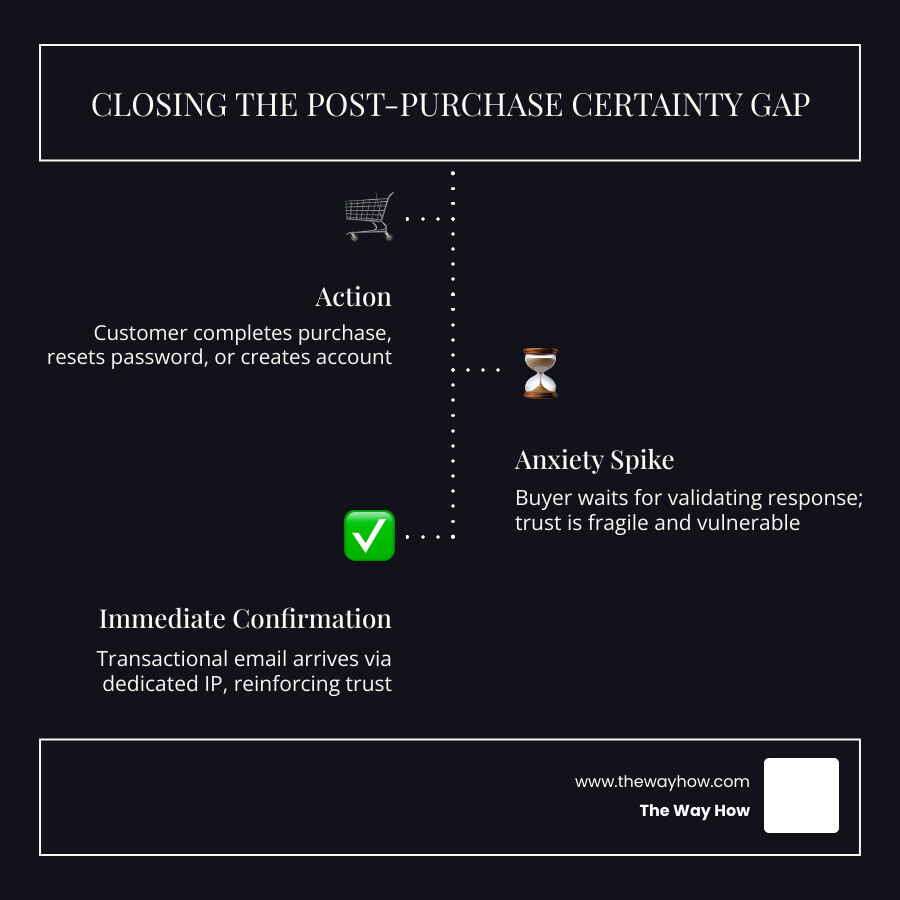
Every transaction is a psychological vulnerability.
When a buyer clicks “Purchase” or “Reset Password,” they experience a brief spike in anxiety. They have performed an action, and they expect an immediate, validating reaction. This is what we call the post-purchase certainty gap. If your confirmation email takes fifteen minutes to arrive, or worse, lands in the spam folder, that anxiety morphs into regret and distrust.

Many businesses fail to realize that transactional emails are not just administrative tasks; they are your highest-engagement touchpoints. While marketing emails struggle to achieve a 20% open rate, transactional messages regularly see open rates exceeding 80%.
When you route transactional messages through the same shared IP addresses used for your marketing newsletters, you risk your critical system updates getting caught in spam filters due to marketing reputation issues. Separating these delivery paths ensures that when a customer needs to access their account or confirm an order, the system delivers immediately, bridging the trust gap and solidifying the relationship.
At its core, the HubSpot Transactional Email add-on is an enterprise-grade delivery engine. It is designed to send relationship-based, one-to-one communications triggered by specific user behaviors.
Unlike standard marketing emails, which are sent to lists of subscribers to promote products or share updates, transactional emails are legally and operationally distinct. They keep your customers informed of critical account activities and system updates, and you can manage them directly through Inform Customers with Transactional Email Software | HubSpot.
Integrating these sends directly into your central CRM provides a complete, unified view of the customer journey. Instead of having purchase history in one tool, support tickets in another, and transactional confirmations hidden inside a separate developer tool, everything is recorded on the contact’s timeline in HubSpot.
The customer journey does not end at checkout; it intensifies. System messages, invoices, and password resets are critical touchpoints that satisfy a basic human need for confirmation and control.
Using HubSpot Ecommerce Workflows, you can design automated post-purchase flows that trigger these vital communications instantly. When your system responds with speed and clarity, it reduces post-purchase cognitive dissonance, lowering support ticket volume and laying the groundwork for repeat business.
One of the most powerful features of the HubSpot transactional email add-on is its ability to bypass standard subscription preferences. Because these messages contain essential, relationship-based information, they are delivered to contacts regardless of their opt-in status, quarantine status, or non-marketing contact status.
If a customer has opted out of all promotional newsletters, they will still receive their invoice or password reset. HubSpot enforces strict guardrails here: only contacts who have previously bounced as an “unknown user” will be dropped from transactional sends. For all other deliverability hurdles, the system prioritizes delivery to ensure vital business information arrives safely. If you encounter issues with standard bounces, you can refer to our guide on HubSpot Email Troubleshooting.
To access this level of deliverability and control, you must understand the financial and technical requirements. The transactional email tool is not a standalone product; it requires a base subscription and is sold as a bundled add-on.
| Requirement Type | Details | Estimated Monthly Cost (USD) |
|---|---|---|
| Base Subscription | Marketing Hub Professional or Enterprise | Starts at $800/mo (Pro) or $3,600/mo (Enterprise) |
| Required Add-on | Transactional Email Add-on (includes Dedicated IP) | $600/mo |
| Additional Seats | Core seats for team members | $50/mo (Pro) or $75/mo (Enterprise) |
The Transactional Email Add-on is priced at $600 per month. This add-on requires both the Dedicated IP Add-On and the Transactional Email Add-On to be purchased together, which is reflected in the final cost. You can learn more about how this fits into your budget by reviewing HubSpot Transactional Email Pricing and HubSpot Marketing Hub Pricing.
For scaling companies, the $600/month investment is easily justified when considering the cost of alternative setups. Managing separate email delivery providers like SendGrid or Mailgun requires developer resources, custom API maintenance, and separate reporting interfaces.
By centralizing your systems, you achieve platform consolidation, which reduces operational overhead. More importantly, your transactional emails do not count against your marketing contact limits. This means you can store non-marketing contacts in your database and email them system updates without paying extra contact tier fees, protecting both your domain reputation and your bottom line. To understand how to structure this system properly, see our strategic guide on HubSpot Marketing Hub Implementation.
Before you can send your first transactional email, you must complete several technical configurations to authenticate your domain and establish trust with inbox providers.
For a deeper look at what you can configure during portal setup, check out our overview of HubSpot Features.
Once the add-on is enabled, HubSpot provides three distinct methods to create and send transactional messages, depending on your team’s technical resources and system architecture.

To learn more about setting up these delivery methods, you can refer to the official documentation on How to Use Transactional Emails to Send Relationship-Based Emails in HubSpot.
For marketing and operations teams who want to build emails without writing code, HubSpot’s drag-and-drop email editor is the easiest path. You can design transactional templates directly in the UI, selecting “Transactional” as the email type.
These emails can be triggered automatically using workflows. For example, when a customer completes a form or updates a property in your CRM, a workflow can instantly send the designated transactional email. To learn how to build these automated systems, consult our HubSpot Marketing Workflows Complete Guide.
If you have an external system — such as a proprietary web application, billing software, or an e-commerce platform — that already generates emails, you can route those messages through HubSpot’s SMTP server. This allows you to use your existing codebase while benefiting from HubSpot’s dedicated transactional IP and tracking capabilities.
To set this up:
That SMTP API tokens generated through the public API expire after 12 months and are automatically deleted once expired. Tokens created directly within the HubSpot UI do not expire automatically. For security, HubSpot actively monitors public repositories like GitHub and will automatically deactivate any tokens found exposed online. You can read more about token security in the Transactional email API guide - HubSpot docs.
For developers who need a highly customized, programmatic integration, HubSpot offers the Single-Send API. This method allows you to design your templates within HubSpot’s visual editor and trigger them via a POST request to the API.
When sending a request to the endpoint /marketing/transactional/2026-03/single-email/send, you include:
emailId of the published HubSpot template.message object containing recipient details (to, cc, bcc, replyTo).contactProperties object to update or create contact records in your CRM during the send.customProperties object to pass dynamic values (like order totals, item lists, or custom URLs) directly into the email template.Using a unique sendId in your API payload is highly recommended to prevent duplicate sends if a network request is retried. You can find the full API schema and details in the Send a transactional email - HubSpot docs.
Because transactional emails bypass standard opt-out preferences, they are subject to strict regulatory scrutiny under laws like CAN-SPAM and GDPR. To maintain compliance, these emails must focus entirely on the transaction or relationship.
Adding marketing copy, promotional banners, or discount codes to a transactional message can legally reclassify it as a marketing email. If a customer who opted out receives a promotional message disguised as a transaction, your business could face hefty fines. Always consult your legal team to review the content of your templates.
Additionally, be aware of technical limitations:
To keep your deliverability rates high, you must monitor your dedicated IP’s performance. HubSpot provides built-in tracking for transactional emails, showing you real-time metrics on opens, clicks, and bounces. If you notice a drop in delivery performance, check for domain authentication errors, invalid recipient addresses, or content that triggers spam filters. For a step-by-step resolution path, see our guide on HubSpot Email Troubleshooting.
No. Unlike a dedicated IP used for marketing campaigns — which requires a gradual, 40-day warm-up period to build a reputation with inbox providers — the dedicated IP included in the Transactional Email Add-on does not require an automated warm-up. Because transactional send volumes are typically distributed and triggered by individual user actions, you can start sending immediately upon activation without risking domain reputation damage.
Yes. Transactional emails bypass the marketing contact classification. This means you can send critical updates, invoices, and password resets to contacts labeled as “non-marketing” without changing their status or incurring additional contact-tier fees. This separation provides significant cost savings for businesses with large databases of users who only require operational communications.
If an SMTP API token is accidentally committed to a public repository like GitHub, HubSpot’s automated security systems will detect the exposure, deactivate the token immediately to prevent unauthorized use, and send an administrative alert to your portal. You will need to generate a new token in your SMTP settings and update your application credentials.
At The Way How, we believe that every digital touchpoint is an opportunity to build or break trust. Transactional emails are not just code or automated scripts; they are the moments where your brand keeps its promises. When an order confirmation arrives instantly, or a password reset works seamlessly, you reduce friction and create emotional safety for your customers.
If your growth has stalled, the issue is rarely just a traffic problem. It is often a trust problem. Unreliable delivery, disjointed post-purchase experiences, and technical friction in your systems can quietly erode customer relationships.
We help leadership teams diagnose these hidden certainty gaps and architect robust, behavior-driven systems that restore momentum. If you are ready to turn your operational emails into a dependable engine for customer retention, let’s discuss how we can optimize your HubSpot Transactional Email setup to build lasting trust.
 Jeremy Wayne Howell : Jul 22, 2026 9:48:31 PM
 Jeremy Wayne Howell : Jul 21, 2026 9:47:10 PM
 Jeremy Wayne Howell : Jul 20, 2026 9:46:47 PM