
The Cost of Integration Inertia: Why Your NetSuite Architecture is Stalling Growth

NetSuite SOAP record handling differences come down to a few core structural and operational gaps that affect every developer or integration team working with the platform today.
Here is a fast-reference summary:
| Area | SOAP Behavior | REST Behavior |
|---|---|---|
| Record model | Abstract Record superclass; typed subclasses | JSON resources; no class hierarchy |
| Custom fields | Stored in customFieldList on every record | Accessed via metadata-catalog (OpenAPI) |
| Sublists | Elements ending in List (e.g. itemList) | Subresource endpoints; translation limits apply |
| Search results | Returns full record data | Returns IDs and HATEOAS links only |
| Metadata discovery | WSDL (static; standard fields only) | OpenAPI schema via metadata-catalog |
| Authentication | Token-Based Auth (TBA) only | TBA and OAuth 2.0 |
| Saved Searches | Natively supported | Requires RESTlets or SuiteAnalytics Datasets |
| Batch operations | addList, updateList, deleteList | Homogeneous Batch (introduced 2026.1) |
| Deprecation status | Retired fully at 2028.2 | Active; Oracle’s stated long-term path |
These differences are not just technical footnotes. They shape how integrations are architected, how custom objects are discovered at runtime, and whether your current SOAP-based workflows will survive the 2028.2 retirement deadline.
Most teams don’t realize how deep these structural differences run until something breaks — or until a migration deadline forces the issue.
I’m Jeremy Wayne Howell, a revenue growth strategist who has spent over 20 years helping founders and revenue leaders untangle the systems — including ERP integrations — that quietly stall business momentum, and NetSuite SOAP record handling differences are one of the most commonly misunderstood sources of that friction. In the sections below, we’ll break down exactly where SOAP and REST diverge, what it means for your integration strategy, and how to move forward without compounding technical debt.
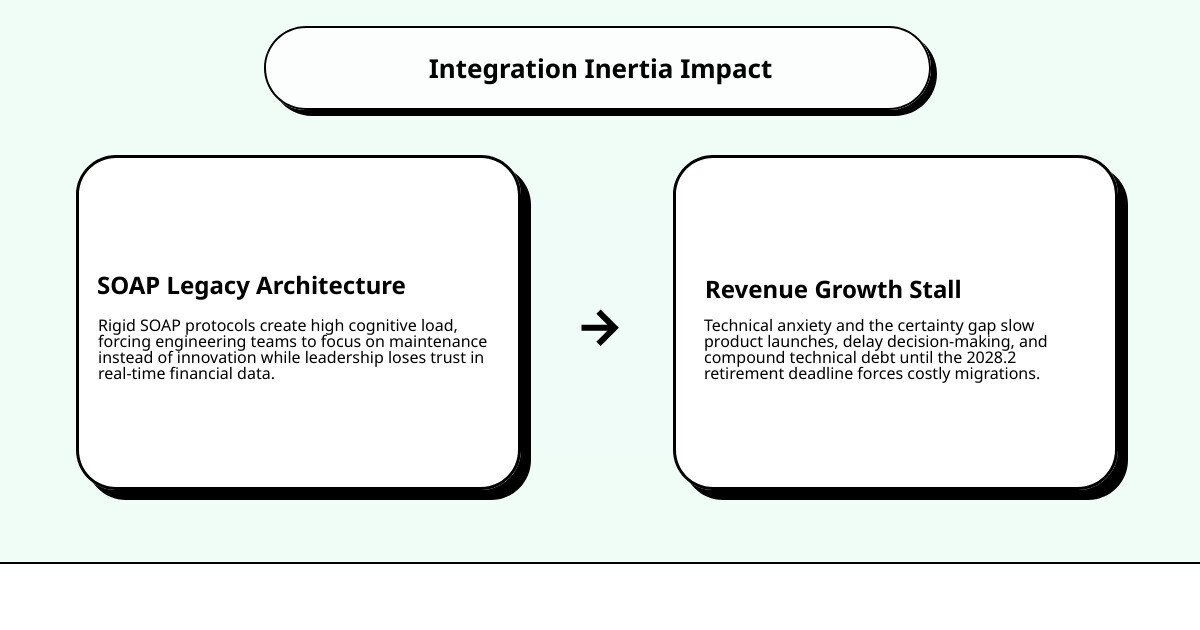
When an integration underperforms, the immediate reaction is often to blame the code. But at a deeper, psychological level, the real issue is cognitive load and technical anxiety. When your engineering team is forced to wrestle with a legacy SOAP protocol designed over a decade ago, they are spending their mental energy on maintenance rather than momentum.
This technical debt creates a subtle but dangerous “certainty gap.” Because SOAP integrations are rigid, slow to adapt, and increasingly difficult to maintain, leadership teams begin to doubt the accuracy of their real-time financial data. This hesitation stalls decision-making, slows down product launches, and ultimately impacts revenue growth.

Holding onto SOAP as we move through 2026 is the strategic equivalent of holding onto a flip phone in a smartphone world. The friction isn’t just operational; it is behavioral. To restore certainty and velocity to your business, we must first understand the structural realities of the systems we are relying on.
Decoding the Architecture: The SOAP Record Class Hierarchy
To understand how SOAP handles data, we have to look at its underlying object-oriented design. In NetSuite’s SOAP web services, all standard and custom records inherit from a single, abstract base class called the Record class. This hierarchy is designed to keep the API simplistic and language-neutral, allowing platforms like Java, .NET, and PHP to easily map NetSuite records to local objects.
According to the official NetSuite Applications Suite - Records in SOAP Web Services documentation, every record type you interact with—whether it is a Customer, Invoice, or Opportunity—is a concrete subclass of this abstract parent.
This inheritance model introduces a few distinct rules for identifying and referencing records:
- RecordRef: This class is used to abstract internal IDs when performing read, update, or delete operations. It acts as a lightweight pointer containing the record’s internal ID and its type.
- CustomRecordRef: Standard
RecordRefobjects are insufficient for custom records because they lack type context. ACustomRecordRefincludes atypeIdfield, which explicitly tells NetSuite which custom record type is being targeted.
This rigid structure ensures type safety at compile time, but it lacks the dynamic flexibility found in modern RESTful resource models.
NetSuite SOAP Record Handling Differences in Field and Sublist Structures
In SOAP, a record’s data is divided into standard body fields, composite attributes, and sublists. Standard body fields map directly to simple types like strings, integers, and booleans. However, when we look at how custom fields and sublists are structured, the differences between SOAP and REST become highly pronounced.
Resolving NetSuite SOAP Record Handling Differences in Custom Fields
One of the most significant NetSuite SOAP record handling differences lies in how custom fields are stored and accessed. Unlike standard fields, which are represented as direct properties on the record object, all custom fields are grouped together inside a single composite attribute called the customFieldList.
As outlined in Working with Fields in Web Services, this structure requires developers to treat custom fields differently than standard ones:
- The customFieldList Container: To get or set a custom field, you must instantiate the appropriate custom field type (such as
StringCustomFieldReforSelectCustomFieldRef) and append it to this list. - Runtime Discovery: Because the SOAP WSDL is static, it cannot dynamically update to include your account’s specific custom fields. To build generic, adaptable integrations, developers must use the
getCustomizationIdAPI to query custom object metadata at runtime. - UI Customization Overrides: SOAP web services operate independently of UI-level customizations. For example, if a field is marked as “disabled” or “read-only” in the NetSuite user interface, it remains fully settable via SOAP calls.
- Hidden Fields: Be aware of endpoint versioning. Custom hidden fields are completely inaccessible on SOAP endpoint versions 2011.2 and later.
How NetSuite SOAP Record Handling Differences Impact Sublist Operations
Sublists in SOAP—such as the item lines on a Sales Order or Cash Sale—are identified by XML elements that end with the suffix List (for example, itemList or addressbookList). The only exception to this naming convention is the customFieldList.
Working with sublists in SOAP presents unique challenges compared to REST:
- All-or-Nothing Payload Overhead: By default, SOAP search operations only return body fields to optimize performance. To retrieve sublist data, you must explicitly set the
bodyFieldsOnlypreference tofalsein your search preferences. - Array Management: In SOAP, sublists are structured as complex objects containing arrays. Modifying a single line item often requires sending the entire sublist back to NetSuite, which increases payload sizes and network latency.
- REST Subresources: In contrast, NetSuite’s REST API treats sublists as independent subresources. This allows you to perform targeted operations on individual lines without transferring the entire record payload.
WSDL vs. OpenAPI: The Metadata Discovery Bottleneck
The structural differences between SOAP and REST extend directly to how integrations discover schema metadata. SOAP relies on a Web Services Description Language (WSDL) file, which is a static XML document.
Because the WSDL is static, it only contains standard NetSuite records and fields. If your business adds a new custom field, that field will not appear in your generated SOAP proxy classes. To work around this, developers using .NET, Java, or the PHP Toolkit must write custom parsing logic or rely on the customFieldList collection.
Furthermore, developers using Microsoft .NET frequently run into the ”*Specified” attribute issue. For non-string fields, the .NET proxy generator creates a companion boolean field (e.g., amountSpecified). If this boolean is not explicitly set to true, the corresponding data field will be omitted from the XML payload, resulting in silent failures or missing data. More details on these platform-specific quirks can be found in the NetSuite Applications Suite - PHP Toolkit Overview.

NetSuite’s REST API bypasses this bottleneck entirely by providing a dynamic OpenAPI-compliant metadata catalog. By querying the metadata-catalog endpoint, integrations can retrieve a real-time JSON schema of both standard and custom records, allowing for true dynamic runtime discovery.
Operational Realities: CRUD, Batch Processing, and Performance Benchmarks
When evaluating the performance of your integration layer, the differences in protocol efficiency become stark. Migrating from SOAP to REST can yield approximately 40% faster response times, with some market analyses suggesting up to 50% to 70% overall performance improvements.
This speed difference is driven by payload formats and operational structures:
| Operational Metric | SOAP Web Services | REST Web Services |
|---|---|---|
| Data Format | Heavy, verbose XML | Lightweight, human-readable JSON |
| Batch Processing | addList, updateList, deleteList (multi-record arrays) | Homogeneous Batch (introduced in 2026.1) |
| Async Operations | Native asynchronous job queues and polling | Asynchronous batch processing for long jobs |
| Query Engine | SOAP Search (basic and advanced) | SuiteQL (SQL-like queries with JOINs) |
| Response Payload | Full record structures returned | HTTP 204 with location headers (IDs only) |
While SOAP’s batch operations allow you to send mixed arrays of records, the sheer size of the XML payloads can cause socket timeouts. In contrast, REST’s Homogeneous Batch operations allow for highly optimized bulk creations, updates, and upserts within a single, lightweight JSON request.
Security, Saved Searches, and File Cabinet Workarounds
As security standards evolve, authentication has become a primary driver for API modernization. SOAP web services rely strictly on Token-Based Authentication (TBA). While secure, TBA requires complex signature generation.
NetSuite’s REST API expands on this by fully supporting OAuth 2.0 (including Machine-to-Machine JWT grants). This simplifies credential management and aligns your ERP integrations with modern enterprise security standards.
Operational capabilities also differ when accessing non-record resources:
- Saved Searches: SOAP natively supports executing saved searches and retrieving paginated results. REST does not support legacy Saved Searches directly; instead, you must use SuiteAnalytics Datasets or write custom RESTlets.
- File Cabinet: Managing files in the File Cabinet via SOAP can be cumbersome due to base64 encoding requirements. In REST, files are managed as standard resources, though many teams still prefer using SuiteScript-based RESTlets to handle complex file-handling workflows.
When building RESTlets to bridge these gaps, developers rely heavily on the NetSuite Applications Suite - N/record Module to programmatically manipulate records using server-side JavaScript.
The Deprecation Countdown: Navigating the 2025.2 to 2028.2 Migration
Oracle NetSuite has officially set the clock ticking on legacy SOAP integrations. Staying on SOAP is no longer a viable long-term option; it is a business risk.
The deprecation timeline is structured as follows:
- 2025.2: This was the final planned SOAP endpoint. No new SOAP features or record types will be introduced.
- 2026.1: No new SOAP endpoints will be shipped. All new integration projects must be built using REST and OAuth 2.0.
- 2027.1: New SOAP-based integrations will be completely disallowed.
- 2028.2: SOAP Web Services will be fully retired. At this point, any remaining SOAP calls will cease to function, resulting in immediate integration failures.
To prevent operational disruption, integration teams should consult the NetSuite Applications Suite - SOAP Web Services to REST Web Services Upgrade Guide to map their existing legacy operations to their modern REST equivalents.
Frequently Asked Questions about NetSuite API Transitions
For more answers to common platform-specific SOAP quirks, refer to the NetSuite Applications Suite - SOAP Web Services Frequently Asked Questions (FAQ).
When will NetSuite SOAP Web Services be fully retired?
SOAP Web Services will be completely retired in the 2028.2 release. After this release, all SOAP endpoints will be disabled, and any applications attempting to make SOAP calls will receive connection errors.
Why does NetSuite REST search return only record IDs?
NetSuite’s REST search uses a HATEOAS (Hypermedia As the Engine of Application State) design pattern. To optimize initial payload sizes, it returns only record IDs and resource links. If you need full record data in a single query, the best workaround is to use the SuiteQL query endpoint.
How do I handle custom field metadata in SOAP vs REST?
In SOAP, custom fields are not defined in the static WSDL and must be queried at runtime using getCustomizationId. In REST, custom field metadata is dynamically generated and can be retrieved directly via the metadata-catalog endpoint.
Restoring Certainty: Aligning Your Integration Strategy with Business Momentum
At The Way How, we believe that technical systems should serve human systems—not the other way around. When your integration architecture is fractured, rigid, or outdated, it creates friction that ripples across your entire organization. Your developers get frustrated, your data becomes untrustworthy, and your growth stalls.
We help leadership teams remove this uncertainty. By diagnosing the gaps in your technology, your processes, and your customer journeys, we design predictable systems that restore momentum and build trust.
If you are ready to transition your legacy NetSuite architecture into a modern, high-performing engine that supports your long-term growth, explore our services at The Way How Services to see how we can help you lead with clarity and strategic execution.