
The Clock Is Already Running on Your NetSuite Integrations

NetSuite SOAP to REST migration is no longer optional — it is a time-bound business continuity requirement with a hard deadline of the 2028.2 NetSuite release, after which all SOAP endpoints will be permanently disabled.
Here is what you need to know right now:
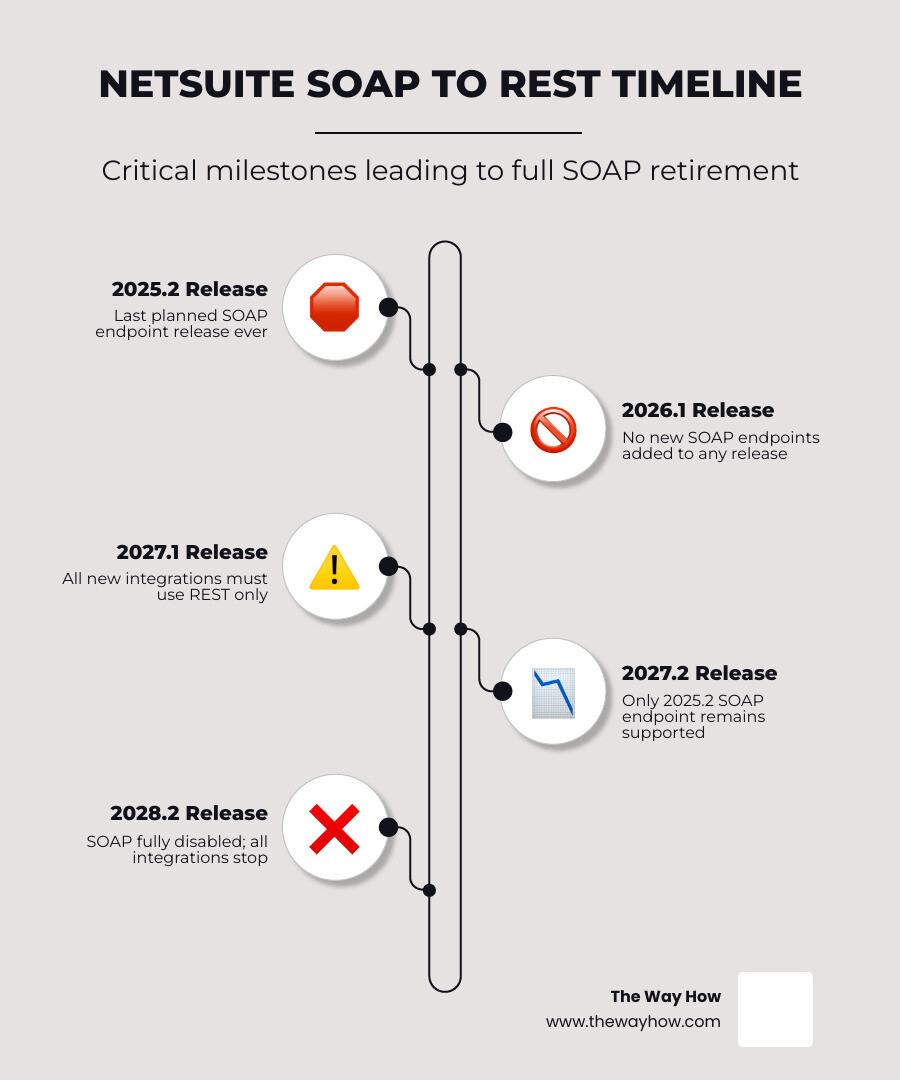
| Milestone | What It Means |
|---|---|
| 2025.2 release | Last planned SOAP endpoint — ever |
| 2026.1 release | No new SOAP endpoints added to any release |
| 2027.1 release | All new integrations must use REST |
| 2027.2 release | Only the 2025.2 SOAP endpoint remains supported |
| 2028.2 release | SOAP fully disabled — all SOAP integrations stop working |
If your business runs any integration built on NetSuite’s SOAP web services — whether it handles order syncing, financial reporting, inventory updates, or customer data — that integration has a known expiration date.
The risk is not dramatic. It is quiet. Most of these integrations were built years ago by developers who have since moved on. They work every morning at 4 AM and nobody thinks about them — until they don’t.
That is exactly where the danger lives.
I’m Jeremy Wayne Howell, founder of The Way How, a psychology-first revenue strategy firm — and while my work centers on buyer behavior and growth systems, I’ve spent over two decades helping founders and revenue leaders diagnose what’s silently breaking underneath their operations, including the kind of technical debt that a NetSuite SOAP to REST migration surfaces. I’ve seen how integration failures don’t announce themselves until they cost real money, and this guide is built to help you get ahead of it.
The Cost of Quiet Systems: Why Legacy Integrations Create Silent Business Risks
When we look at business operations through a behavioral lens, we find that leaders do not fear change itself; they fear the loss of control. In any growing company, certainty is the ultimate operational currency. When your systems run quietly in the background, they create an illusion of permanent stability. This is what we call the certainty gap: the space between how secure you feel your systems are and how fragile they actually are.
Legacy integrations are classic examples of quiet systems. A developer built a SOAP-based bank feed, custom CRM sync, or inventory update tool years ago. It has worked without intervention for so long that it has drifted entirely out of organizational consciousness.
But maintaining a deprecated integration platform is essentially operating on borrowed time. It represents a silent operational anxiety that sits in the back of your technical team’s mind. When systems rely on legacy frameworks, your business continuity is constantly at risk. If an endpoint suddenly fails or loses compatibility during a routine NetSuite update, the flow of cash, inventory, or customer data stops.
By taking a proactive, diagnostic approach to your integration architecture, you are not just performing a technical upgrade. You are actively removing uncertainty from your revenue systems, protecting your customer journey, and ensuring that your growth engine remains dependable.
The Reality of the NetSuite SOAP to REST Migration Timeline
Oracle NetSuite has established a clear, multi-year deprecation roadmap to phase out legacy SOAP web services. Because we are currently in June 2026, we have already crossed several major milestones on this timeline.
The NetSuite 2026.1 release is already active. This means Oracle is no longer providing a new SOAP web services endpoint with each release. The 2025.2 SOAP endpoint was the last regularly planned SOAP release. Under NetSuite’s standard rolling support policy, each SOAP endpoint receives exactly three years of support after its release. Consequently, the 2025.2 endpoint will be supported until the 2028.2 release, at which point all SOAP web services will be completely retired and unavailable.
To understand how this transition affects your existing and future integrations, we can map out the milestones:
| NetSuite Release | Target Timeline | Impact on SOAP Integrations | Impact on REST Integrations |
|---|---|---|---|
| 2025.2 | Late 2025 | Final planned SOAP endpoint released. | REST APIs continue to mature with enhanced record support. |
| 2026.1 | Early 2026 | No new SOAP endpoints provided. Older endpoints begin rolling retirement. | All new NetSuite features (such as AI-driven processes) are REST-only. |
| 2027.1 | Early 2027 | Creating new SOAP-based integrations is no longer permitted. | REST web services become the mandatory standard for all new builds. |
| 2027.2 | Late 2027 | Only the 2025.2 SOAP endpoint remains supported. All prior endpoints are disabled. | REST integrations must use modern authentication standards. |
| 2028.2 | Late 2028 | SOAP web services are completely removed and unavailable. | REST is the sole native web service interface for NetSuite. |
Waiting until the final cutoff is a high-risk strategy. As older WSDL versions are disabled on a rolling three-year schedule, custom integrations built on legacy endpoints will break silently. To understand the operational impact of these changes, developers and IT leaders should consult resources like the NetSuite 2026.1 SOAP Deprecation: REST API Migration Guide and the official NetSuite Applications Suite - SOAP Removal Plans FAQ to audit their current endpoint usage.
Why Oracle is Retiring SOAP: The Architectural Shift to REST
The decision to retire SOAP web services is driven by the industry-wide evolution toward lightweight, secure, and highly performant API architectures. Over 70% of public APIs now use REST as their primary architecture.
Historically, SOAP (Simple Object Access Protocol) relied on XML payloads wrapped in strict envelopes, which required significant processing overhead to parse. In contrast, REST (Representational State Transfer) uses JSON (JavaScript Object Notation), a lightweight data format that reduces server load and minimizes bandwidth usage.

This architectural shift offers several distinct business and technical benefits:
- Faster Performance: REST web services provide 30-40% faster data synchronization speeds compared to SOAP, which directly translates to snappier real-time integrations and reduced latency.
- Modern Security Standards: SOAP integrations often rely on legacy token-based authentication or basic credentials. REST web services prioritize OAuth 2.0, which aligns with modern security requirements and offers superior role-based access control.
- Platform Alignment: New NetSuite features—such as SuiteAnalytics Workbooks and SuiteScript 2.x—are designed natively for REST interfaces. SOAP is in maintenance-only mode and does not support these modern platform capabilities.
For a deeper dive into how modern API structures improve overall operational efficiency, see our analysis on NetSuite API Integration: Top Benefits in 2024.
Technical Differences in a Netsuite SOAP to REST Migration
Migrating from SOAP to REST is not a simple syntax translation. The underlying mechanics of how data is queried, structured, and processed are fundamentally different.
- Querying Data (SuiteQL vs. Saved Searches): SOAP integrations heavily rely on pulling data via Saved Searches. REST web services do not support legacy Saved Searches. Instead, REST utilizes SuiteQL (a powerful SQL-like query language) and SuiteAnalytics Datasets. SuiteQL is supported exclusively through the NetSuite2.com data source, which replaces the deprecated NetSuite.com data source.
- Result Navigation (Collection Paging): While SOAP handles large datasets through custom search results paging, REST uses standard collection paging to navigate query results smoothly.
- Asynchronous Processing: For long-running tasks or bulk data imports, REST supports asynchronous request processing, allowing integrations to submit a job and retrieve its status later via an async service endpoint.
- Domain Routing: Unlike SOAP, which often used generic data center URLs, REST web services require the use of account-specific domains to ensure secure and reliable routing.
The Feature Parity Gap: What is Missing in REST?
While REST is the strategic direction for NetSuite, it is critical to recognize that 100% feature parity between SOAP and REST does not exist, nor is it planned. NetSuite is not porting legacy features to the REST API.
Some of the notable gaps and differences include:
- Legacy Tax Support: REST does not support legacy tax configurations. Organizations must migrate to SuiteTax to utilize tax calculations natively within REST web services.
- Attach/Detach Operations: Operations to attach or detach files and records do not map directly to standard REST endpoints.
- Custom Metadata: Accessing custom metadata catalogs works differently under REST, requiring developers to query metadata endpoints directly.
To bridge these functional gaps, developers can use SuiteScript RESTlets. RESTlets allow you to write custom server-side scripts in NetSuite and expose them as custom REST endpoints. If a specific record type or operation is unsupported in the native SuiteTalk REST API, a RESTlet serves as an excellent, highly flexible workaround.
To map out these differences for your specific environment, refer to the NetSuite Applications Suite - SOAP Web Services to REST Web Services Upgrade Guide.
The Migration Trap: Why a 1-to-1 Endpoint Swap Will Fail
The most common mistake engineering teams make during a netsuite soap to rest migration is treating it as a simple find-and-replace exercise. Attempting to swap every SOAP XML call with an equivalent REST JSON call is an architectural trap that will fail in production.
This failure occurs primarily due to the N+1 sub-resource problem. In SOAP, a single request to retrieve a transaction record (like a Sales Order) can return the record along with all its sub-records (like line items, billing addresses, and shipping details) in a single nested XML payload.
In the native REST Record API, retrieving a list of records does not allow you to expand sub-resources inline. If you request a list of 100 invoices, the API returns the top-level invoice data. To get the line items for those invoices, a naive integration would have to make 100 subsequent API calls—one for each invoice. This is the N+1 query bottleneck.
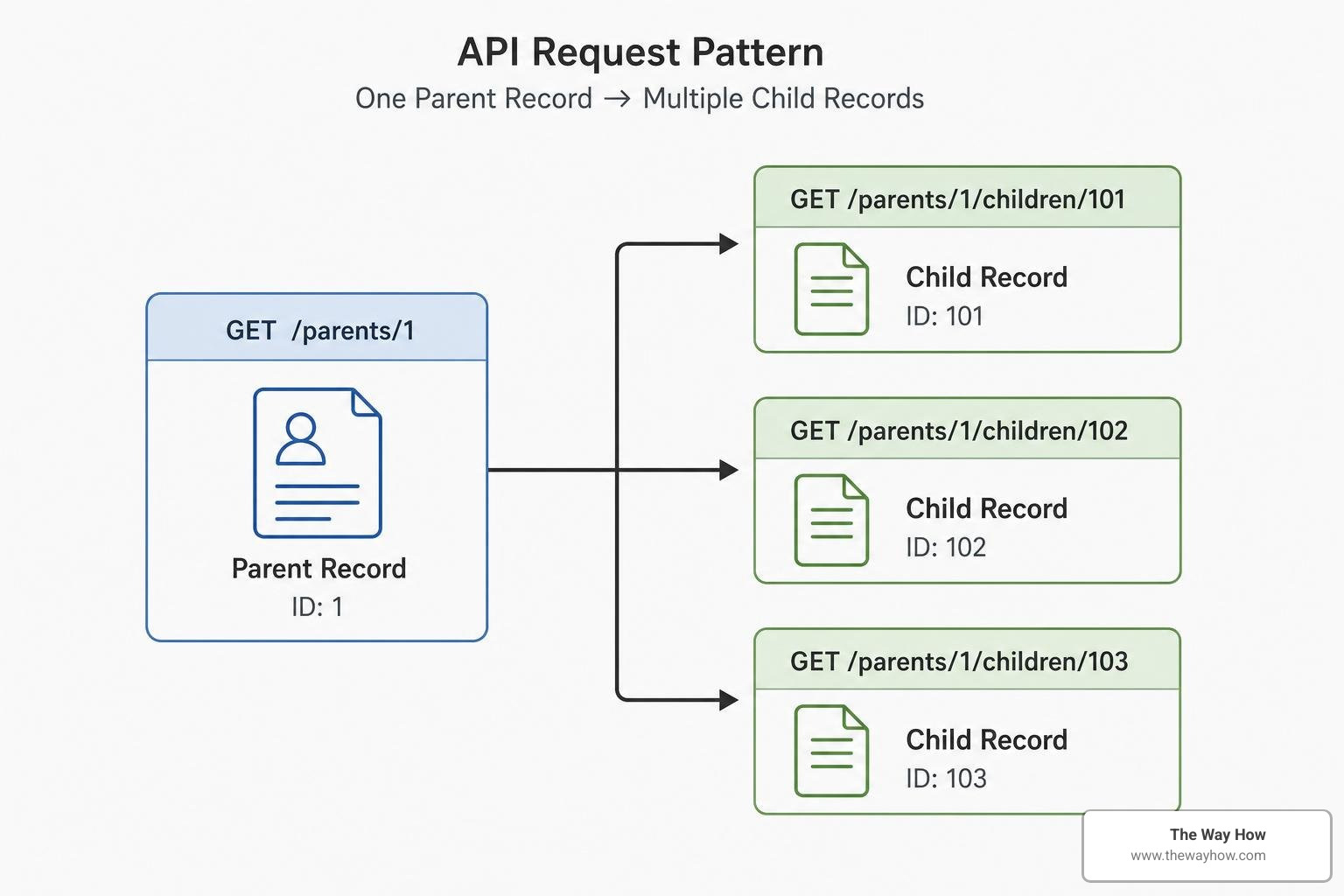
This bottleneck quickly collides with NetSuite’s strict concurrency limits. Unlike other SaaS platforms that enforce daily API rate limits, NetSuite limits the number of concurrent threads allowed to execute at any given millisecond.
- The default NetSuite tier allows only 15 concurrent requests.
- Higher tiers support up to 55 concurrent requests.
- Each SuiteCloud Plus license purchased adds 10 additional threads to your concurrency pool.
If your integration triggers an N+1 bottleneck, it will instantly exhaust your concurrency limits, resulting in HTTP 429 (Too Many Requests) errors and broken workflows. To survive these limits, your integrations must implement robust error handling, including exponential backoff with jitter, and avoid the N+1 trap entirely by restructuring how data is read.
For a comprehensive breakdown of these concurrency challenges, read A Practical NetSuite Migration Guide: Moving Off SOAP Before 2028 | Truto Blog.
Designing a Tri-Partite Architecture for Netsuite SOAP to REST Migration
To build a reliable, high-performance REST integration that respects NetSuite’s concurrency constraints, we recommend adopting a tri-partite architecture. This design splits your integration logic into three specialized layers:
- The Read Layer (SuiteQL): Instead of using the REST Record API to list records (which causes the N+1 problem), use SuiteQL via the query endpoint. SuiteQL allows you to perform complex SQL JOINs on the NetSuite2.com database, pulling records and their sub-resources (like line items) in a single, highly optimized database query.
- The Write Layer (SuiteTalk REST): Use the native SuiteTalk REST API exclusively for single-record writes (POST, PATCH, PUT, DELETE) and targeted reads. The REST API supports homogeneous batch operations, which helps group write operations efficiently.
- The Custom Layer (SuiteScript RESTlets): Use RESTlets to handle complex business logic, PDF generation, or legacy operations that the standard REST API cannot process.
Additionally, you should implement modern OAuth 2.0 for all authentication, replacing legacy Token-Based Authentication (TBA) which requires complex, CPU-heavy cryptographic signature calculations on every request. Finally, use declarative mapping tools like JSONata to translate schemas cleanly without hardcoding transformation logic.
The Step-by-Step Migration Roadmap and iPaaS Tooling
A successful migration requires a structured, phased approach to minimize operational disruption. We recommend dividing your migration project into four distinct phases:
Phase 1: Audit & Assessment (Weeks 1-2)
  └── Identify all active SOAP integrations and WSDL versions
  └── Document business criticality and data dependencies

Phase 2: Architectural Design (Weeks 3-5)
  └── Map SOAP operations to REST/SuiteQL/RESTlets
  └── Establish OAuth 2.0 credentials and security profiles

Phase 3: Development & Parallel Testing (Weeks 6-10)
  └── Build REST integrations alongside existing SOAP pipelines
  └── Run parallel syncs to validate data and performance parity

Phase 4: Phased Cutover & Monitoring (Weeks 11-12)
  └── Migrate low-risk workflows first, followed by critical systems
  └── Monitor concurrency utilization and error rates
To streamline this process, many organizations leverage integration platforms (iPaaS) or specialized middleware connectors:
- Celigo: Celigo users who explicitly selected the legacy “Web Services” option in their connectors must manually migrate their flows to use RESTlets or native REST options.
- Boomi: Boomi integrations utilizing the native SOAP connector must be updated to use generic HTTP client connectors configured for NetSuite’s REST web services and OAuth 2.0.
- Workato: Workato users should copy existing SOAP-based recipes and systematically replace the triggers and actions with REST-based equivalents.
- KingswaySoft SSIS: For SSIS-based data warehouses, KingswaySoft provides zero-code configuration options to transition payloads from legacy SOAP structures to REST-friendly formats.
To evaluate how these middleware tools fit into your transition timeline, read the strategic overview in NetSuite SOAP to REST Migration + Future-Proof Your Integration | Versich.
Frequently Asked Questions About NetSuite API Upgrades
Do we need dedicated developer resources for this migration?
Yes. Because a netsuite soap to rest migration requires redesigning query logic, rewriting data mappings, and transitioning authentication protocols to OAuth 2.0, you will need developer resources or a specialized systems integration partner. Standard “plug-and-play” conversions rarely work for custom business logic.
What happens if we miss the 2028.2 deadline?
If you do not migrate before the 2028.2 release, your SOAP-based integrations will stop functioning entirely. This will cause immediate data blockages, halting automated order processing, inventory syncs, and financial reporting. Emergency rebuilds under pressure are highly stressful, prone to errors, and significantly more expensive than planned migrations.
Is OAuth 2.0 mandatory for all REST integrations?
While Token-Based Authentication (TBA) is still supported for existing REST integrations, Oracle NetSuite strongly recommends OAuth 2.0 as the modern security standard. Starting with the 2027.1 release, all new integrations will be required to use REST web services with OAuth 2.0. Transitioning to OAuth 2.0 now future-proofs your security architecture.
Restoring Certainty: How to Lead Your Team Through Complex ERP Transitions
At The Way How, we understand that technical migrations are rarely just about the technology. They are about people, trust, and the psychological need for certainty. When an ERP system as central as NetSuite undergoes a major architectural shift, it introduces friction and hesitation across your leadership, finance, and technical teams.
Our psychology-first approach to revenue strategy and system architecture is designed to address these exact points of friction. We help leadership teams diagnose where growth is stalled, identify certainty gaps in operational workflows, and design robust systems that build momentum.
By treating this migration not as an emergency IT task, but as a strategic modernization of your revenue infrastructure, you can eliminate operational anxiety and ensure your business systems remain dependable engines for growth.
If you are looking for strategic clarity, behavioral insights, or fractional leadership to guide your team through this transition smoothly, we are here to help. More info about our strategic services is available to help you take the next step toward operational certainty.