A Complete Guide to CRM Systems and Database Management
 Jeremy Wayne Howell : Jul 22, 2026 9:48:31 PM
NetSuite SuiteTalk SOAP to REST testing tools are now a critical part of any integration team’s toolkit — because Oracle NetSuite has officially begun phasing out its legacy SOAP Web Services in favor of modern REST APIs, and the 2028.2 deadline is closer than most teams realize.
Here is a quick-reference summary of the most effective tools for this migration:
| Tool | Best For | SOAP or REST |
|---|---|---|
| Postman | REST endpoint testing, OAuth 2.0 validation | REST |
| SoapUI | SOAP XML payload generation and testing | SOAP |
| WireMock | Recording and replaying SOAP requests locally | SOAP |
| jacobsvante/netsuite | Async Python client for both APIs | Both |
| ehmad11/netsuite-rest | Lightweight JavaScript REST wrapper | REST |
| nsmockup | Local SuiteScript simulation before deployment | Both |
| suitetalk_connector | Python abstraction layer for SOAP integration | SOAP |
| JUnit + recording proxy | Extracting and templatizing SOAP payloads | SOAP |
If you are managing NetSuite integrations today, the pressure is real. The 2025.2 release marks the last planned SOAP endpoint. After 2026.1, no new SOAP features will be added. By 2027.1, new SOAP-based integrations will no longer be permitted. And by 2028.2, all remaining SOAP calls will simply stop working.
That is not a distant problem. For teams running mission-critical ERP, CRM, or analytics workflows through SuiteTalk SOAP, this is an operational risk that compounds the longer it goes unaddressed.
The challenge is not just technical. It is psychological. Developers know SOAP. They have built reliable workflows around it. Switching to REST means learning new authentication patterns, different data structures, unfamiliar error handling, and entirely new testing approaches. The uncertainty that creates is where migrations stall — not in the code, but in the decision.
This guide is designed to remove that uncertainty. It maps the tools, methods, and testing strategies you need to migrate confidently from SOAP to REST — without disrupting what is already working.
I’m Jeremy Wayne Howell, founder of The Way How and a revenue growth strategist with over 20 years of experience helping organizations diagnose and fix the systems that quietly block momentum — including complex enterprise integration decisions like choosing the right NetSuite SuiteTalk SOAP to REST testing tools. In this guide, I’ll walk you through exactly what has changed, what it means for your team, and how to build a testing strategy that gives you clarity before you cut over.
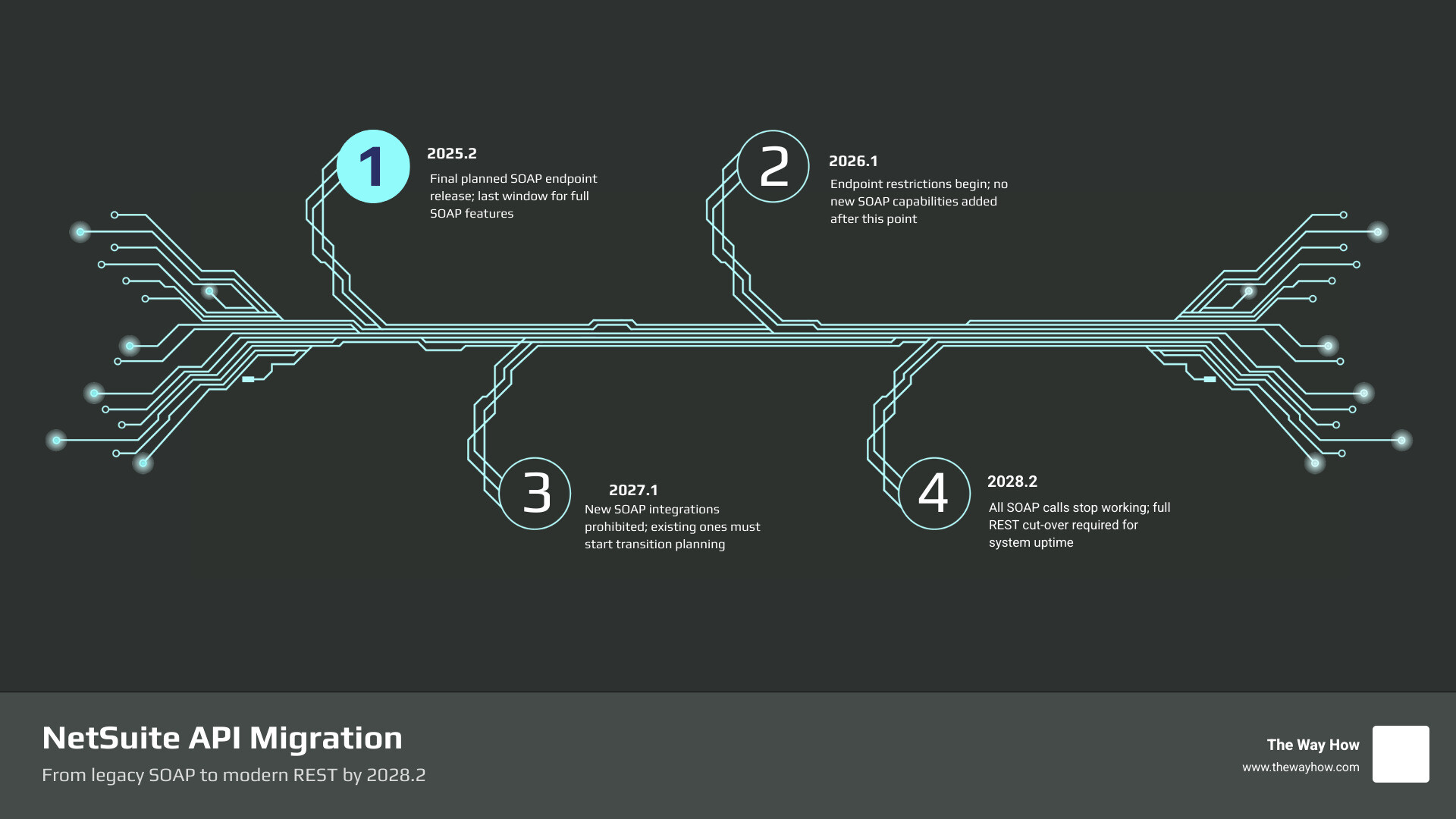
For years, SuiteTalk SOAP was the default choice for connecting NetSuite to external platforms. It was mature, full-featured, and deeply understood. However, modern engineering standards have shifted. Today, 93% of organizations standardize on REST APIs. Recognizing this, Oracle NetSuite has set a firm deprecation timeline that forces a transition.
The countdown is structured in phases to prevent sudden failures, but the steps are strict:
Waiting until 2028 to address this migration is a recipe for operational disruption. Migrating early is not just about avoiding a system shutdown; it is a strategic opportunity. Upgrading from SOAP to REST has been shown to yield approximately 40% faster response times, with broader market analyses suggesting performance improvements of 50% to 70% in data delivery.
By taking a diagnostic approach to your integrations now, you can map out dependencies, eliminate technical debt, and ensure your ERP data flows smoothly into your marketing and sales systems. For a deeper look at aligning enterprise software architectures, see our ERP CRM Development Complete Guide.
The move from SOAP to REST is more than a change in syntax; it is a complete shift in how data is structured and navigated. Developers accustomed to SOAP are used to strict, strongly typed XML payloads defined by a Web Services Description Language (WSDL) document. In contrast, the NetSuite REST API uses lightweight JSON payloads guided by OpenAPI 3.0 schemas.
This transition introduces a few structural differences that can initially cause frustration for development teams:
| Architectural Component | SuiteTalk SOAP API | SuiteTalk REST API |
|---|---|---|
| Payload Format | Verbose XML | Lightweight JSON |
| Metadata Discovery | WSDL schema (standard fields only) | OpenAPI / Swagger (includes custom fields) |
| Data Retrieval | Returns full records in a single call | Uses HATEOAS links; often returns record IDs first |
| Query Mechanism | Saved Searches and basic search objects | SuiteQL query service |
| Bulk Operations | Multi-call batches (up to 1,000 records) | Homogeneous batch endpoints (introduced in 2026.1) |
One of the biggest psychological hurdles for developers is how REST handles record queries. In SOAP, a single request can return an entire record and its joined data. In the REST API, a standard search might return only record IDs and Hypermedia As The Engine Of Application State (HATEOAS) links, requiring follow-up calls to retrieve the actual data.
To bypass this multi-call limitation and optimize read performance, developers should leverage SuiteQL. SuiteQL is NetSuite’s SQL-like query language, which is fully supported via the REST query service and allows you to execute complex JOIN operations, paginating results at up to 1,000 rows per response.
Security is another area where the migration forces an upgrade. While legacy SOAP integrations often relied on basic user credentials or complex Token-Based Authentication (TBA) requiring manually constructed HMAC-SHA256 signed headers (including a nonce, timestamp, and signature), REST introduces modern standards.
When testing REST integrations, you should focus on validating two primary authentication paths:
Your testing suite must validate token expiration, refresh token rotations, and proper error rejection when an expired or invalid token is presented.
A common misconception is that NetSuite REST APIs enforce a strict per-minute rate limit. In reality, NetSuite manages traffic through concurrency limits. Standard NetSuite licenses allow up to 10 concurrent web service requests across the entire account.
When testing your migrated REST endpoints, you must validate how your integration middleware or custom code handles these limits:
To navigate this migration without losing your sanity, you need the right set of NetSuite SuiteTalk SOAP to REST testing tools.
For manual testing, prototyping, and environment validation, Postman and SoapUI are the industry standards. Postman is highly effective for testing REST endpoints, validating OAuth 2.0 flows, and executing SuiteQL queries. SoapUI remains useful for inspecting legacy SOAP WSDL files and generating the baseline XML payloads you need to compare against your new REST endpoints.
Additionally, tools like WireMock can be used to record live SOAP traffic in your sandbox environment and replay it locally, allowing you to build mock servers that mimic NetSuite’s behavior without exhausting your sandbox concurrency limits.
You do not have to build your testing frameworks from scratch. Several powerful open-source libraries can serve as foundational NetSuite SuiteTalk SOAP to REST testing tools:
One of the hardest parts of SOAP testing is generating the initial XML payload. If you are struggling to build SOAP requests from scratch, you can use the suitetalk_connector Python library to programmatically generate valid SOAP structures.
Alternatively, you can generate a Java client from the NetSuite WSDL and use a recording proxy (like WireMock) combined with JUnit tests. By running a basic Java test through the proxy, you can capture complete, working SOAP XML payloads from the proxy logs, which can then be templatized and compared directly to your new JSON REST payloads.
For teams building complex custom systems, working with specialized CRM Software Developers can help streamline this transition and ensure that your data mappings remain accurate.
The ultimate goal of your testing strategy is functional parity: proving that the new REST integration performs the exact same business logic as the legacy SOAP integration, with zero data loss.

This is particularly challenging when dealing with complex transactions and sublists. For example, tax sublists, item allocations, and currency translations can behave differently under REST than they did under SOAP. Some older, legacy record types or features may not have direct native REST endpoints yet. In these cases, you must build custom SuiteScript RESTlets to act as a bridge, exposing those records via custom REST endpoints.
To validate parity, we recommend a three-step testing approach:
Oracle NetSuite is retiring SOAP Web Services in phases. The 2025.2 release was the final SOAP endpoint. After 2026.1, no new SOAP features are being added. By 2027.1, you will not be allowed to create new SOAP integrations. The final, complete removal of SOAP Web Services will occur in the 2028.2 release, after which all SOAP calls will fail.
Yes. While Postman is primarily designed for REST, you can use it to test SOAP APIs by sending POST requests with raw XML payloads to the NetSuite SOAP endpoint. However, you will need to manually construct the SOAP headers, including the HMAC-SHA256 signature, which can be complex. For SOAP, SoapUI is often easier for initial payload generation, while Postman is the superior tool for REST and SuiteQL testing.
While NetSuite’s REST API is highly capable, some legacy features, record types, or sublists may not be natively supported yet. The industry best practice is to write a custom SuiteScript RESTlet. RESTlets allow you to define custom GET, POST, PUT, or DELETE endpoints using SuiteScript 2.1, giving you complete access to NetSuite’s internal APIs and Saved Searches to bridge any functionality gaps.
Technology migrations are rarely just about the code. When an enterprise platform like NetSuite undergoes a major architectural shift, it introduces uncertainty that can stall decision-making and slow down your entire organization’s momentum.
At The Way How, we look at technology through a psychology-first lens. We understand that your integrations are the nervous system of your business—connecting your ERP, your CRM, and your marketing automation platforms to create a single source of truth. When those connections are uncertain, your revenue strategy suffers.
We help founders and leadership teams remove this uncertainty by diagnosing the hidden gaps in their systems, alignment, and processes. Whether you are navigating a complex NetSuite migration, optimizing your HubSpot architecture, or redesigning your demand generation strategy, we focus on building predictable, human-centric systems that restore momentum and drive growth.
Ready to bring clarity and predictability back to your systems? Explore More info about our revenue and integration services to see how we can help your team execute a seamless, risk-free transition.
 Jeremy Wayne Howell : Jul 22, 2026 9:48:31 PM
 Jeremy Wayne Howell : Jul 21, 2026 9:47:10 PM
 Jeremy Wayne Howell : Jul 20, 2026 9:46:47 PM