A Complete Guide to CRM Systems and Database Management
 Jeremy Wayne Howell : Jul 22, 2026 9:48:31 PM

CRM data integration is the process of connecting your CRM system to other business tools — so that customer data flows automatically between them, without manual effort or duplication.
Here’s what that means in plain terms:
| Term | What it means |
|---|---|
| CRM | Software that stores your customer relationships, deals, and conversations |
| Data integration | Linking that software to other tools so data moves between them automatically |
| CRM data integration | The combined process of syncing, transforming, and centralizing customer data across your tech stack |
Why it matters at a glance:
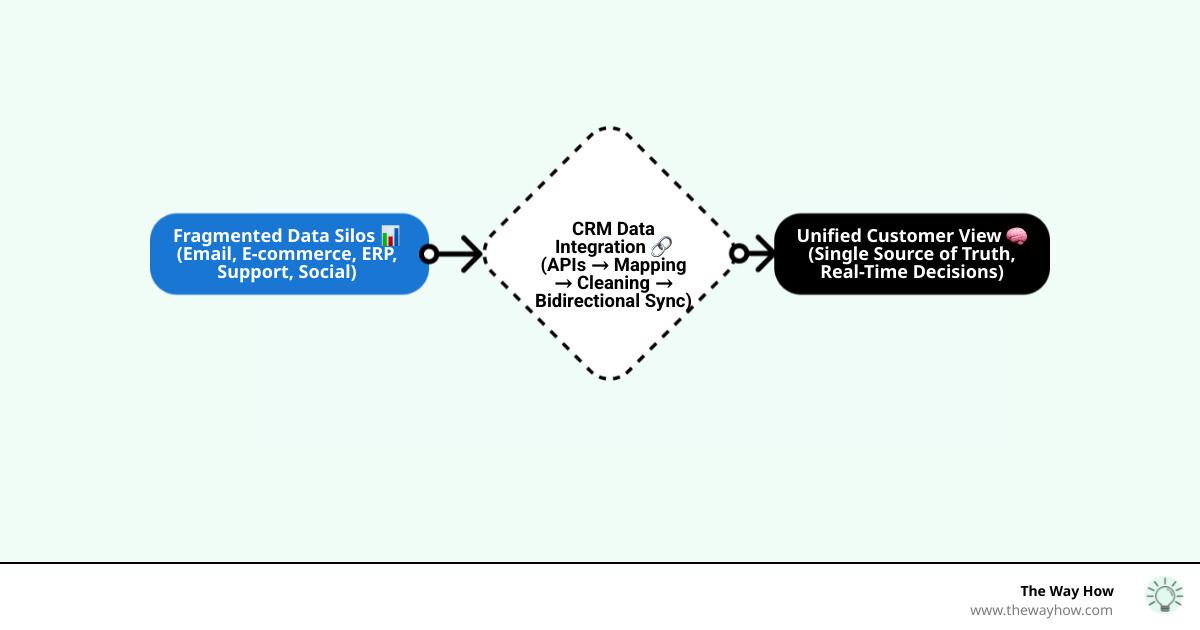
How it works (simplified):
Think of it less like a software project and more like a nervous system. When it works, every part of your business feels what the customer feels — in real time.
I’m Jeremy Wayne Howell, founder of The Way How and a revenue growth strategist with over 20 years of experience helping companies align their marketing, sales, and technology around how buyers actually behave — including implementing HubSpot CRM and CRM data integration systems that reflect buyer psychology, not just org charts. If you’ve ever felt like your tools hold more data than your team can actually use, that’s exactly the problem we’ll untangle here.
Related content about CRM data integration:
When we look at a business through a psychology-first lens, we see that growth stalls not because of a lack of effort, but because of “certainty gaps.” A certainty gap occurs when a salesperson doesn’t know if a lead just opened a marketing email, or when a customer support rep doesn’t know a client has an overdue invoice. This fragmentation creates friction, and friction kills momentum.
CRM data integration is the bridge over these gaps. It creates a Single Source of Truth (SSOT), ensuring that every department sees the same customer journey. Without it, your teams are operating in silos, which 81% of IT leaders admit impedes digital transformation.
From a buyer’s perspective, there is nothing more frustrating than having to repeat their history to different departments. Integration allows your business to act with empathy because you actually remember the human on the other side of the screen. Whether you are building a HubSpot CRM Architecture or managing a complex enterprise stack, the goal is the same: removing the cognitive load from your employees so they can focus on building trust.
Currently, 91% of businesses with more than 11 employees use a CRM. However, a CRM is only as effective as the data flowing into it. If that data is trapped in a “digital junk drawer” of 900+ disconnected apps, your CRM is just an expensive Rolodex.
To understand how systems “talk,” we have to look at the Application Programming Interface, or API. Think of an API as a waiter in a restaurant. You (the user) tell the waiter what you want, the waiter goes to the kitchen (the system), and brings the food back to you.
In professional CRM data integration, we typically see three tiers of APIs:
For most modern businesses, especially those using the HubSpot API, the gold standard for security is OAuth 2.0. This protocol allows systems to share information without ever sharing your actual password, using “tokens” instead. It’s a critical layer of protection that ensures your data highway doesn’t become a security liability.
Integration isn’t just about moving names and emails; it’s about automating the heartbeat of your company. Here are a few ways we see this manifest in the real world:
Successful integration doesn’t happen by accident. It requires a diagnostic approach. We don’t just “plug things in”; we design a system that supports the way people work.
To move from silos to a unified view, follow this phased roadmap:
The biggest mistake businesses make is integrating “garbage” data. If you sync messy data, you just end up with messy data in two places.
Quality CRM data integration requires strict transformation rules:
Research shows that organizations can see up to 20% revenue growth simply by improving data quality. When your data is clean, your team trusts the system. When they trust the system, they use it.
You don’t always need a team of developers to connect your dots. Depending on your complexity and budget, several platforms can do the heavy lifting:
Integration is not without its challenges. The average business has integrated only 28% of its applications, often because the technical debt and security concerns feel overwhelming.
One major hurdle is security. Interestingly, 83% of SaaS tools have been found to be compliant with fewer than half of the most common security certifications. This means you cannot assume a tool is secure just because it has a nice website.
When building your integration, consider these safeguards:
The “buzz” around AI in business is often just noise—unless that AI is grounded in integrated data. CRM data integration is the prerequisite for meaningful AI.
By connecting AI capabilities to your CRM, you can move from looking at what happened (descriptive analytics) to what will happen (predictive analytics). This can lead to a 25% increase in sales revenue by accurately forecasting which leads are most likely to close.
Advanced architectures like Retrieval Augmented Generation (RAG) allow AI agents to “read” your integrated CRM data to provide answers that are contextually accurate and free of “hallucinations.” Instead of a generic chatbot, you get an intelligent assistant that knows a customer’s entire history across sales, marketing, and support. This is the future of the “Agentic Enterprise”—where AI doesn’t just suggest actions but executes them across your integrated stack.
Basic integrations often require 2-4 weeks, while complex enterprise-level orchestrations involving legacy systems can span 3-6 months depending on data cleanliness and mapping complexity. The timeline is usually dictated by the quality of the source data; cleaning the “junk drawer” always takes longer than building the connection.
One-way sync pushes data from a source to a target (e.g., sending a website lead to the CRM). It’s simpler to set up but can lead to data drift. Bidirectional sync ensures that updates in either system are reflected in the other, maintaining real-time accuracy across the entire tech stack. This is essential for tools like CRM and ERP where both teams need the latest info.
When manual data entry leads to human error, lead response times lag, or leadership lacks a clear view of the customer journey, the cost of inaction exceeds the investment in integration. If your team is spending more than an hour a day “tab-switching” to find information, you are ready.
At The Way How, we believe that technology should serve the human experience, not complicate it. We are a psychology-first revenue strategy firm that helps leadership teams remove the uncertainty that stalls growth.
Whether we are providing Fractional CMO leadership or designing a high-performance HubSpot Integration Strategy Guide, our focus is on creating systems that build trust. CRM data integration is one of the most powerful ways to restore momentum because it replaces “I think” with “I know.”
If you’re tired of chasing tactics and ready to build a dependable growth engine rooted in behavioral insight and operational excellence, we invite you to explore our strategic services. Let’s stop juggling mismatched data and start connecting the dots.
 Jeremy Wayne Howell : Jul 22, 2026 9:48:31 PM
 Jeremy Wayne Howell : Jul 21, 2026 9:47:10 PM
 Jeremy Wayne Howell : Jul 20, 2026 9:46:47 PM