

Everything You Need to Know About Google Analytics
Google Analytics in digital marketing is the practice of using Google’s free web and app measurement platform to understand how real people find, use, and respond to your website — so you can make smarter decisions about where to spend your budget and how to grow revenue.
Here is what you need to know at a glance:
Most marketing teams believe their problem is not enough traffic or not enough budget. But the more common issue is simpler and harder to see: they are making expensive decisions without reliable data about what their buyers are actually doing.
You can spend tens of thousands on campaigns and still have no clear answer to basic questions like: Which channel actually drove that sale? Where are people dropping off? Who is converting, and why?
That gap — between the data you have and the decisions it should be driving — is where growth stalls.
Google Analytics exists to close that gap. When it is set up correctly and used with intention, it does not just tell you what happened. It shows you why it happened, and where to look next.
I’m Jeremy Wayne Howell, founder of The Way How, a psychology-first marketing and revenue strategy firm, and I have spent over 20 years helping founders and revenue leaders use tools like google analytics in digital marketing to stop optimizing for vanity and start building predictable growth systems. This guide reflects the frameworks I use with clients — not just what the platform can do, but how to make it actually useful.
Why Smart Marketing Still Feels Uncertain Without the Right Data
Marketing without a clear measurement plan feels like driving in heavy fog. You know you are moving, but you cannot see the obstacles ahead or the turns you missed. Many leadership teams experience “certainty gaps”—those moments where they suspect a campaign is failing but cannot prove it, or they see a spike in sales but cannot replicate it because they do not know the source.
When we look at the psychology of decision-making, uncertainty is the primary driver of stalled growth. Without data you can trust, you default to “vanity metrics”—likes, impressions, or raw traffic numbers—that make you feel busy but do not impact the bottom line. Google analytics in digital marketing should be the antidote to this confusion. It provides the behavioral signals that tell us if our message is actually resonating with human beings or if we are just shouting into the void.

What Google Analytics Is and How Google Analytics in Digital Marketing Actually Works
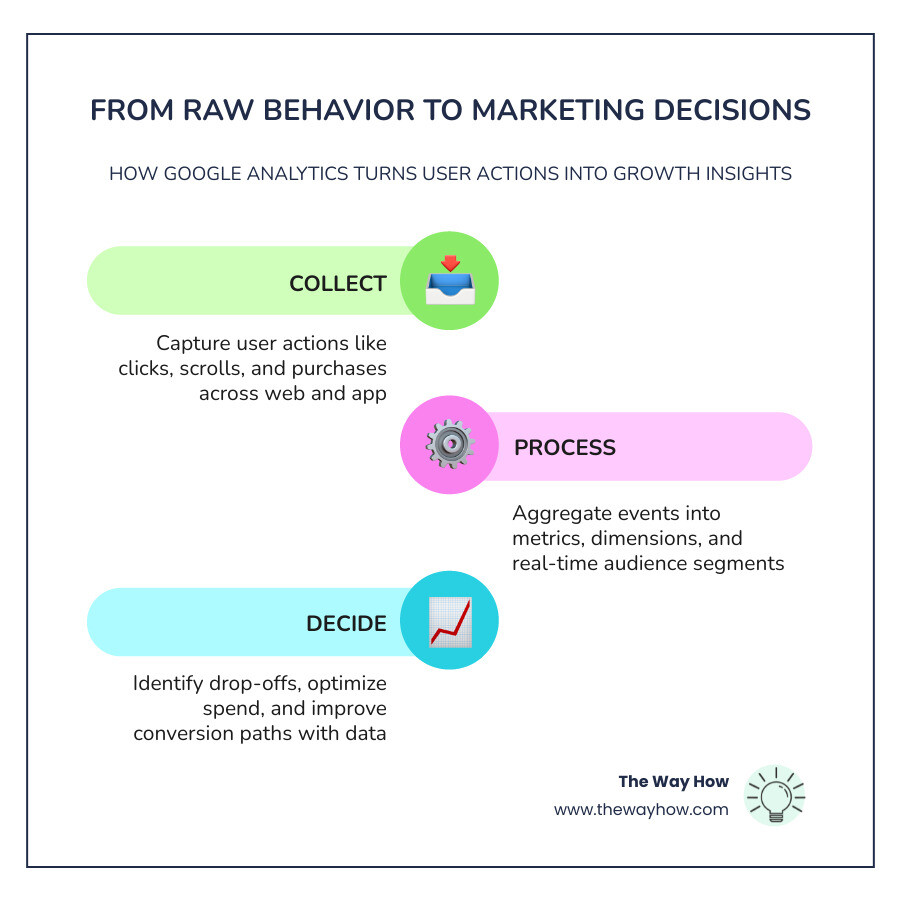
At its core, Google Analytics is a web analytics service that provides statistics and basic analytical tools for SEO and marketing purposes. However, in May 2026, we are no longer looking at the old session-based models of the past. The current standard, Google Analytics 4 (GA4), operates on an event-based data model.
This means every interaction—a click, a page view, a video play, or a scroll—is treated as an individual “event.” This shift allows us to see the user journey with much higher resolution. Instead of seeing a “session” that lasted five minutes, we see a human being who viewed a blog post, scrolled 90% of the way down, clicked a CTA, and then signed up for a newsletter.
For a deeper dive into how professionals use these tools, you can explore Analytics for marketing specialists and digital analysts.
What Google Analytics measures across websites and apps
One of the most powerful aspects of GA4 is its ability to measure across platforms. Whether a user is on your mobile app or your desktop website, Google Analytics can stitch those interactions together into a single customer journey. It measures:
- Web and App Streams: Data flowing from all your digital touchpoints.
- Users and Sessions: Distinguishing between a new person and a repeat visitor.
- Engagement: Moving beyond the “bounce” to see if people are actually interacting with your content.
- Cross-platform behavior: Understanding that a user might research on their phone and buy on their laptop.
How Google Analytics in digital marketing turns interactions into reports
The process begins with the Google tag (a small piece of JavaScript) placed on your site. When a user interacts with your page, this code sends data to Google’s servers. This data is then processed through a pipeline where dimensions (the “what”—like city or device type) and metrics (the “how many”—like event count or revenue) are organized into the reports you see in your dashboard.
Modern analytics also uses machine learning to fill in the gaps. With increasing privacy controls and the decline of third-party cookies, Google uses modeled data to provide a complete picture while respecting user consent.
Why Google Analytics in Digital Marketing Matters More Than Most Teams Realise
Data is not just for the “numbers person” on your team; it is the foundation of analytics driven marketing. Research shows that companies with mature data practices achieve 2.5x better business outcomes than those that do not. Furthermore, data-mature organizations often see a significantly higher Net Promoter Score (NPS)—39% compared to only 15% for data-immature ones.
Google Analytics is the most widely used tool for a reason: it allows you to stop guessing. When you understand your marketing data analysis, you can identify exactly where friction exists in your funnel and fix it. To learn more about how this integrates with your broader plan, see What is Google Analytics and How Can It Help Your Digital Marketing Strategy?.

From vanity metrics to behavior signals that improve ROI
We often see teams celebrating “record traffic” while revenue remains flat. This is the danger of vanity metrics. To drive real ROI, we must focus on:
- Customer Acquisition Cost (CAC): Are you spending more to get a customer than they are worth?
- Return on Ad Spend (ROAS): Which specific campaigns are actually generating dollars?
- Conversion Rate: What percentage of visitors are taking the “Key Event” you want them to take?
- Micro-conversions: Small wins, like downloading a PDF, that signal a user is moving closer to a purchase.
How audience and content insights shape stronger marketing strategy
By analyzing demographics, devices, and geography, you can refine your data driven marketing strategies. For example, if you discover that 80% of your conversions happen on mobile but your blog is formatted for desktop, you have found a massive opportunity for growth. Content insights tell you which pages have the highest engagement time, helping you decide which topics to double down on and which need a refresh.
The Metrics, Features, and GA4 Reports Marketers Should Actually Care About
The GA4 interface can be overwhelming, but most marketers only need to master a few key areas to find growth opportunities.
Core metrics and dimensions that explain marketing performance
To understand your performance, focus on these must-track KPIs:
- Engaged Sessions: Sessions that lasted longer than 10 seconds, had a conversion event, or had at least 2 page views.
- Engagement Rate: The percentage of sessions that were “engaged” (the helpful inverse of the old bounce rate).
- Source/Medium: Exactly where your traffic is coming from (e.g., “google/organic” or “email/newsletter”).
- Key Events: Previously called “conversions,” these are the actions that matter most to your business.
GA4 features that help marketers find growth opportunities faster
GA4 is packed with AI-powered features that do the heavy lifting for you. For more on this, read Google Analytics 4 for Marketers: Towards Better Decision-Making. Key features include:
- Predictive Metrics: Using machine learning to identify users likely to purchase or churn.
- Funnel Exploration: Visualizing the exact steps users take and where they abandon the process.
- Custom Channel Groups: Allowing you to track AI-referred traffic (like ChatGPT or Perplexity) separately from standard search.
- Automated Alerts: Knowing immediately when a KPI drops. See [how to set up google analytics alerts to monitor your main kpis](https\://www.thewayhow.com/help-center/how-to-set-up-google-analytics-alerts-to-monitor-your-main-kpis).
Universal Analytics vs GA4: What Changed and Why It Changes Your Marketing Decisions
The transition from Universal Analytics (UA) to GA4 was not just an update; it was a total rebuild. UA was built for a world of desktop computers and cookies. GA4 is built for a world of privacy, mobile apps, and complex, multi-device journeys.
| Feature | Universal Analytics (Old) | Google Analytics 4 (Current) |
|---|---|---|
| Data Model | Session-based | Event-based |
| Tracking | Primarily Cookies | Events + Machine Learning |
| Device Focus | Desktop/Web | Cross-platform (Web + App) |
| Privacy | Limited | Privacy-first (IP Anonymization default) |
| Reporting | Pre-defined, rigid | Flexible, Exploration-based |
The differences that matter for marketers, not just analysts
The biggest shift is moving from “Bounce Rate” (which was often misleading) to “Engagement Rate.” In the old days, if someone read your entire 2,000-word blog post and then left, UA called that a “bounce.” GA4 recognizes that as an “engaged session,” providing a much more accurate reflection of content value.
Common GA4 challenges and limitations teams run into
Despite its power, 73% of marketing teams struggle with GA4. Common hurdles include:
- Conversion Configuration: It is no longer as simple as “setting a goal” based on a URL.
- Data Retention: By default, GA4 only keeps user-level data for 2 months. You must manually change this to 14 months in settings.
- Missing Referrers: Traffic from “dark social” or AI tools often gets lumped into “Direct,” making attribution difficult.
How to Set Up Google Analytics on Your Website, Track Conversions, and Build a Real Measurement Plan
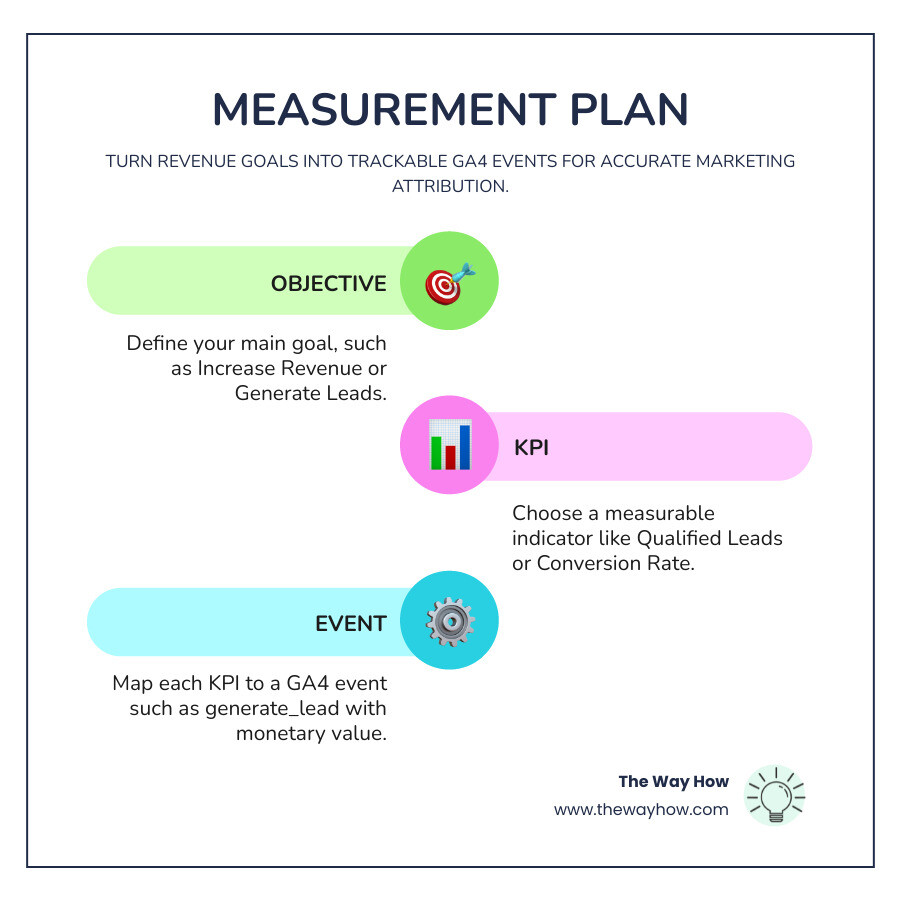
Setting up google analytics in digital marketing requires more than just pasting a code. You need a measurement plan—a document that maps your business objectives to specific digital interactions.
How to install GA4 and verify clean data collection
We recommend using Google Tag Manager (GTM) for your installation. It acts as a middleman, allowing you to manage all your tracking scripts without touching your website’s code every time.
- Create your GA4 property and data stream.
- Install the Google Tag via GTM.
- Use the “Preview” mode and GA4 “DebugView” to ensure events are firing.
- Filter out internal traffic so your team’s visits don’t skew the data.
For a step-by-step walkthrough, see how to set up google analytics tracking from scratch. If you use subdomains, you will also want to know how to display subdomains in your google analytics reports and how to verify that you’re tracking subdomains correctly in google analytics.
How to track conversions and document a measurement plan that supports revenue
A solid measurement plan starts with your financial goals and works backward. If your goal is “Increase Revenue,” your KPI might be “Qualified Leads,” and your GA4 event would be generate_lead firing on a form submission.
Assigning monetary values to these events—even if they aren’t direct sales—helps the system calculate the true value of your marketing channels. This is essential for business data analysis and business analysis and analytics. To get this right, follow our guide on how to set up and track custom events in google analytics 4.
Integrations, Best Practices, and the Next Best Step Toward Better Decisions
Google Analytics does its best work when it talks to your other tools.
How integrations make Google Analytics more useful for digital marketing
Linking your ad accounts allows you to see the full customer lifecycle.
- Google Ads: Import your GA4 “Key Events” into Google Ads to optimize your bidding for actual revenue, not just clicks.
- Search Console: See which keywords are driving not just traffic, but engaged users. Learn [how to link google analytics 4 with google search console](https\://www.thewayhow.com/help-center/how-to-link-google-analytics-4-with-google-search-console) and [how to configure search console data in google analytics](https\://www.thewayhow.com/help-center/how-to-configure-search-console-data-in-google-analytics).
- Looker Studio: Create beautiful, easy-to-read dashboards for your leadership team so they don’t have to dig through the GA4 interface.
- BigQuery: For larger enterprises, exporting raw data to BigQuery allows for advanced [marketing data analysis](https\://www.thewayhow.com/learn-something/marketing-data-analysis).
Best practices for using Google Analytics without getting misled by the data
At The Way How, we believe in psychology-first measurement. Data tells you what happened, but you must apply human insight to understand why.
- Audit Monthly: Digital systems break. Check your tracking regularly.
- Use a Single Source of Truth: Don’t compare Shopify data to GA4 data to Google Ads data and expect them to match perfectly. Pick one as your primary decision-making tool.
- Manage Access: Ensure only the right people have “Editor” access to prevent accidental setting changes. See [how to manage user access for google analytics 360 products](https\://www.thewayhow.com/help-center/how-to-manage-user-access-for-google-analytics-360-products).
Frequently asked questions about google analytics in digital marketing
Why does GA4 data differ from Google Ads?
This is the most common question we hear. Differences occur because Google Ads and GA4 use different attribution models and counting methods. For example, Google Ads might attribute a sale to the day the ad was clicked, while GA4 attributes it to the day the sale occurred.
What are the biggest limitations of Google Analytics?
The biggest limitation is that it is only as good as its implementation. If your tags are broken, your data is a lie. Additionally, privacy regulations like GDPR and tools like AdBlockers mean you will never track 100% of your visitors—which is why machine learning and modeled data are so important in 2026.
Can small businesses use Google Analytics to improve ROI?
Absolutely. In fact, small businesses often benefit more because they have less budget to waste. Using GA4 to identify that one social channel is driving 90% of your leads allows you to stop spending time and money on the other platforms that aren’t working.
Restoring Momentum Through Clarity
The goal of using google analytics in digital marketing is not to have the most complex dashboard in the world. The goal is to remove uncertainty. When you can see the path your customers take—from the first moment of curiosity to the final decision to buy—you can stop “chasing tactics” and start building a system that creates trust and predictable revenue.
If your growth has stalled and you aren’t sure why, the answer is almost certainly hidden in your data. It is time to stop guessing and start diagnosing.
Ready to set up a system that actually drives decisions? Let’s get your tracking right from the start.