A Complete Guide to CRM Systems and Database Management
 Jeremy Wayne Howell : Jul 22, 2026 9:48:31 PM
NetSuite REST API search result pagination controls how large datasets are broken into manageable pages when querying records or running SuiteQL queries through NetSuite’s REST web services.
Quick answer — how it works:
| Method | Default Page Size | Max Per Page | Max Total Results |
|---|---|---|---|
| Record collection (limit/offset) | 1,000 | 1,000 | 100,000 (1,000,000 with SuiteAnalytics Connect) |
| SuiteQL via SuiteTalk REST | 1,000 | 1,000 | 100,000 (unlimited with SuiteAnalytics Connect) |
| SuiteQL via RESTlet (N/query) | up to 5,000 | 5,000 | 100,000 (unlimited with SuiteAnalytics Connect) |
The core pattern:
limit (1–1,000) to control how many records return per pageoffset (must be divisible by limit) to move between pageshasMore, totalResults, and navigation links in the response to know where you areHere’s the frustrating reality: NetSuite holds enormous amounts of business-critical data, but pulling it out reliably — all of it, in order, without missing records or hitting invisible walls — is harder than it looks.
Most developers hit the same friction points. The default page size feels manageable at first. Then a query returns 80,000 records. Then 120,000. Then the runSuiteQLPaged method quietly stops at page 1,000 and nobody knows why. The data pipeline stalls. Reports go stale. Revenue decisions get made on incomplete information.
This isn’t a code problem at its core. It’s a systems clarity problem — one that shows up as a technical error but traces back to not fully understanding how NetSuite’s pagination architecture is designed, where its limits live, and which tool is the right fit for which job.
This guide walks through every major pagination mechanism in the NetSuite REST API — from basic limit/offset parameters to advanced ROWNUM subquery strategies — so you can build integrations that handle real data volumes without breaking.
I’m Jeremy Wayne Howell, founder of The Way How, and over 20 years of working with revenue systems and integrations — including diagnosing broken data pipelines that stall growth — has made NetSuite REST API search result pagination one of the most underestimated technical problems I see teams face. If you’re here because something in your integration isn’t working the way it should, you’re in the right place.
When an integration stalls, the immediate reaction is usually to blame the code. We write more retry logic, increase timeouts, or build complex error-handling loops. But the real issue is often cognitive load and integration friction.
When your systems cannot communicate smoothly, your leadership team loses visibility. You make decisions on inventory, customer lifetime value, and sales velocity using cached, outdated, or incomplete data.

Every time a sync fails due to an unhandled pagination boundary, a silent “certainty gap” opens in your business. We believe the system is working, but under the hood, crucial records are being skipped. To build a dependable revenue engine, we must first build reliable data pipelines. That starts with mastering how NetSuite serves paginated data.
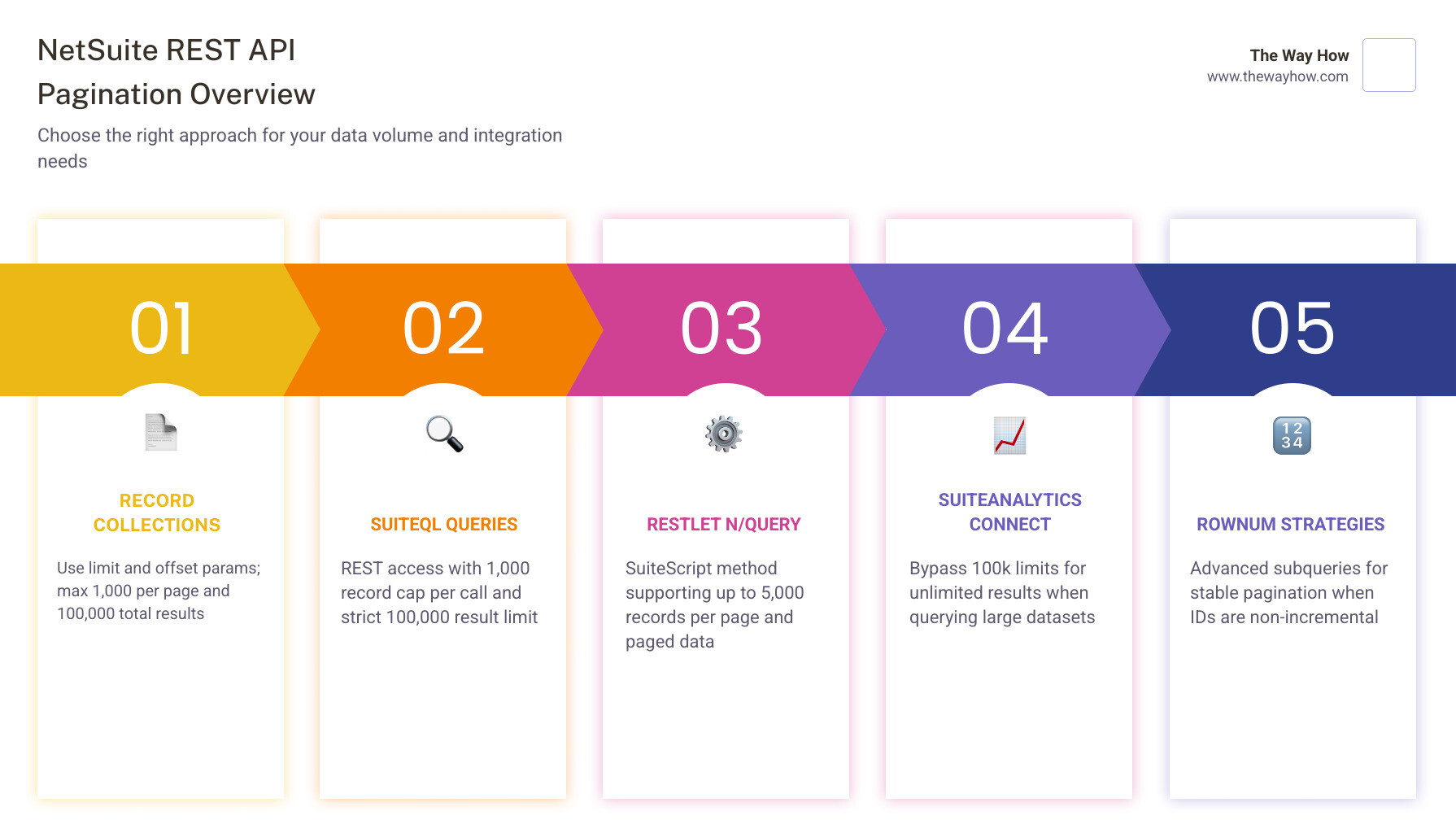
To retrieve lists of record instances or run custom queries, NetSuite provides three primary pagination paths:
/record/v1/customer)./query/v1/suiteql endpoint.Understanding these paths is crucial for translating legacy processes, such as those covered in our guide on Netsuite SOAP to REST Search Filter Conversion, into modern RESTful integrations.
To explore the official rules governing these collection endpoints, you can review the NetSuite Applications Suite - Collection Paging documentation.
When you perform a GET request on a collection endpoint, NetSuite defaults to returning a specific number of records. To control this systematically, you must use the limit and offset query parameters.
However, NetSuite enforces strict architectural constraints on these parameters:
limit is set to 50, your offset must be 0, 50, 100, 150, and so on. If you send a request with limit=50&offset=75, NetSuite will return an error.To illustrate, if you want to skip the first 90 records and retrieve the next 10, your request would look like this:
GET /services/rest/record/v1/customer?limit=10&offset=90
When NetSuite returns a paginated collection, the JSON response contains a structured envelope designed to make navigation predictable. This structure includes a meta property and a links array, alongside the actual items.
A typical paginated response looks like this:
By parsing this metadata, your integration can dynamically adapt:
count: The number of records returned in this specific response page.hasMore: A boolean indicating if there are additional pages available.totalResults: The total number of records matching your query across all pages.links: An array of objects with relationship types (self, first, prev, next, last) that allow your application to fetch neighboring pages without manually calculating offsets.For more details on navigating these metadata schemas, check out the Section n3522244.html resource.
For complex integrations, SuiteQL is highly superior to standard record filtering. It allows you to use SQL syntax, aggregate functions, and JOINs to fetch data efficiently. However, SuiteQL has its own set of hard limits.
By default, SuiteQL queries executed via the REST API are capped at a maximum of 100,000 total results if the SuiteAnalytics Connect feature is disabled in your NetSuite account. If you attempt to paginate past this limit, your queries will fail or return incomplete datasets. If SuiteAnalytics Connect is enabled, this total result limit is lifted, allowing you to paginate through millions of rows.
Additionally, each individual SuiteQL request via the REST API is capped at 3,000 records per call. To extract larger datasets, you must implement systematic pagination. To learn more about how NetSuite handles these higher-level pagination parameters, refer to the NetSuite Applications Suite - Pagination documentation.
If you are executing queries inside NetSuite using SuiteScript (for example, within a RESTlet), you will likely use the query.runSuiteQLPaged method. This method returns a search.PagedData object, which is highly efficient because it lets you retrieve the total record count without loading all rows into memory.
However, developers frequently run into an undocumented wall: runSuiteQLPaged is strictly capped at 1,000 pages.
No matter how large your pageSize parameter is, you cannot request page 1,001. If your page size is set to the maximum of 1,000 rows, your query is hard-capped at 1,000,000 total records. If your page size is smaller (e.g., 100 rows), you will hit the cap at just 100,000 records.
To prevent your integrations from stalling when they hit this limit, you must design workarounds that do not rely on standard offset-based page counters. To understand the properties of this metadata object, you can read the NetSuite Applications Suite - search.PagedData reference.
To safely paginate past the 100,000-record barrier or the 1,000-page cap, we recommend two primary advanced strategies: ROWNUM subqueries and ID-based pagination.
In Oracle SQL (which powers SuiteQL), ROWNUM is a pseudocolumn that assigns a temporary sequential integer to query results. A common mistake is applying ROWNUM directly to a sorted query:
This fails because ROWNUM is evaluated before the ORDER BY clause is applied, resulting in scrambled, unpredictable pages. To solve this, you must wrap your query in two non-correlated subqueries:
By nesting the query, the sorting is executed first, ROWNUM is assigned second, and the outermost query safely filters the exact range of rows you need.
While ROWNUM is highly flexible, ID-based pagination is the most performant and reliable method for massive datasets. Instead of asking NetSuite to “skip” thousands of rows using offsets, you filter your query based on the last internal ID retrieved.
If the last record on Page 1 has an ID of 5432, your next request simply filters for records greater than that ID:
This approach bypasses page caps entirely, scales infinitely, and executes significantly faster because NetSuite can leverage its database indexes on the primary key.
If you are migrating legacy integrations to the REST API, you are likely familiar with SOAP’s pagination architecture. SOAP relies on session-stateful operations, using searchMore, pageSize, and pageIndex parameters to traverse results.
| Feature | SOAP Web Services | REST API (SuiteTalk REST) |
|---|---|---|
| Statefulness | Stateful (requires active session/search ID) | Stateless (self-contained requests) |
| Pagination Parameters | pageSize, pageIndex | limit, offset |
| Next Page Method | searchMore or searchMoreWithId | Follow next link in response |
| Max Page Size | 1,000 records | 1,000 records |
| Caching | Caches search results temporarily | No caching (real-time query) |
In SOAP, if a record is added or deleted while you are paginating, the cached search state can lead to mismatched index counts or skipped records. The REST API’s stateless design forces you to handle these changes in real time, which is far more robust for modern cloud integrations.
For a deeper dive into legacy search behaviors, see the NetSuite Applications Suite - search guide.
To protect system performance, NetSuite enforces strict rate limits and concurrency constraints on its REST API.
HTTP 429 Too Many Requests error.Prefer: transient header in your HTTP requests. This tells NetSuite not to persist query metadata on the server, resulting in faster execution times and reduced memory overhead.
If you are designing high-volume data syncs, we recommend implementing a queue system that respects these limits. For example, our HubSpot API Integration Guide 2026 explains how to structure multi-threaded sync architectures to maximize throughput without triggering rate limit blocks.
Choosing the wrong integration pattern is a primary driver of project delays. Each method has a clear use case:
For a broader perspective on designing robust API architectures, you can read our HubSpot API Complete Guide, which contrasts platform-native endpoints with custom middleware strategies.
When paginating through live databases, you must plan for “data drift.” Because NetSuite searches are not cached in the REST API, the dataset can change while your integration is in the middle of paginating.
If a record on Page 1 is deleted by an ERP user while your system is fetching Page 2, the entire index shifts. If you are using offset-based pagination (offset=1000), you will end up skipping a record or processing a duplicate.
Furthermore, do not assume that NetSuite internal IDs are strictly incremental. While they generally increase over time, system processes, imports, and transaction deletions can leave large gaps in the sequence.
Our recommendation: Use ID-based pagination (WHERE id > last_processed_id) sorted by ID ASC. This ensures that even if records are added or deleted, your integration maintains a solid, unshakeable anchor point in the database.
The default limit is 100 records per page, and the maximum limit is 1,000 records per page. The offset parameter must always be a positive multiple of your limit (e.g., if the limit is 250, offsets must be 0, 250, 500, etc.).
To pull more than 100,000 records, you must either enable the SuiteAnalytics Connect feature in your NetSuite account or transition to an ID-based pagination strategy (WHERE id > last_id) which bypasses traditional offset limits entirely.
ROWNUM is assigned to rows as they are fetched, before sorting (ORDER BY) is applied. To sort your data first and apply pagination second, you must wrap your query in a nested subquery structure.
At The Way How, we believe that integration friction is rarely just a coding challenge—it is a strategic block that prevents leadership teams from steering their businesses with confidence. When your data pipelines stall, your growth engine stalls with them.
We help founders and revenue leaders remove uncertainty from their systems. Whether you are seeking to optimize your HubSpot architecture, design predictable demand generation systems, or build robust NetSuite integrations that scale, we focus on clarity and human behavior first.
If you are ready to turn your data systems into a predictable engine for growth, explore Our Revenue and Integration Services to see how we can help you build momentum.
 Jeremy Wayne Howell : Jul 22, 2026 9:48:31 PM
 Jeremy Wayne Howell : Jul 21, 2026 9:47:10 PM
 Jeremy Wayne Howell : Jul 20, 2026 9:46:47 PM