
Beyond the Code: Why Your Integration Strategy Fails Before the First API Call

HubSpot API integration is the process of connecting HubSpot’s CRM and marketing platform to external apps, data sources, and workflows using HubSpot’s REST APIs.
Quick answer — what you need to know:
Most developers searching for this expect a straightforward technical setup. And the setup is straightforward — HubSpot’s APIs are well-documented, the SDKs are mature, and the official CLI gets you moving fast.
But here’s what most guides skip: the integration usually isn’t the hard part. The hard part is knowing why you’re connecting these systems and what behavior you want to change as a result.
HubSpot serves over 184,000 customers across more than 120 countries. Its developer platform supports everything from simple data syncs to AI-powered automations. The tools are capable. The question worth asking before you write a single line of code is whether your integration architecture is built around how your buyers and teams actually behave — or just around what the API makes possible.
I’m Jeremy Wayne Howell, founder of The Way How, and over the past 20 years I’ve helped revenue teams implement hubspot api integration as part of broader CRM and lifecycle systems designed around buyer psychology, not org charts. In this guide, I’ll walk you through the technical foundation and the strategic thinking that makes integrations actually move revenue.
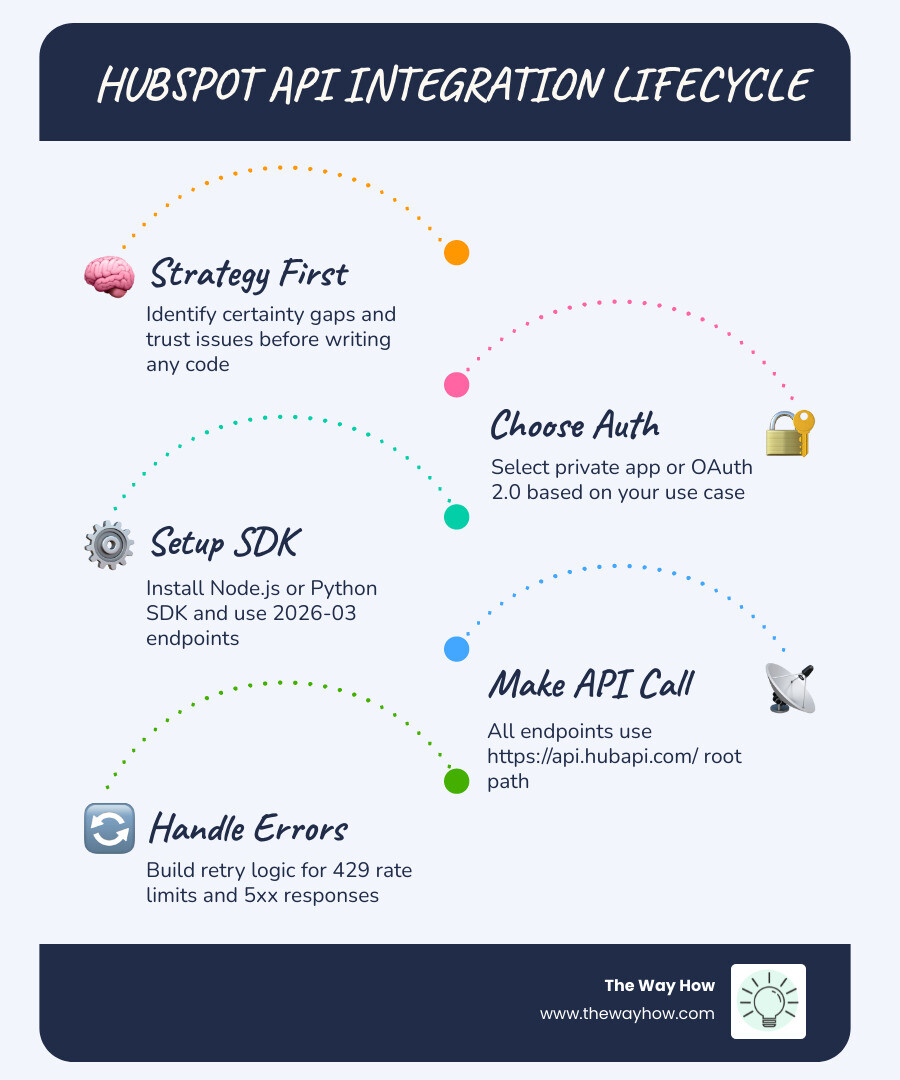
When we look at hubspot api integration through the lens of psychology, we often find “certainty gaps.” These are moments where a customer or a team member loses trust in the system because data is missing, delayed, or irrelevant. An integration should not just move data; it should reinforce a trust architecture. If your sales team doesn’t believe the “Lead Score” coming from your custom AI integration, they won’t act on it. The code works, but the system fails. We start by diagnosing these gaps before we ever open a terminal.
Navigating the 2026-03 Date-Based Versioning Shift
As of May 2026, the most significant change for developers is the shift in how HubSpot versions its APIs. If you are used to the old numeric versioning (like CRM v3), you need to adjust your mental model to the new date-based system.
The 2026-03 release represents a move toward a more predictable, stable schedule. Instead of incrementing a version number for the entire API, HubSpot now uses date-based paths. This allows for a more granular update cycle where a new version can be released without breaking every other endpoint in your stack.
Key facts about the 2026-03 versioning:
- Root Path: All APIs, regardless of version, use the same base:
https://api.hubapi.com/. - Endpoint Structure: The pattern has shifted to
/api-name/2026-03/resource. - Continuity: When a new date version is released, the previous one continues to work until its specific end-of-life (EOL) date. This provides a predictable migration window.
Understanding this shift is part of mastering the Hubspot Crm Architecture. It ensures that your integration remains stable and that you aren’t caught off guard by sudden deprecations. For those managing complex auth flows, you should specifically review how to Manage OAuth access tokens with the 2026-03 API - HubSpot docs.
The Technical Foundation for HubSpot API Integration
To get started, we need to move from the “why” to the “how.” HubSpot provides a robust set of developer tools designed to reduce friction. The center of this universe is the HubSpot CLI (Command Line Interface).

The CLI allows you to manage your developer projects, handle authentication, and deploy assets directly from your local environment.
- Install the CLI: You can install it globally via npm:
npm install -g @hubspot/cli. - Authorize your account: Use
hs initto walk through the authorization process. - Choose your tool: Whether you are building a Hubspot Developer Api solution or a custom UI extension, the CLI is your primary interface.
Beyond the CLI, you must understand the two primary ways to access the Hubspot Api: Private Apps and OAuth. Private apps are the modern replacement for the now-deprecated API keys (hapikeys), providing a scoped access token for internal use within a single portal.
Authenticating Your First HubSpot API Integration
Security is the cornerstone of any integration. We don’t just want to move data; we want to move it safely. For most internal business tools, a Private App is the fastest path. It gives you an access token that you can use in your request headers.
For apps intended for the HubSpot Marketplace or multi-portal use, OAuth 2.0 is required. This involves a more complex “handshake” where a user grants your app permission to access specific “scopes” (like crm.objects.contacts.read).
If you are working with Node.js, the GitHub - HubSpot/hubspot-api-nodejs repository provides the official client library. It simplifies the process of managing these tokens and making authenticated calls. For a deeper dive into the nuances of this process, our Hubspot Integration Complete Guide covers the full spectrum of security protocols.
Setting Up the Developer Environment
Efficiency in development comes from using the right SDKs. HubSpot maintains official libraries for several languages, ensuring that you don’t have to write raw HTTP requests for every operation.
- Node.js: The
@hubspot/api-clientis the standard. It includes built-in support for the 2026-03 endpoints and handles rate limiting via the Bottleneck library. - Python: The hubspot-api-client v7.0.0 is the latest major release, requiring Python 3.7 or higher. It includes helpful methods like
get_all()which automatically handles pagination—a common pain point in data syncing.
When we engage in Hubspot Custom Development, we prioritize environment variables for token storage. Never hardcode your access tokens into your scripts. Use .env files and ensure they are excluded from your version control.
High-Impact Use Cases for CRM and Marketing Automation
Why do businesses invest in hubspot api integration? Usually, it’s to solve a fragmentation problem. Data lives in one place, but the decision-making happens in another.
| Use Case | API Involved | Strategic Benefit |
|---|---|---|
| E-commerce Sync | CRM + Products API | Personalize marketing based on actual purchase history. |
| Lead Routing | Webhooks + Workflows | Reduce “speed to lead” by notifying sales in real-time. |
| Custom Dashboards | Analytics + CRM API | Provide leadership with a single source of truth. |
| Automated Onboarding | Deals + Associations API | Trigger external setup tasks when a deal is closed won. |
Effective Hubspot Integrations rely on data normalization. This means ensuring that “Email Address” in your Shopify store matches “Email Address” in HubSpot perfectly. For example, a Hubspot Shopify Integration doesn’t just pass names; it passes intent, allowing you to trigger abandoned cart emails that actually sound human.
Scaling Your HubSpot API Integration with AI and Workflows
In 2026, the frontier of integration is AI. HubSpot’s platform now allows developers to build “UI Extensions” and “Custom Actions” that can leverage AI models.
Imagine a custom workflow action that takes a transcript from a Hubspot Zoom Integration call, uses an LLM to summarize it, and then updates a custom property in the CRM with the “Customer’s Primary Concern.” This isn’t just data moving; it’s insight being generated.
By following a Hubspot System Design Complete Guide, you can build these intelligent layers. You might use a Hubspot Slack Integration to push these AI summaries directly to a sales channel, ensuring the team stays in their flow without switching tools.
Frequently Asked Questions about HubSpot Development

How do I handle rate limiting and 429 errors?
HubSpot employs “ten-secondly rolling limits.” For OAuth apps, this is typically 100 requests every 10 seconds. If you exceed this, the API returns a 429 Too Many Requests error.
The best practice is to implement a retry mechanism with exponential backoff. This means if you hit a limit, your code waits a short period (e.g., 200ms) before trying again, increasing the wait time with each subsequent failure. The official Node.js and Python SDKs have “retry middleware” that can be configured to handle this automatically. For more on this, see our Hubspot Integration Strategy Guide.
What is the difference between Private Apps and OAuth?
- Private Apps: Best for internal tools. They are easy to set up, provide a single access token, and are scoped to one HubSpot portal.
- OAuth: Necessary for apps that will be used by multiple different HubSpot customers. It requires a more robust infrastructure to handle token exchange and refresh flows.
If you are building a tool specifically for your company’s own use, start with a Private App. If you are building a product for others, you’ll need the OAuth flow. You can find a breakdown of how different tools use these in our Complete Hubspot Integrations List Guide.
How do I migrate from numeric v3 to 2026-03 APIs?
The migration is primarily a change in the URL structure. Instead of calling https://api.hubapi.com/crm/v3/objects/contacts, you will now call https://api.hubapi.com/crm/2026-03/objects/contacts.
While the logic often remains similar, the 2026-03 version may include security enhancements, such as requiring parameters in the request body rather than query strings for sensitive OAuth operations. This shift is common when maintaining a Hubspot Wordpress Integration where legacy code might still be using older patterns.
Restoring Momentum Through Architectural Clarity
At The Way How, we believe that technology should never be the bottleneck for growth. Most “stalled” revenue engines aren’t failing because the code is broken; they’re failing because the systems are disconnected from how people actually make decisions.
When we design a hubspot api integration, we aren’t just looking at endpoints. We are looking at the customer journey. We are identifying where uncertainty creeps in—perhaps a lead waits too long for a response, or a customer receives a marketing email for a product they just bought.
Our approach blends strategic clarity with operational execution. We help founders and leadership teams remove the guesswork from their sales and marketing systems by building HubSpot architectures that are rooted in behavioral insight and decision-making psychology.
If your current integrations feel like a “black box” or if you’re struggling to turn your CRM data into predictable revenue, we can help you see the problem clearly. Explore our Fractional CMO and HubSpot architecture services to see how we can help you restore momentum and build a dependable growth engine.