A Complete Guide to CRM Systems and Database Management
 Jeremy Wayne Howell : Jul 22, 2026 9:48:31 PM
NetSuite SuiteTalk SOAP to REST data integrity checks are the difference between a migration that looks successful and one that actually is successful. Most teams notice the obvious failures — broken authentication, missing fields, HTTP 500 errors. What they miss are the silent ones: duplicate records created by retry logic, custom fields that map differently across protocols, partial writes that succeed on one end and fail on the other with no visible error.
Here is a fast answer to what these checks involve:
| Check Type | What It Catches |
|---|---|
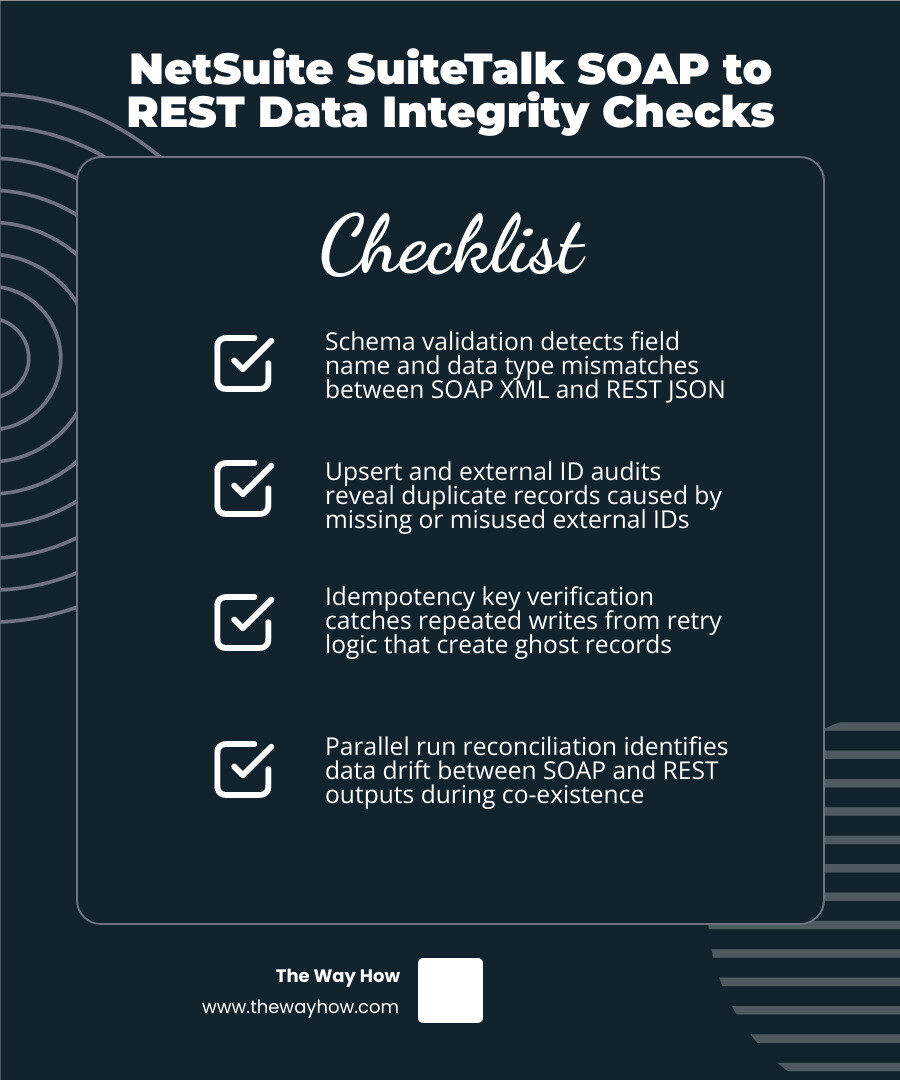
| Schema validation | Field name and data type mismatches between SOAP XML and REST JSON |
| Upsert and external ID audit | Duplicate records caused by missing or misused external IDs |
| Idempotency key verification | Repeated writes from retry logic that create ghost records |
| Parallel run reconciliation | Data drift between SOAP and REST outputs during co-existence phase |
| Log and audit trail review | Silent failures missed by standard error handling |
| Rate limit and partial failure handling | Incomplete transactions caused by HTTP 429 or timeout interruptions |
The shift from SOAP to REST is not just a technical swap. It is a change in how NetSuite processes, validates, and returns data — and the differences are subtle enough to feel safe until they are not.
Starting with NetSuite 2026.1, Oracle stopped releasing new SOAP web services endpoints. All new features are REST-only from this point forward. That means organizations still running SOAP-based integrations are not just carrying legacy code — they are carrying compounding risk.
I’m Jeremy Wayne Howell, founder of The Way How, and while my core work is in revenue strategy and buyer psychology, I’ve spent years helping companies diagnose the systems failures underneath their growth problems — including the kind of integration debt that quietly corrupts reporting, operations, and decision-making. Understanding NetSuite SuiteTalk SOAP to REST data integrity checks is one of those foundational operational concerns that, when ignored, creates the exact uncertainty that stalls revenue confidence at the leadership level.
When an integration breaks loudly, developers fix it. When an integration corrupts data silently, leadership makes bad decisions based on bad reports, trust erodes, and team momentum stalls. This is the psychological reality of data migration. Protocol transition anxiety is real because migrating from a legacy, highly structured SOAP system to a modern REST environment introduces a severe trust deficit.
Many teams suffer from decision paralysis because they cannot prove that the new REST endpoints are writing data with the exact same fidelity as the old SOAP endpoints. The fear is not that the system will crash; the fear is that the system will run perfectly while quietly altering financial totals, duplicate customer records, or misaligning inventory counts. At The Way How, we look at systems through the lens of human behavior: if your team does not trust the data, they will revert to manual workarounds, spreadsheets, and defensive behavior. To remove this uncertainty, we must establish rigorous validation systems that prove data integrity at every step of the migration.
Maintaining data integrity requires understanding that SOAP and REST handle state management, payloads, and transaction boundaries in fundamentally different ways. SOAP relies on XML schemas (WSDLs) that strictly enforce structural rules before a payload ever hits the NetSuite application layer. REST, conversely, uses JSON, which is lightweight, flexible, and dynamically parsed.
While REST provides a cleaner developer experience, it lacks the strict, client-side compile-time validation that SOAP developers have relied on for decades. As we explore in our guide on NetSuite API Integration: What to Know Before You Build, this transition shifts the burden of structural and semantic validation from the protocol layer directly to your application logic. This is a critical consideration for any team managing Crm Data Integration.
| Feature | SuiteTalk SOAP | SuiteTalk REST |
|---|---|---|
| Payload Format | XML (Strict WSDL Validation) | JSON (Dynamic Schema Validation) |
| Read Mechanics | Complex Search Operations | SuiteQL & Collection Filtering |
| Write Mechanics | Bulk Operations (upsertList up to 1,000) | Single-Record CRUD (by default) |
| Error Delivery | SOAP Faults (Nested XML) | Standard HTTP Status Codes (JSON) |
| Idempotency | Managed via External ID / Custom Keys | X-NetSuite-Idempotency-Key Header |
One of the most common ways data integrity is compromised during a migration is through concurrency starvation. NetSuite enforces account-wide concurrency limits that are shared across all API surfaces, including SOAP, REST, and RESTlets. These limits scale based on your service tier:
Each SuiteCloud Plus license adds roughly 10 concurrent slots to your account’s pool.
If you run SOAP and REST integrations in parallel during a migration phase, they will compete for these exact same slots. When the account-wide ceiling is reached, NetSuite will return HTTP 429 (Too Many Requests) for REST calls or concurrency faults for SOAP calls. If your integration does not handle these limits gracefully, transactions will drop mid-flight, leaving your external systems out of sync with NetSuite.
Payload limits and pagination differences also introduce data drift. The NetSuite REST API caps response payload sizes at 104 MB. To prevent timeouts and memory issues, REST defaults to a page size of 100 records per request, though you can use the limit parameter to request up to 1,000 records.
In SOAP, pagination is managed via search pages and session-based search IDs. In REST, collection paging relies on limit and offset parameters. If your application logic does not correctly handle offset calculations—especially when records are being added or modified during the sync process—it is incredibly easy to skip records entirely or process the same record twice.
To build a reliable bridge between these two protocols, we must design explicit data integrity checks that validate schemas, handle customizations, and run continuously in test environments. This process requires a systematic approach to Business Data Analysis to ensure no financial or operational data is lost in translation.
NetSuite accounts are highly customized. Every custom field, custom record, and customized form alters your database schema. In SOAP, these customizations require you to periodically regenerate your WSDL client or build loose XML parsing structures.
In REST, customizations are exposed dynamically in the metadata catalog. This makes mapping easier but introduces the risk of schema drift. If a NetSuite administrator changes a custom field’s data type or removes a field entirely, a REST payload may fail silently or drop the unmapped field without throwing a hard parsing error.
To prevent this, refer to the NetSuite Applications Suite - SOAP Web Services to REST Web Services Upgrade Guide to map your custom types accurately. We recommend building an automated schema validator that compares the REST metadata catalog against your application’s internal data models before running sync pipelines.
Never perform a cutover without rigorous parallel testing. As of NetSuite 2026.1, sandbox refreshes are unlimited, allowing you to establish a continuous testing environment.
We recommend running a parallel validation strategy:
Duplicate records are the bane of any ERP system. They distort financial reporting, ruin customer relationships, and destroy inventory accuracy. When moving to REST, you must redesign how you prevent duplicates.
In the legacy SOAP API, developers relied heavily on the upsertList operation. This allowed you to send up to 1,000 records in a single request. NetSuite would automatically check if a record with the specified external ID existed; if it did, it updated it; if not, it created it.
The standard NetSuite REST Record API does not support bulk upsert operations. Instead, it processes one record per request for create (POST) and update (PATCH) operations. This architectural difference is a common pain point discussed in guides like the How to Integrate the Oracle NetSuite API Without SOAP Complexity | Truto Blog.
If you attempt to replicate SOAP’s bulk behavior by firing hundreds of individual REST calls concurrently, you will quickly hit your concurrency limits and trigger rate limiting. To manage this, you must either write custom RESTlets to handle batch logic or implement a robust queue system that processes single REST writes sequentially and safely.
Because REST writes are single-record operations, network drops and timeouts are highly disruptive. If your system sends a POST request to create an invoice, and the connection drops before NetSuite returns a response, your system does not know if the invoice was created. If you simply retry the request, you risk creating a duplicate invoice.
To prevent this, NetSuite REST API supports the X-NetSuite-Idempotency-Key header. When you send a write request:
X-NetSuite-Idempotency-Key header.Error handling is not just about catching exceptions; it is about keeping your systems in a known, consistent state. This is an essential pillar of Erp Crm Development Complete Guide.
In SOAP, a bulk request like writeList or upsertList returns a list of individual write results. Some records in the list might succeed while others fail. Your application must parse the nested XML response, identify which records failed, and handle those specific failures individually.
Because REST relies on single-record operations, you do not have to parse complex, multi-status bulk payloads. However, if you are simulating a bulk transaction—such as creating a Sales Order and its corresponding Customer record—you must manage transaction boundaries yourself. If the Customer write succeeds but the Sales Order write fails, you must have a rollback strategy to either delete or flag the orphaned Customer record, or queue the Sales Order for a safe retry. For deep implementation details on REST error payloads, refer to the NetSuite REST API: Complete Developer Guide (2026) | BrokenRubik.
When NetSuite limits your API usage, it returns an HTTP 429 (Too Many Requests) status code. This response includes a Retry-After header indicating how many seconds you must wait before trying again.
Your integration must respect this header. We recommend implementing an exponential backoff formula with jitter:
Additionally, use connection pooling and keep-alive headers to reduce the overhead of TLS handshakes, which can consume valuable processing time and trigger rate limits under heavy loads.
A successful integration is a monitored integration. You cannot manage what you do not measure, and you cannot verify integrity without audit trails that outlive NetSuite’s native limitations. This visibility is what enables true, Data Driven Decisions across your business.
A major operational risk with NetSuite is that its native Web Services Logs are retained for only 7 days and will auto-disable after 30 days of inactivity. If a silent data corruption issue occurs, and your team only notices it during the monthly close process, your diagnostic logs are already gone.
To build a reliable integration, as highlighted in the NetSuite API Integration: Top Benefits in 2024, you must offload your logs to an external system. We recommend buffering your integration requests through a message queue like AWS SQS or Apache Kafka and streaming your execution logs to an external logging platform (such as Datadog, Logstash, or AWS CloudWatch). This ensures you have a permanent, searchable audit trail of every payload sent and received.
Do not rely solely on real-time error handling to keep your systems aligned. Implement a daily automated reconciliation process.
lastModifiedDate.During a phased migration, you will likely run a hybrid architecture where SOAP and REST co-exist. To prevent this complexity from breaking your systems, you should adopt clean architectural patterns and use Crm Workflow Automation to coordinate the flow of data.
While SOAP searches are notoriously slow and verbose, NetSuite’s REST Query Service supports SuiteQL. SuiteQL allows you to execute SQL-like queries, complete with complex JOINs, projections, and aggregate functions, through a single REST POST request.
SuiteQL can retrieve up to 100,000 rows in a single query. This makes it the ultimate read layer for high-volume integrations, allowing you to fetch complex datasets—such as customers alongside their primary addresses and subsidiary relationships—without making hundreds of individual, resource-intensive API calls.
If the standard SuiteTalk REST API does not support a specific capability you need, or if you require custom server-side validation, do not fall back to SOAP. Instead, write a RESTlet.
RESTlets are custom endpoints created using SuiteScript (NetSuite’s JavaScript-based scripting language). They allow you to:
As discussed in our analysis of NetSuite’s planned updates for web services SuiteTalk web services - part II, leveraging RESTlets alongside standard REST endpoints provides the structural flexibility needed to phase out SOAP entirely without losing key functional capabilities.
NetSuite does not separate concurrency limits by protocol. SOAP calls, REST calls, and RESTlets all draw from the exact same account-level concurrency pool. If your account allows 15 concurrent requests, and your legacy SOAP integration is currently using 12 of those slots, your new REST integration will only have 3 slots available before triggering HTTP 429 errors. Managing this shared ceiling is critical during a parallel run phase.
No. The standard SuiteTalk REST API is designed around single-record operations for creates and updates. If you need to perform high-volume bulk upserts without hitting concurrency limits, you must either write a custom RESTlet to accept an array of records and process them via SuiteScript, or use an integration middleware (iPaaS) that handles queuing, throttling, and sequential processing on your behalf.
Unlike SOAP, which requires you to regenerate WSDL files to recognize schema changes, the REST API dynamically updates its metadata catalog. Your custom fields will automatically appear in the REST schemas. However, you must manually update your integration’s payload structures to map to these fields using JSON formats instead of XML namespaces, and verify that the data types match perfectly.
At the end of the day, an integration is not just a pipe connecting two databases. It is the foundation of your business’s operational certainty. When data flows cleanly, teams move with confidence. When data is suspect, growth stalls because leadership is forced to manage internal chaos instead of pursuing market opportunities.
At The Way How, we help leadership teams remove uncertainty from their growth engines. We look past the code to understand the human systems, behavioral patterns, and strategic clarity required to scale predictably. If your NetSuite integration is a source of anxiety rather than a driver of momentum, we can help you diagnose the gaps, align your architecture, and build a system you can trust.

Ready to restore clarity and predictability to your systems? More info about our integration services is available to help you build a resilient, future-proof ecosystem.
 Jeremy Wayne Howell : Jul 22, 2026 9:48:31 PM
 Jeremy Wayne Howell : Jul 21, 2026 9:47:10 PM
 Jeremy Wayne Howell : Jul 20, 2026 9:46:47 PM