A Complete Guide to CRM Systems and Database Management
 Jeremy Wayne Howell : Jul 22, 2026 9:48:31 PM
NetSuite SuiteTalk SOAP to REST record access patterns are shifting in a fundamental, irreversible way — and if your integrations still depend on SOAP, you’re working against a hard deadline.
Here’s the short version of what’s changing:
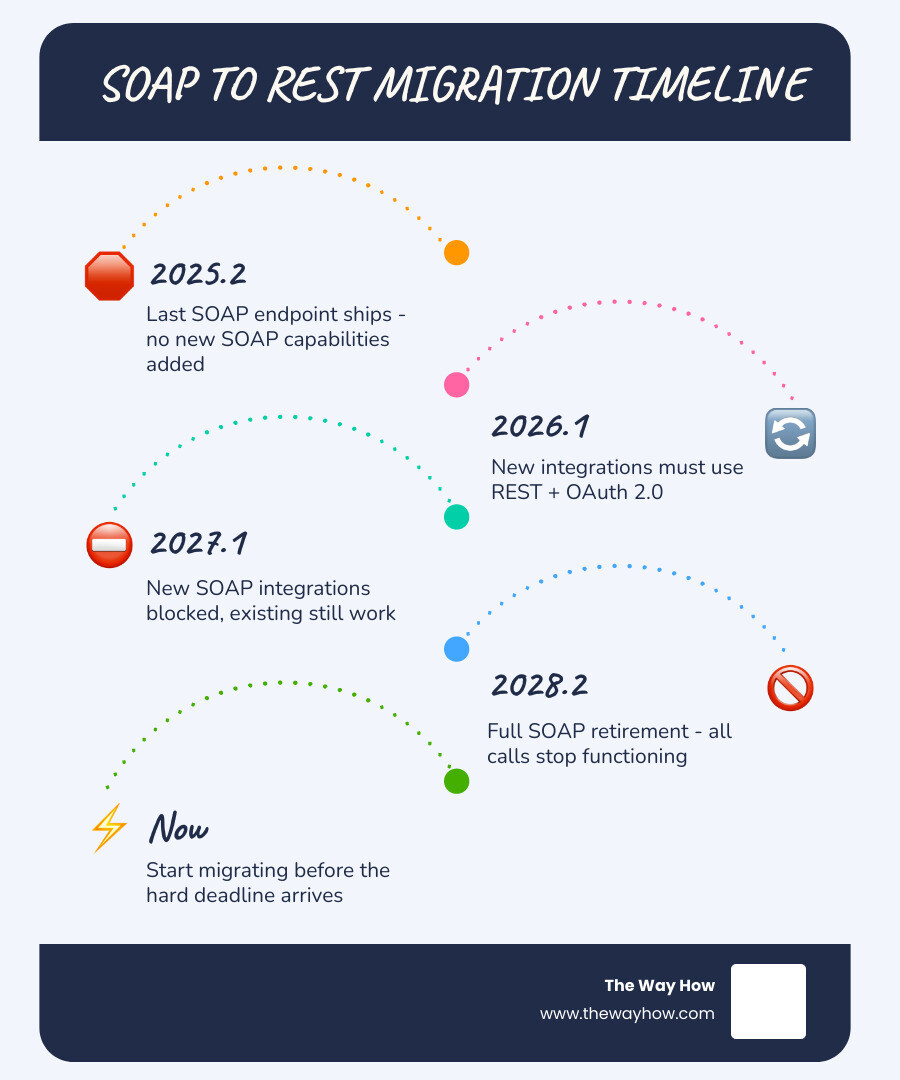
| Stage | Release | What Happens |
|---|---|---|
| Last SOAP endpoint ships | 2025.2 | No new SOAP capabilities after this |
| New integrations must use REST | 2026.1 | REST + OAuth 2.0 required for new builds |
| New SOAP integrations blocked | 2027.1 | Existing SOAP still works, new ones don’t |
| Full SOAP retirement | 2028.2 | All SOAP calls stop functioning |
The core difference between the two APIs isn’t just syntax. SOAP returns full records in a single call. REST, by design, returns IDs and links — requiring follow-up requests to get the data you actually need. That distinction has major consequences for how you architect an integration, not just how you write the code.
This isn’t a simple “find and replace” migration. It’s a structural shift that catches teams off guard when they assume REST works the same way SOAP does.
I’m Jeremy Wayne Howell, founder of The Way How — and while my work centers on buyer psychology and revenue strategy, I’ve spent over 20 years working directly with founders and operators who depend on systems like NetSuite to run their businesses. Understanding NetSuite SuiteTalk SOAP to REST record access patterns is one of those technical inflection points where the wrong architectural decision quietly stalls revenue operations for months before anyone names the problem. What follows is a clear, honest breakdown of what’s changing, what breaks if you ignore it, and how to build something that actually holds.
For many engineering and operations teams, an API deprecation sounds like a problem for next quarter. But when the API in question is the central nervous system of your ERP, procrastination creates an invisible bottleneck of operational risk.
As of June 2026, we are already moving through NetSuite’s phased deprecation timeline. The final SOAP endpoint shipped in the 2025.2 release. In the 2026.1 release, NetSuite mandated that all new integrations utilize the REST API with OAuth 2.0. By the 2027.1 release, NetSuite will actively block the creation of new SOAP-based integrations. When the 2028.2 release arrives, the legacy SOAP service will be shut down entirely.
This phased sunsetting is not just a technical update; it is an architectural eviction notice. Over 93% of modern organizations have standardized on REST APIs for their external systems, and NetSuite is forcing its ecosystem to follow suit. While staying on SOAP might feel easier in the short term, it is the architectural equivalent of holding onto a flip phone in a world designed for smartphones.
When integrations run on outdated patterns, they introduce deep uncertainty into your business systems. If a sales order fails to sync or an inventory update drops, it is rarely a failure of the code itself. It is a failure of trust. For founders and leadership teams, this technical debt translates directly into operational friction. To prevent these gaps, teams must plan their migration long before the 2028.2 hard cutoff. Whether you are managing internal resources or working with external Crm Consulting Services, understanding this timeline is critical to safeguarding your data pipeline.
The most common mistake development teams make during this transition is treating it as a translation exercise. They assume they can swap XML envelopes for JSON payloads, map the endpoints 1-to-1, and call it a day.
This approach is an engineering trap.
In the legacy SOAP world, a single query for a list of records (such as customers or sales orders) returns the complete data set, including all nested sublists and custom fields, in one massive XML payload. It is heavy, slow, and structurally rigid, but it is complete.
The SuiteTalk REST API behaves differently. It is built on HATEOAS (Hypermedia As the Engine of Application State) principles. When you request a list of records from a REST collection endpoint, NetSuite does not return the full records. Instead, it returns a list containing only the internal IDs of those records and a series of hypermedia URLs pointing to where those records live.
This design introduces the N+1 query problem. If you need to retrieve 100 sales orders, a standard REST list request returns the 100 IDs. To get the actual line items, billing addresses, and custom fields for those orders, your integration must perform 100 separate follow-up GET requests. What was a single API call in SOAP suddenly becomes 101 API calls in REST.
Under NetSuite’s strict account-level concurrency limits, this sudden explosion of API traffic will trigger HTTP 429 (Too Many Requests) throttling errors, stalling your data syncs and breaking downstream workflows. This structural difference is explored deeply in A Practical NetSuite Migration Guide: Moving Off SOAP Before 2028 | Truto Blog.
| Feature / Pattern | SuiteTalk SOAP (Legacy) | SuiteTalk REST (Modern) |
|---|---|---|
| Data Format | XML (WSDL-defined) | JSON (OpenAPI/Swagger-defined) |
| List Retrieval | Returns full records and nested sublists | Returns record IDs and HATEOAS links only |
| Payload Efficiency | Large, verbose XML envelopes | Lightweight, structured JSON |
| Search Capabilities | Native Saved Search execution | SuiteQL queries or metadata-driven filtering |
| Write Operations | Supports large multi-call batches | Historically single-record; homogeneous batching in 2026.1 |
This architectural shift is a core consideration when designing modern Crm Data Integration pipelines. If you do not adjust your data retrieval strategy, your migration will result in degraded performance and systemic instability.
To successfully query and manipulate data in the REST environment, we must master how NetSuite handles record-level access and nested sub-resources.
When executing a GET request on a specific record, such as:
GET https://[account-id].suitetalk.api.netsuite.com/services/rest/record/v1/customer/12345
The REST API returns the primary fields of that customer record. However, sublists—such as address books, contact lists, or transaction lines—are treated as sub-resources. By default, they are represented as links rather than fully expanded arrays.
To bypass the N+1 problem for single-record reads, you must explicitly instruct NetSuite to expand these nested sublists using the expandSubResources parameter:
GET /services/rest/record/v1/customer/12345?expandSubResources=true
This flag instructs the API to populate the sublists within the initial JSON response, saving valuable API round-trips.
For write operations, the REST Record API supports standard HTTP methods. You use POST to create a record, PATCH for targeted, partial updates, PUT for full record replacements, and DELETE to remove records. When performing a POST or PATCH, NetSuite does not return the updated record body in the response. Instead, it returns an HTTP 204 No Content status, with the URL of the newly created or updated record located in the Location response header.
Understanding these patterns is essential for any developer transitioning to REST, as highlighted in the hands-on examples provided by NetSuite REST Record API: CRUD Operations with Real Examples - The NetSuite Pro.
To build a reliable, high-performing integration that respects NetSuite’s strict platform limits, you cannot rely on the REST Record API alone. A modern NetSuite integration requires a tri-partite architecture that assigns specific tasks to the tool best suited for the job:
N/render module, accessing legacy saved searches, or executing complex, multi-record transactional logic that must run atomically inside NetSuite.This balanced approach is highly recommended in the official NetSuite Applications Suite - SOAP Web Services to REST Web Services Upgrade Guide. By separating your read, write, and custom logic layers, you protect your system from performance degradation and ensure a clean path forward as you work on Crm Development projects.
SuiteQL is the breakout star of the SuiteTalk REST ecosystem. It allows developers to execute powerful SQL-92 queries directly against NetSuite’s database via a dedicated REST endpoint:
POST /services/rest/query/v1/suiteql
Unlike standard REST list endpoints, SuiteQL supports complex JOIN operations, aggregations (SUM, COUNT, GROUP BY), and subqueries. This makes it highly efficient for business intelligence, data warehousing, and real-time dashboard syncs.
However, SuiteQL comes with its own set of platform rules that you must design around:
limit and offset parameters.Prefer: transient header with your SuiteQL requests.ORDER BY clause on a unique column (such as id). Without explicit ordering, NetSuite does not guarantee the row sequence across paginated requests, which can lead to skipped or duplicated records.As detailed in the NetSuite REST API: Complete Developer Guide (2026) | BrokenRubik, mastering SuiteQL is the single most effective way to eliminate latency and reduce API call volume during your SOAP-to-REST transition.
Migrating to REST also requires updating your security and connection management patterns. The legacy SOAP API relied heavily on Token-Based Authentication (TBA) built on the OAuth 1.0a standard. While TBA is highly secure, it requires your integration to mathematically construct and sign every single HTTP request with an HMAC-SHA256 signature using five distinct credentials (consumer key, consumer secret, token ID, token secret, and a dynamically generated nonce and timestamp).
If your server clock drifts by more than five minutes, or if you reuse a nonce during a rapid pagination loop, NetSuite will reject the request with a 401 Unauthorized error.
The REST API supports OAuth 2.0, specifically the Client Credentials (Machine-to-Machine) flow. Instead of signing every request, your integration uses a private key and client certificate to request a short-lived bearer token from NetSuite’s token endpoint. This token is then passed in the standard Authorization: Bearer [token] header for all subsequent calls.
However, NetSuite’s OAuth 2.0 implementation has a critical constraint: access tokens expire hourly, and refresh tokens expire every seven days. For background, headless server-to-server integrations, this weekly expiration can create maintenance overhead. This is why many enterprise developers continue to use OAuth 1.0a TBA for background syncs, while reserving OAuth 2.0 for user-facing applications.
Beyond authentication, you must design your integration to survive NetSuite’s concurrency limits. NetSuite does not enforce daily API call volume limits; instead, it limits the number of concurrent threads your account can open at any single second.
Depending on your service tier and whether you have purchased SuiteCloud Plus licenses, your account-level concurrency limit will typically range from 15 to 55 concurrent requests. This limit is shared across all API surfaces—SOAP, REST, SuiteQL, and RESTlets combined. If your integration spikes past this limit, NetSuite will immediately throttle your connection, returning HTTP 429 errors.
Designing an integration that gracefully handles these limits is one of the most complex aspects of ERP architecture, a reality explored in depth by The Final Boss of ERPs: Architecting a Reliable NetSuite API Integration | Truto Blog. For teams of Crm Software Developers, managing this concurrency pool is the difference between a reliable integration and a system that constantly drops transactions.
To implement a secure, resilient connection, we recommend the following security practices:
Migrating off a legacy SOAP integration requires a structured, phased approach to ensure zero business disruption. We recommend following this five-step migration playbook:

Before writing any code, audit your existing SOAP integration. Identify every record type accessed, every custom field mapped, and every SOAP operation used (such as addList, updateList, or search). Categorize these operations into reads and writes.
Configure your NetSuite Integration Records. Generate your OAuth 2.0 client credentials or set up your TBA security tokens. Ensure your integration roles have the exact permissions required for the target REST endpoints.
Map your legacy SOAP operations to their REST equivalents. Replace SOAP search operations with SuiteQL queries for high-performance reads. Map SOAP write operations to the REST Record API, utilizing PATCH for partial updates and POST for record creation.
Because every NetSuite instance is highly customized, build “feature-adaptive” query logic into your integration. At connection time, run pre-flight queries to detect active NetSuite features (such as OneWorld or Multi-Currency) by probing the database:
SELECT 1 FROM subsidiary
If the query returns a “Record not found” error, your integration knows it is dealing with a standard single-subsidiary account and can adjust its data payloads accordingly.
Never perform a “cold cutover” for an ERP integration. Run your new REST integration in shadow mode alongside your active SOAP integration. Validate that the data written by REST matches SOAP perfectly, compare response latencies (REST is typically 40% faster), and monitor your concurrency pools before deprecating the SOAP endpoints.
Following this structured path is essential when Developing A Crm or migrating an ERP integration, as it minimizes the risk of data loss and operational downtime.
One of the greatest strengths of the SuiteTalk REST API is its dynamic metadata discovery. In the legacy SOAP world, the WSDL schema is static and only includes standard NetSuite fields. To discover custom fields or custom records, developers had to write custom RESTlets or manually upload schema definitions.
The REST API solves this through the metadata-catalog endpoint:
GET /services/rest/record/v1/metadata-catalog
By calling this endpoint with the header Accept: application/swagger+json, you can retrieve a complete, real-time OpenAPI (Swagger) schema of your specific NetSuite account. This schema dynamically includes all of your custom records, custom fields, and tenant-specific configurations.
This allows modern integrations to dynamically discover schemas, generate field-mapping interfaces on the fly, and adapt to custom fields without requiring code redeployments.
The deprecation follows a multi-year phased rollout:
The REST API utilizes HATEOAS principles to keep payloads lightweight and performant. Returning full records for list queries is highly resource-intensive. To get complete record data, you should use SuiteQL (/services/rest/query/v1/suiteql), which allows you to define exactly which columns and joined tables you want to return in a single, flat JSON payload.
Yes, but you must account for token expiration. NetSuite’s standard OAuth 2.0 refresh tokens expire after seven days, which requires manual user re-authentication. For headless, background integrations, you should use the OAuth 2.0 Client Credentials (Machine-to-Machine) flow, which utilizes digital certificates to obtain fresh access tokens programmatically without human intervention. Alternatively, OAuth 1.0a TBA remains fully supported for background syncs. For a deeper dive into these authentication nuances, consult NetSuite API Integration: What to Know Before You Build | Unified.to.
At The Way How, we look at technical transitions through a different lens. When an enterprise ERP integration faces a forced migration like the SOAP-to-REST transition, the primary challenge isn’t the syntax—it’s the uncertainty it introduces to your leadership team.
When data pipelines are unstable, founders and executives lose visibility. You begin to question your inventory numbers, your sales syncs, and your financial reporting. That friction stalls momentum, creates operational anxiety, and slows down strategic decision-making.
We help leadership teams remove this uncertainty by aligning technical systems with business psychology and revenue strategy. We don’t just look at the code; we diagnose where certainty gaps exist in your customer journey and internal operations. By designing clean, predictable systems—whether that involves structuring your HubSpot architecture, refining your demand generation, or guiding your ERP integration strategy—we turn complex technology into a dependable growth engine.
If you want to move off legacy technical debt and build a system that supports predictable revenue, we are here to help you see the problem clearly before we ever talk about solutions.
 Jeremy Wayne Howell : Jul 22, 2026 9:48:31 PM
 Jeremy Wayne Howell : Jul 21, 2026 9:47:10 PM
 Jeremy Wayne Howell : Jul 20, 2026 9:46:47 PM